

Summary
- Intelligent Studio combines culling, AI editing and manual photo editing inside the same project.
- The new editor supports RAW and JPEG files with a full set of manual controls.
- The Assistant accepts natural-language instructions for searching, selecting and changing photos.
- The beta has been rolling out gradually since September 29, 2026, while Pay-as-you-go billing now happens at export.
- Culling and editing without a fixed order
- A full RAW/JPEG editor inside Imagen
- An AI Assistant controlled with natural language
- Review edits before the whole album is finished
- Lightroom stays in the workflow, with one important difference
- Pay-as-you-go moves billing to export
- When the beta becomes available
- Download Imagen
- What we think
- Frequently asked questions
Imagen has begun the gradual rollout of Intelligent Studio, a major beta update that brings culling, AI editing and full manual editing into the same project.
The key change is not just the built-in editor. The app no longer forces a fixed sequence of culling, editing and exporting, allowing photographers to move back from editing to culling or work only on a selected part of a shoot without setting up separate projects.
Culling and editing without a fixed order
In Intelligent Studio, every project now supports both culling and editing. You can make a first selection, edit the photos, return for another culling pass, or isolate a specific moment and work only on those images.
Photographers who do not want automated culling can choose Skip AI culling when creating a project and handle the selection manually later. The idea is one workspace instead of consecutive stages that require another project or an export to a different application.
A full RAW/JPEG editor inside Imagen
For the first time, Imagen includes full manual editing directly inside the app. The beta supports RAW and JPEG files and includes basic adjustments, curves, HSL, point color, color grading, detail, lens corrections, geometry, effects, calibration, crop and straighten.
Manual controls work alongside the adjustments already made by an AI Profile. Settings can be saved as presets, while Versions lets photographers create a different interpretation of the same image without altering the original.
The layout and keyboard shortcuts are designed to feel familiar to Lightroom users. Masks are not part of the initial beta yet, but they are on the roadmap together with the ability to apply a different AI Profile only to selected photos.
An AI Assistant controlled with natural language
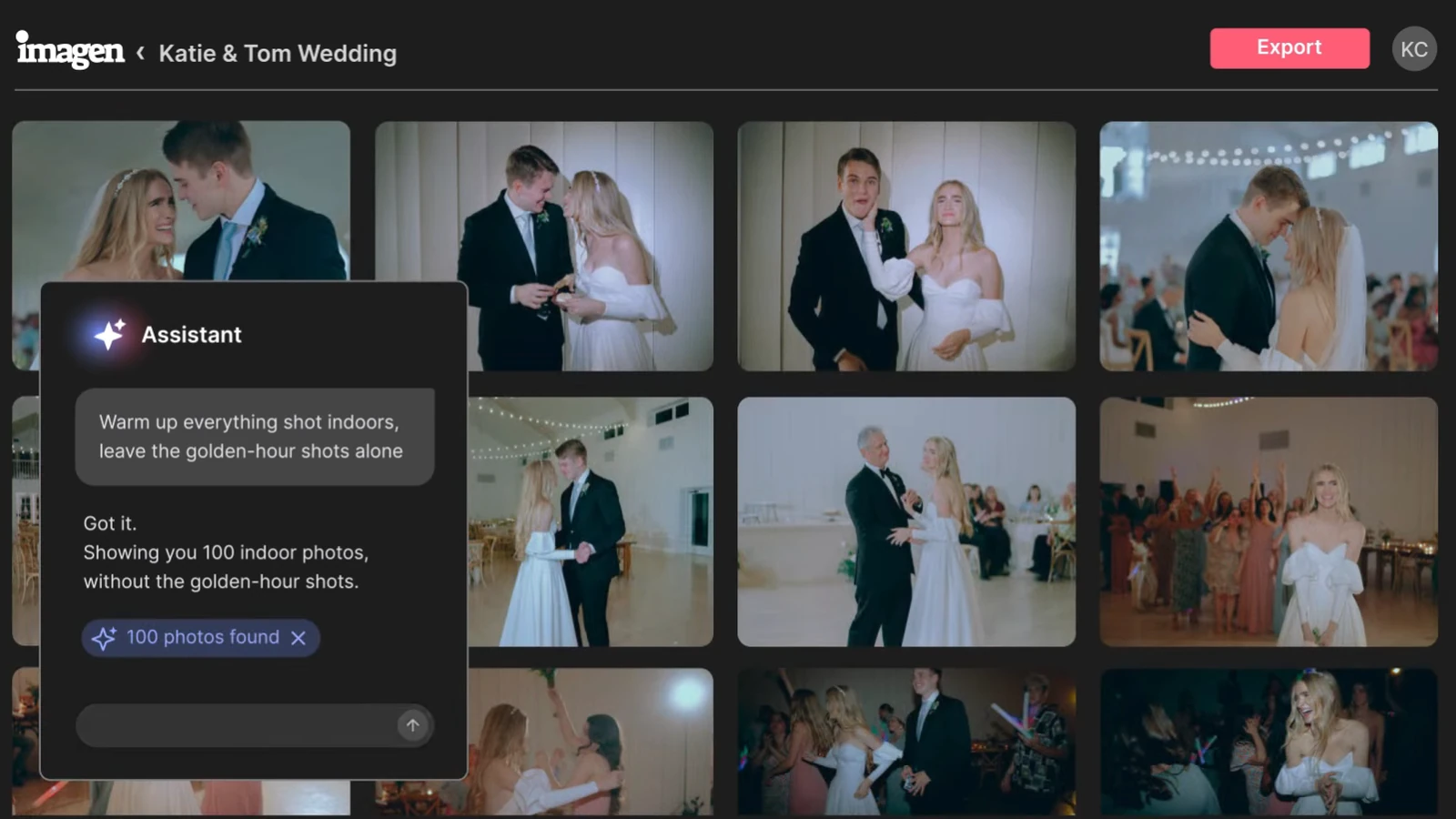
The new Assistant can search, select and edit photos through natural-language instructions. A photographer can, for example, ask to surface images of a specific person, apply denoise only to files above a chosen ISO value, or create black-and-white versions for a particular scene.
Smart filters can also narrow a gallery using criteria such as out-of-focus frames or closed eyes, without requiring manual tagging.
Review edits before the whole album is finished
In the new workflow, edits arrive in batches as they are completed, so photographers can start reviewing and fine-tuning before the entire album finishes processing. Imagen also says its culling and editing models are now faster.
Lightroom stays in the workflow, with one important difference
Integration with Lightroom Classic, Bridge, Photoshop and Camera Raw continues through XMP files. AI Profile and AI tool edits, along with ratings, flags and color labels, can still move into the Adobe workflow.
Manual adjustments made in Imagen’s new editor do not transfer to Lightroom. Photographers who want to finish in an Adobe application are better off reviewing the AI edits in Imagen without additional manual adjustments, then downloading the XMP files after processing is complete.
Pay-as-you-go moves billing to export
For Pay-as-you-go users, Imagen is changing when billing happens: payment is now triggered when photos are exported rather than when an AI tool is applied. The Limitless plan keeps its existing flat-rate model.
When the beta becomes available
The Intelligent Studio beta began rolling out gradually on September 29, 2026, and the rollout will continue over the following weeks. Availability is gradual, so the new experience may not yet appear on every account.
Download Imagen
Intelligent Studio is not a separate application. Imagen for Windows or macOS can be downloaded from the official Imagen download page. Once an account becomes eligible for the beta, the upgrade to Intelligent Studio is offered through the app.
What we think
The meaningful shift is that Imagen is trying to become the photographer’s central workspace rather than simply an AI editing stage before Lightroom. Unified culling and editing plus the Assistant can reduce app switching, but the beta still has clear limits, most notably that manual edits made in the new editor do not carry into the Adobe workflow.
Frequently asked questions
Is Intelligent Studio a separate product?
No. It is the next evolution of the existing Imagen app and is initially being released as a beta.
Does it support RAW and JPEG?
Yes. The built-in editor supports both file types and includes a full set of core and advanced manual editing controls.
Can I keep working in Lightroom?
Yes. The XMP workflow remains available, but manual adjustments made inside Imagen’s editor do not transfer to Lightroom.
Are masks already available in the new editor?
Not in the initial beta. Imagen says masks are on the roadmap for a later stage of development.
When will it appear in my account?
The rollout started on September 29, 2026 and is gradual. Eligible users receive the relevant upgrade prompt in the app.