

Summary
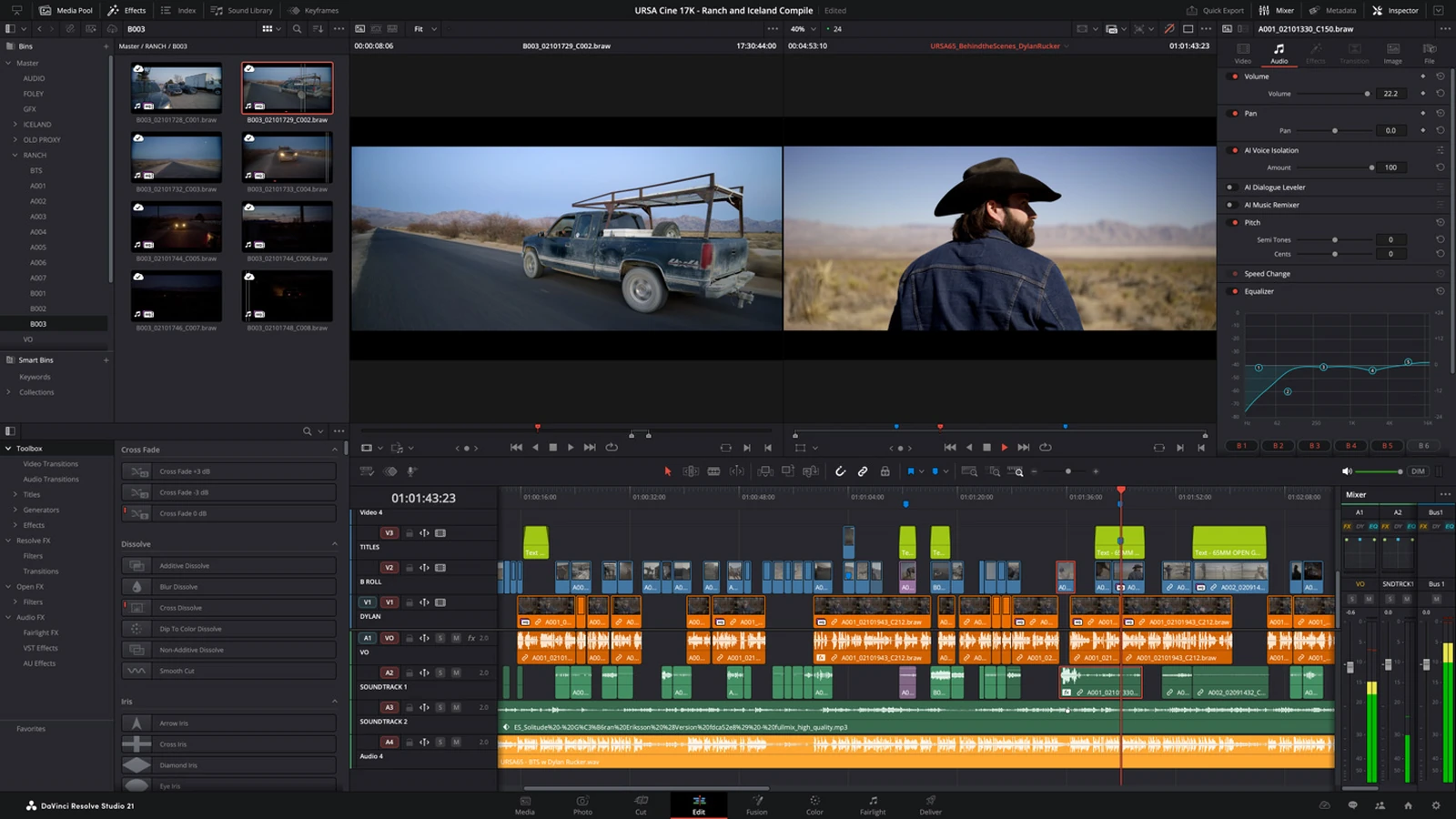
- DaVinci Resolve 21.2 introduces touch controls on the new PROLED XDR MacBook Pro.
- Blackmagic claims up to five times faster effects rendering on M5 Pro and M5 Max without a complete benchmark methodology.
- The update also supports Generation 6 LUTs and improves multicam editing, audio and camera media handling.
- It is a free update for users of the corresponding editions.
- How touch works on the new MacBook Pro
- Up to 5× faster rendering: what the claim covers
- Generation 6 LUTs and tools for colorists
- More practical multicam editing and fewer steps
- Audio, media formats and reliability fixes
- Availability and precautions before updating
- What we think
- Frequently asked questions
DaVinci Resolve 21.2 brings touch controls to the new MacBook Pro, streamlines everyday editing operations and promises faster effects rendering on selected Apple silicon systems.
Blackmagic Design released the update on November 4–5, 2026 for both the free and Studio editions. Alongside PROLED XDR touch support, it adds Blackmagic Generation 6 LUTs, multicam and compound clip refinements, and numerous fixes involving audio, graphics and camera media.
How touch works on the new MacBook Pro
On MacBook Pro models with a PROLED XDR touchscreen, editors can scroll the timeline with their fingers, drag clips into the media pool and drag effects or titles onto the timeline. Blackmagic also describes panning and pinch-to-zoom gestures in the Photo, Edit, Color, Media and Deliver viewers.
Multitouch controls are available for virtual sliders across the application and for the audio mixer on the Cut, Edit and Fairlight pages. On the Color page, users can adjust color wheels and master wheels, work with color charts, Color Warper and annotations, and apply Power Windows by touch. These are specific Resolve 21.2 features on compatible new MacBook Pro systems, not touchscreen functionality added to older MacBooks.
Up to 5× faster rendering: what the claim covers
Blackmagic claims up to five times faster effects rendering on Apple M5 Pro and M5 Max chips. It has not published a full benchmark methodology, specified the precise effects tested or established a clear baseline, so 5× should not be read as a general speed increase for every export, codec or project. Effects-heavy timelines may benefit, but performance on any particular edit still needs to be measured.
Version 21.2 follows the DaVinci Resolve 21.1.2 performance update, which focused in part on IntelliSearch analysis on M6 hardware and OGraf playback. Those are different workloads, so the acceleration figures are not directly comparable.
Generation 6 LUTs and tools for colorists
DaVinci Resolve 21.2 supports Blackmagic Generation 6 Color Science LUTs and film looks in its color workflows. The Studio edition also extends ResolveFX False Color support to Gen 5 and Gen 6 color science. This is useful when handling Blackmagic RAW footage and maintaining consistent exposure and color decisions across a project.
More practical multicam editing and fewer steps
Multicam clips can now open as source clips in source timelines, while “Open in Timeline with Source Viewer” works with both regular clips and multicams. A menu command and shortcut restore the last active edit points, with updated Command or Ctrl selection behavior.
When converting an In/Out range to a compound clip, Resolve can replace the original clips in place, while a separate context-menu action creates a compound clip without using that replacement behavior. Users can also conform-lock multiple timeline clips to one media pool clip. On larger edits, these small controls can remove many repetitive operations.
Audio, media formats and reliability fixes
Extracted audio files now preserve their source timecode, making them easier to synchronize and reposition. MXF audio decoding from network storage is faster, and the update fixes AAF audio timecode involving interlaced media, slow MP3 audio-only renders and incorrect channel order in WAV files containing iXML tracks.
The update adds EXIF metadata support for PNG files and fixes intermittent media-offline frames in certain H.265 clips, artifacts in Sony XAVC Long GOP MXF renders and crashes when decoding some multichannel DNG files. Other improvements address OGraf templates on network or zipped paths, XDCAM drives, TTML subtitles and selected OpenFX and ACES 2.0 workflows.
Studio also improves AI assistant capabilities for Color and Fusion, frame export and thumbnail grids, together with scripting API changes. These assistants build on the MCP integration introduced in DaVinci Resolve Studio 21.1; these specific AI functions should not be confused with features of the free edition.
Availability and precautions before updating
DaVinci Resolve 21.2, DaVinci Resolve Studio 21.2 and Fusion Studio 21.2 are available as no-cost updates for the corresponding users on supported macOS, Windows, Windows on Arm and Linux systems. The standard Resolve edition remains free, while Studio requires a license.
Before upgrading a machine with active client projects, back up the project library and critical individual projects, and coordinate software versions with collaborators. A project opened in version 21.x cannot be reopened in 20.3.2, even though the libraries are designed to remain compatible.
More information here.
What we think
Touch in a tool with such a dense interface can sound like something you might use only occasionally. But scrolling through a timeline, dragging a title into position or moving a Power Window without constantly reaching for the trackpad is genuinely appealing when editing on a laptop away from the studio.
We would not rush to replace a good mouse, keyboard or grading panel for a full day of editing. Touch could work well alongside shortcuts as another input option. The useful test for editors will be which gestures actually save time and which are uncomfortable after a longer session.
Meanwhile, fixes to timecode, multicam behavior and camera formats may prevent more real-world delivery problems than a spectacular performance number. We would want a repeatable render comparison using the same project and effects before deciding that a new Mac is worth buying for a claimed 5× speed-up.
Frequently asked questions
Is DaVinci Resolve 21.2 free?
Yes. This is a no-cost update for users of the corresponding edition. DaVinci Resolve offers a free version, while Studio requires a separate license.
Does every MacBook Pro get the new touch controls?
No. The touch features are designed for the new MacBook Pro models with a PROLED XDR touchscreen. Installing Resolve does not add touch capability to other displays.
Does 5× mean all videos export five times faster?
No. Blackmagic refers to effects rendering performance on M5 Pro and M5 Max systems, not a universal export benchmark.