

Summary
- Cadrage Studio brings essential film preproduction tools together in one workspace
- It supports shot lists, storyboards, mood boards and camera diagrams
- Script revisions can be imported without losing previous production work
- The app works offline and synchronizes projects through iCloud
- The beta version is available free of charge through TestFlight
Cadrage Studio brings the essential tools of creative preproduction into a single workspace for Apple devices.
The team behind the popular Cadrage digital viewfinder app has introduced Cadrage Studio, a native app for macOS, iOS and iPadOS that organizes scripts, shot lists, storyboards, camera diagrams, mood boards and filming locations.
The app is significant because it aims to reduce the fragmentation of preproduction work across different programs, files, emails and shared folders, while keeping users’ data stored locally or in their private iCloud accounts.
A unified workspace for preproduction
Cadrage Studio is designed to follow a production from script import to preparations for the shoot. Users can organize scenes, characters, shots and visual references within the same project, without repeatedly transferring information between different apps.
Shot lists are fully customizable. Ready-made columns are available for common production requirements, while custom fields can also be created to match each team’s workflow.
Camera diagrams and three-dimensional locations
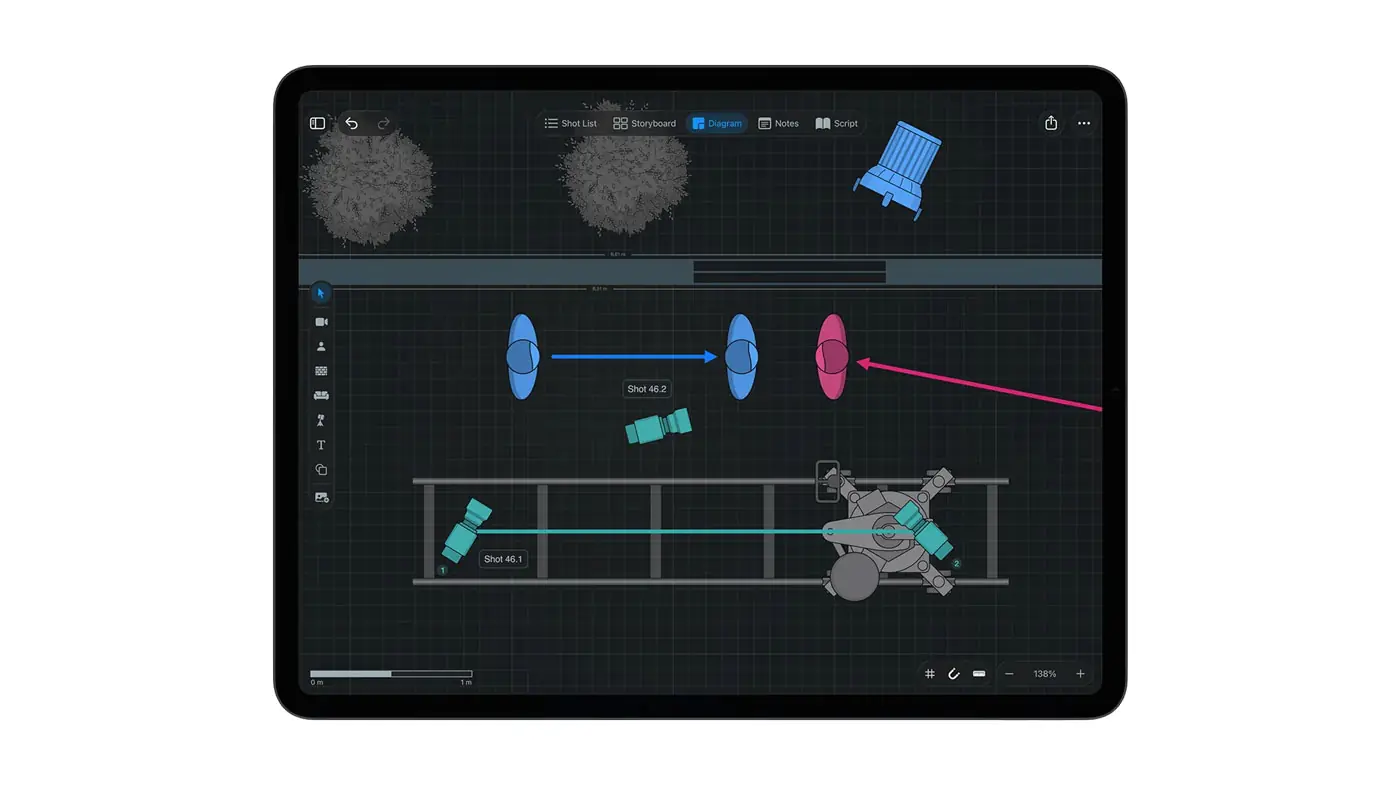
The app allows users to create overhead plans where cameras, actors, lights and set pieces can be positioned. Diagrams can be drawn to scale, while locations can also be imported from three-dimensional scans.
Rooms can be scanned using LiDAR-equipped devices, while existing USDZ files from other apps can also be imported. Each location can include photographs and notes, giving production members access to all the necessary reference material in one place.
Script changes do not disrupt the production plan
One of Cadrage Studio’s main features is its handling of script revisions. The app automatically detects scenes and characters when a script is imported.
When a new version of the script is added, shot lists, storyboards and diagrams remain connected to the correct scenes. Removed scenes are archived, ensuring that previously completed work is not lost.
Mood boards and collaboration through iCloud
Creators can collect images, videos and links in mood boards connected to individual scenes. The material can be exported for presentations, helping maintain a consistent visual direction across the crew, production company, agency and client.
Projects synchronize between iPhone, iPad and Mac through iCloud. Collaborators can also be invited to work on the same project, while structured PDF files can be exported with different information for each production department.
Offline operation and a focus on privacy
Cadrage Studio works without an internet connection. Projects are stored on the device and in the user’s private iCloud account, without being uploaded to the company’s servers.
The app does not use artificial intelligence and, according to the company, no data is sent to third-party AI providers or used to train AI models.
Availability
Cadrage Studio requires macOS 26, iOS 26 or iPadOS 26 and later. The beta version is available free of charge through TestFlight, with the development team accepting applications for early access.
Following its official release on the App Store, Cadrage Studio is expected to be offered through a subscription model.
Find it here.
What we think
Cadrage Studio presents a particularly comprehensive approach to preproduction by connecting tools that are often scattered across multiple applications. Its offline operation, revision management and focus on privacy could make it useful for both small creative teams and larger productions, provided that its final subscription pricing remains competitive.
Frequently asked questions
What is Cadrage Studio?
It is a creative preproduction app for films, television series and audiovisual projects that brings scripts, shot lists, storyboards, camera diagrams, mood boards and locations together.
Which devices does it support?
It supports Mac, iPhone and iPad devices running macOS 26, iOS 26 or iPadOS 26 and later.
Can it be used without an internet connection?
Yes. The app works offline and synchronizes changes through iCloud when the device reconnects to the internet.
Does it support collaboration between different users?
Yes. Users can invite collaborators to shared projects through iCloud or export structured PDF files.
Does it use artificial intelligence?
No. The company states that the app does not use AI and does not send data to third-party artificial intelligence providers.