Summary
- Beat is a free application available for Mac computers
- It organizes scenes, characters, references and locations on a visual canvas
- The Set Plan tool supports camera, lighting and blocking design
- Version 1.5 adds location scouting with maps and street view
- Projects can be exported to Word, PDF, Markdown and Fountain
- No account is required, and project files are stored locally
Beat brings story development and film-shoot preparation together in a single visual workspace.
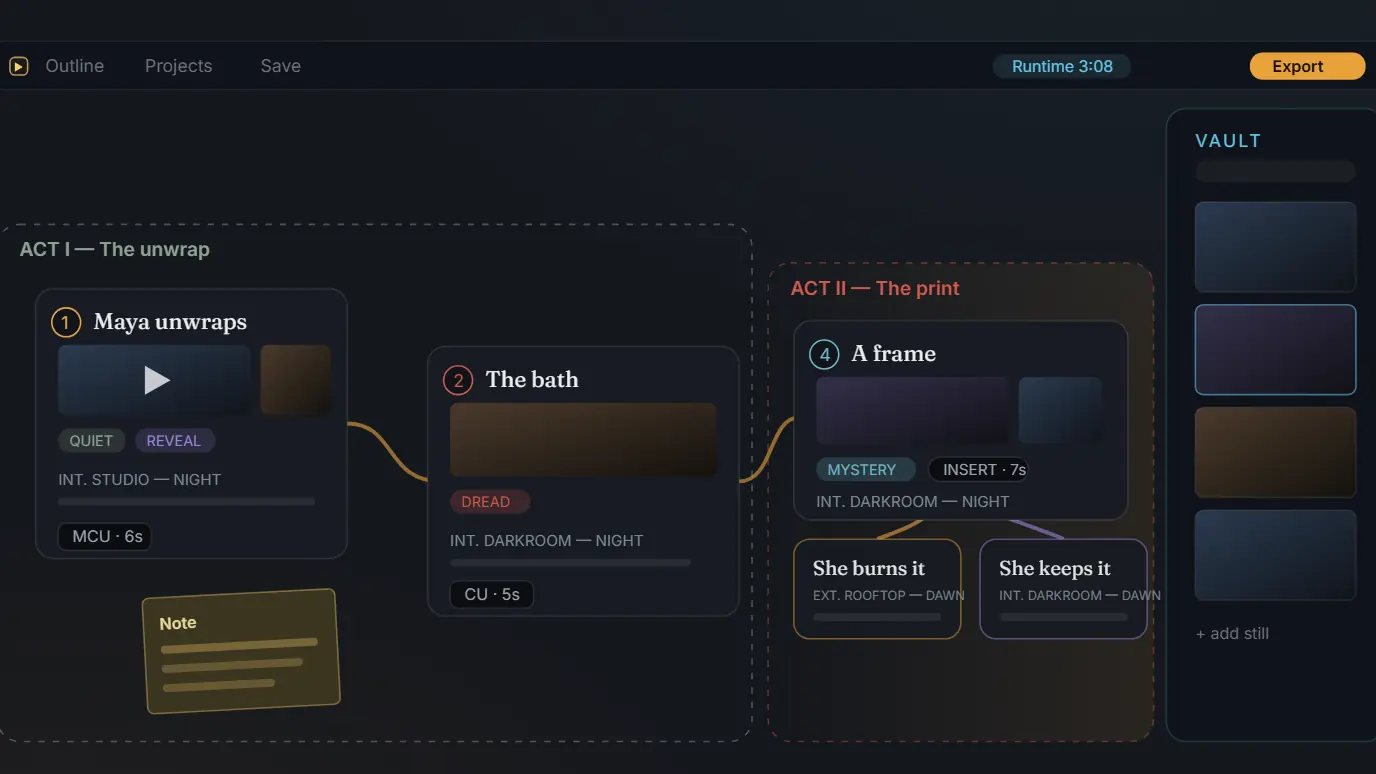
The free macOS application allows screenwriters, directors and other creators to organize scenes, characters, locations, visual references and technical plans on an infinite canvas. Version 1.5 adds location scouting tools, street-view frame capture and new production-planning features.
Beat matters because it attempts to reduce the fragmentation of a production across multiple applications. Instead of keeping notes, reference images, storyboards and lighting diagrams in separate files and services, users can visually connect them within the same project.
A visual canvas for the entire story
Beat is built around nodes and cards rather than the conventional structure of a linear document. Each scene, note, character, prop or location can be placed on the canvas, moved and connected to other elements.
Creators can develop the main narrative spine, build alternative versions of a scene and track details such as duration, shot type, location and tone. Ready-made storytelling structures are also available, including the three-act structure, the Hero’s Journey, Save the Cat and the Story Circle.
Visual references from different sources
The application can import video and image references, allowing visual material to remain next to the scenes it relates to.
An integrated player offers frame-by-frame control, enabling users to save specific stills or GIFs to the project’s media pool. References for lighting, composition, costumes or color palettes therefore do not need to be stored in different applications.
Location scouting in version 1.5
One of the main additions in Beat 1.5 is location scouting. Users can select a real location on a map, store its coordinates and use street view to examine different angles.
A suitable frame can then be captured and stored as an image inside the project. The location remains connected to its corresponding scenes, references and production plans.
Camera, lighting and blocking design
The Set Plan is one of the application’s most specialized tools. It is an overhead scene planner that can be attached to individual story beats.
Users can position cameras with fields of view calculated according to focal length, plan performer movements and add lighting fixtures such as softboxes, Fresnels, LEDs, Kino Flo units, china balls and practical lights.
The system also simulates how light interacts with bounce cards, flags, diffusion materials, walls, doors and windows. Objects can be positioned at real-world scale in metres or feet, while the completed diagram can be exported as an image.
Optional Claude integration
Beat can connect to Claude through the Model Context Protocol. This connection allows the AI system to read and edit the actual project without requiring users to repeatedly copy its contents into a chat window.
It can be used to expand the narrative structure, create character bibles, reorganize acts, critique the screenplay and modify Set Plans. The feature is optional, and the application can be used without artificial-intelligence tools.
Exporting to Word, PDF and Fountain
Projects can be exported in several formats, depending on the needs of the production. Beat can generate compressed folders containing the project’s media, Markdown files, organized Word documents, PDF overviews and storyboards.
Version 1.5 adds production breakdown sheets and Fountain export, a plain-text format used for screenwriting. The application also supports the import of XLSX spreadsheets and CSV files.
Free to use without an account
Beat is available free of charge for modern versions of macOS and supports computers powered by both Apple Silicon and Intel processors.
It does not require an account and, according to its creator, does not use tracking. Each project is stored locally as a folder on the Mac, allowing users to manage and back up their files in the way they prefer.
The application was created by João Lutz as a personal tool for developing stories before being released publicly. Its first public version and the newer 1.1 and 1.5 updates were released in June 2026.
What we think
Beat is noteworthy because it is more than another note-taking or storyboarding application. Connecting the narrative with locations, visual references, camera placement and lighting could be particularly useful for independent creators and small productions. Local file storage and the absence of a subscription are also important advantages, although its Mac-only availability currently limits its potential audience.
Frequently asked questions
Is Beat really free?
The application is available without a charge, subscription or mandatory account. Its creator also states that there are no plans to sell it.
Which computers can run it?
Beat is available for Mac and supports both newer Apple Silicon systems and models equipped with Intel processors.
Does it require an AI connection?
No. Claude integration is optional, and all essential organization and planning tools can be used independently.
What is the Set Plan?
It is an overhead scene-planning tool that includes cameras, lighting fixtures, performer movement, obstacles and real-world dimensions.
Which export formats are supported?
The application supports exports including Word, PDF, Markdown, Fountain, images and compressed folders containing the project’s media files.