

Summary
- The new Affinity launches on iPad with Sketch, Vector, Pixel and Layout studios.
- Photographers get free RAW development, masks and non-destructive editing.
- Canva AI Studio features require a premium subscription.
- iPadOS 18 is required, and some desktop tools are not yet available.
Affinity has arrived on iPad, giving photographers free RAW editing, retouching and page-layout tools inside one application.
Affinity announced the launch on November 2, 2026, one year after introducing the all-in-one desktop Affinity app. Instead of separate apps for photography, design and publishing, the iPad release keeps those workflows together in a single .af document.
Watch the application presentation video:
Four studios, one app
Sketch Studio focuses on freehand drawing, with brushes that respond to Apple Pencil pressure and tilt. Sketches can become editable shapes without having to move the project to another app.
In Vector Studio, creators can work with vector curves, nodes, shapes and typography — particularly useful for logos, icons and graphics that must remain sharp at any size.
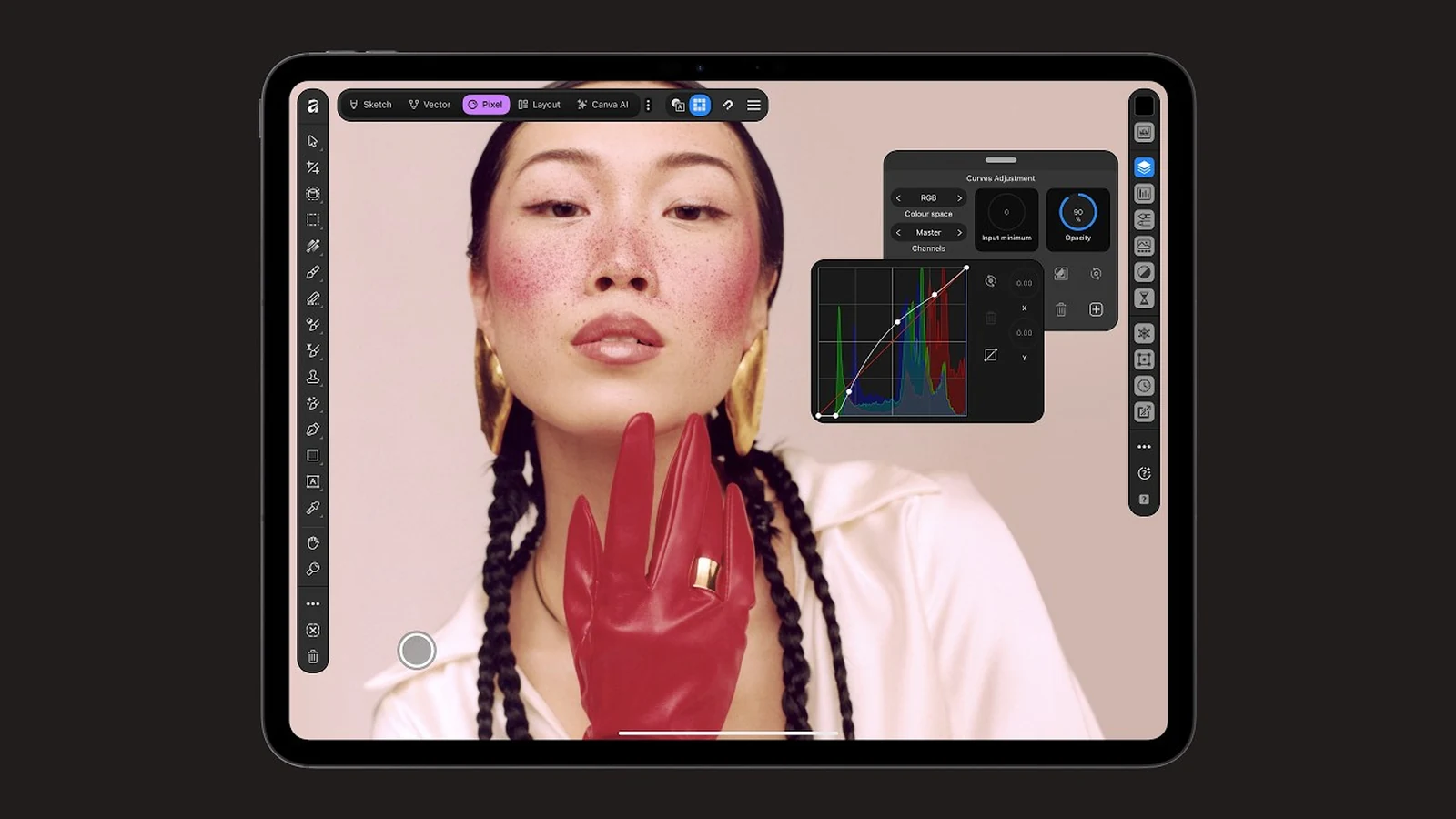
Pixel Studio handles photography: RAW development, tone and color corrections, masks, selections, composites and retouching. Edits remain non-destructive, allowing adjustments to be revisited while preserving the original image.
Layout Studio adds multi-page documents, grids, master pages and typography controls. A photobook, portfolio or client brochure can be finished and exported for print on the same iPad.
What photographers can actually do
The important point is not simply that a RAW file opens on a tablet. You can adjust tone using Curves, paint local masks around hair and other fine edges, remove unwanted elements with Inpainting, and combine many editable layers in a composite.
Affinity also highlights panorama stitching, focus stacking and complex editing of files exceeding 100MP. Actual performance on demanding projects will depend on the iPad model, available memory and file characteristics; those company claims are not independent benchmarks.
For photographers who also deliver presentation material, the transition from RAW processing to a multi-page portfolio no longer requires exporting between several apps. Professional formats such as PSD, AI, INDD, IDML, PDF and SVG are supported too, although compatibility with intricate documents depends on their contents.
Apple Pencil and AI tools
The interface is built for touch and Apple Pencil, supporting gestures, pressure sensitivity and tilt, plus advanced features such as barrel roll, squeeze and hover on compatible Pencil and iPad combinations. That is particularly useful for mask painting and detailed image adjustments.
Canva AI Studio features, including motion-blur reduction, noise cleanup, image expansion and subject isolation, are optional extras that require a Canva premium account. The company says local Affinity files are not used to train its AI features.
What is still missing on iPad
Despite sharing a core approach with desktop, the iPad launch omits several tools: Batch processing, macro recording and Astrophotography Studio, along with Books, Data Merge, Quick Adjustments and the Info/Scope panels. These are meaningful limits for photographers who process large shoots in bulk or rely on specialized astrophotography workflows.
The shared .af format allows projects to move between the new iPad and current desktop Affinity releases. However, this should not be confused with older Affinity V2 apps, which cannot open newer .af documents.
Price and availability
Affinity by Canva is free for individuals through the App Store. It requires iPadOS 18 or later and a free Canva account to sign in. Core Sketch, Vector, Pixel and Layout tools, including export functions, do not require Canva Pro. The App Store listing puts the download at approximately 1.9GB.
More information here.
What we think
For a photographer who already uses an iPad on assignments, this is one of the more compelling software launches of the year. Being able to open RAW files, retouch carefully with a Pencil, then assemble a client portfolio without another subscription makes a tangible difference to what you can deliver away from a desk.
What we particularly like is that the serious photographic tools are not locked behind the AI offering. You can work properly with Curves, layers and masks, then decide for yourself whether any additional automation is worth paying for.
But if your daily workflow involves processing hundreds of shots at a time, the missing Batch feature matters. For selecting images, making precise corrections and preparing client deliverables, the new Affinity gives photographers a strong reason to reconsider the iPad as a primary creative tool.
Frequently asked questions
Do I need Canva Pro to edit RAW files?
No. RAW editing and the core Pixel Studio tools are free for individuals. A premium subscription is needed only for the extra Canva AI Studio features.
Can I continue working on the same file on iPad and desktop?
Yes, using the current Affinity apps that support the shared .af format. Older Affinity V2 apps cannot open files saved in the newer format.