

Summary
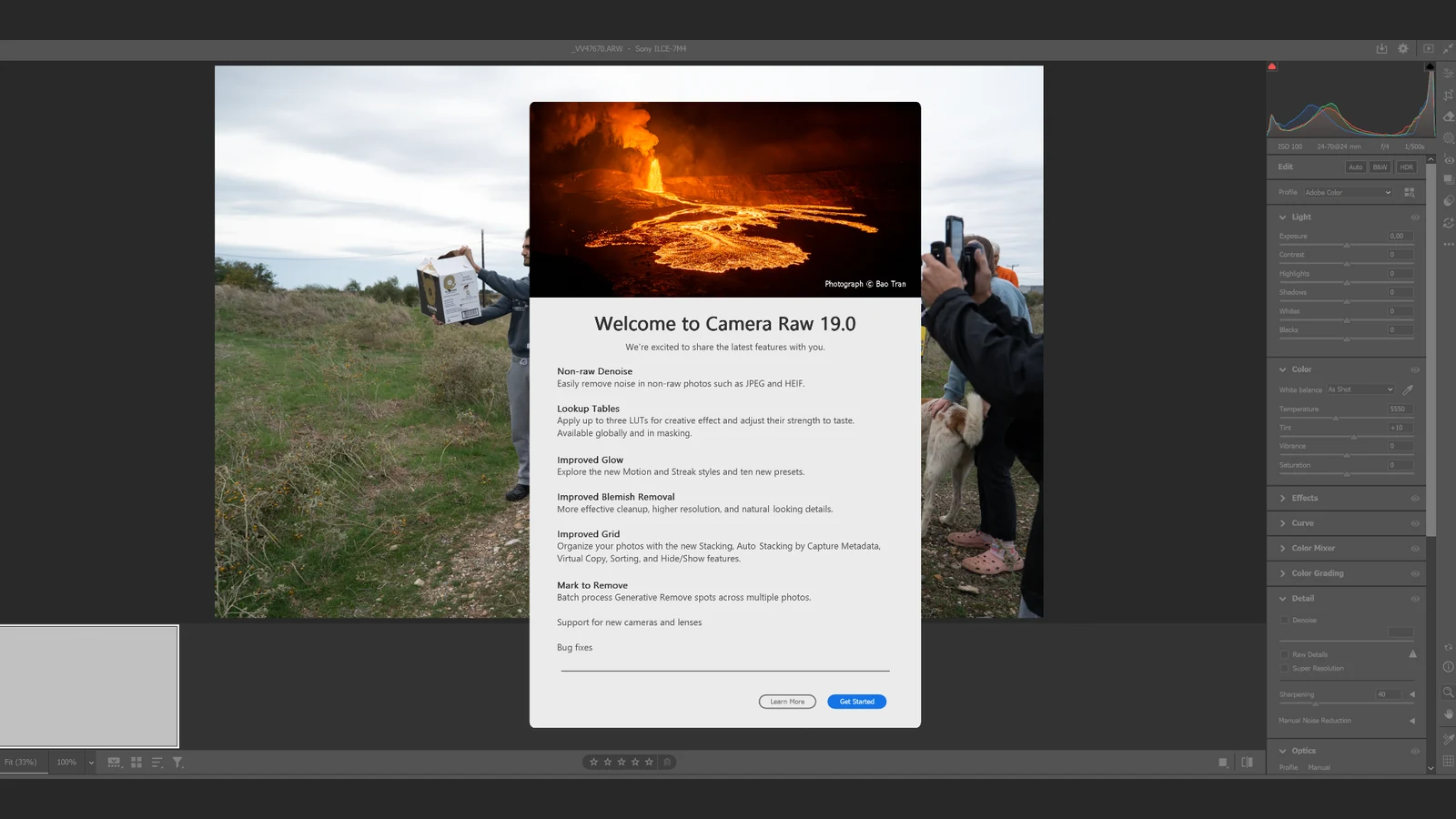
- Adobe Camera Raw 19.0 adds Mark to Remove for batch cleanup.
- Selections persist between sessions and can be copied to similar frames.
- Virtual Copies and Stacking simplify larger shoots.
- Denoise now supports more file types.
Removing the same distraction from hundreds of photos can become tedious; Adobe Camera Raw 19.0 introduces Mark to Remove to make that repetitive job easier to organize.
Adobe released version 19.0 on November 10, 2026, bringing batch Generative Remove, virtual copies, photo-management tools and new creative controls. This update concerns still-photo editing in Camera Raw, rather than the separate object-removal feature for video in Premiere.
Mark to Remove: Remove distractions in batches
Photographers can mark unwanted areas while reviewing images without waiting for generative processing to finish after every selection. Those marks remain available between Camera Raw sessions and can be copied to photographs with matching compositions.
Adobe documents a specific workflow: open a photo, select Remove and brush over the unwanted region. Hold Alt on Windows or Option on macOS to switch the Remove button to Mark to Remove. The selection turns black and waits for processing. Once the marked photos are selected, right-click them and choose Update AI Settings to run Generative Remove across the batch.
For a repeated distraction in the same position, Adobe explains how to use Copy Selected Edit Settings, set Subset to None, choose Remove → Manual and then Paste Edit Settings to the destination photos. This copies a marked selection; it does not mean the AI independently discovers every different unwanted object across an entire shoot.
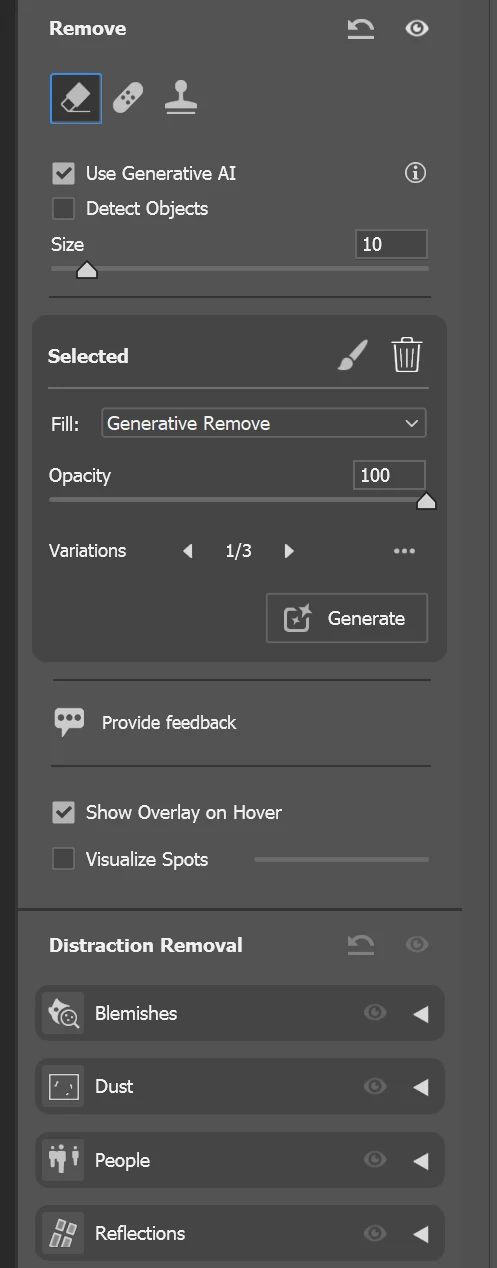
Batch processing still needs inspection. Adobe advises opening each processed photo, checking the result and adjusting Variations or Opacity when necessary. Shoots with repeated compositions, such as a ceremony or a fixed camera position, are likely to see the clearest time savings.
Virtual Copies, Stacking and a clearer review workspace
Virtual Copies allow multiple treatments of one photograph without duplicating the source file. Each version retains its individual settings between sessions and can be saved as a separate output. That is useful when a client requests both a natural-color and a black-and-white interpretation of the same portrait.
Stacking groups related images under a cover thumbnail. Auto-Stack by Capture Metadata can automatically organize images from supported recent Canon and Nikon models and compatible DNG cameras. Hide Photos temporarily removes images from view or displays only selected pictures in the filmstrip and Grid view; hidden photos reappear when a new session starts.
Expanded Denoise, new Glow effects and LUTs
Denoise now extends beyond RAW files to JPEG, HEIF/HEIC, TIFF, PNG, AVIF, JPEG XL, WebP, PSD/PSB and rendered DNG. Adobe also makes Denoise available in Photoshop’s Camera Raw Filter through the checkbox and Amount slider in Detail. This expands noise-reduction options when the original RAW file is unavailable.
Glow gains Motion and Streak for directional light trails. Motion extends highlights in one direction, while Streak extends them in two opposite directions. Direction and Softness adjust the trail angle and edges. Color Grading now supports up to three LUTs across the entire photograph or one LUT per mask, with a separate strength control.
The update builds on Adobe’s earlier image-editing AI work, including reflection and unwanted-person removal in Lightroom. Camera Raw 19.0 puts particular emphasis on organizing this work across larger sets of photos.
Availability
Camera Raw 19.0 is available as an Adobe Camera Raw update through Creative Cloud and compatible Adobe applications. Adobe published its release notes on November 10, 2026, and also added support for new cameras and lenses.
What we think
Anyone covering a wedding, christening or corporate event knows how easily the same distraction can appear at the edge of hundreds of frames. Removing it separately from each photo takes time away from culling and finishing the color. That makes Mark to Remove genuinely practical.
Being able to mark corrections while selecting photos and generate them together is particularly useful. We would start with a small set of nearly identical frames, where copying selections makes sense. If the subject moves considerably, however, the photographer still needs to check where each marked region falls.
We would not deliver an entire batch merely because the AI processing has finished. Hair, body contours and complex backgrounds can reveal obvious problems. Frame-by-frame review remains part of the job, even when the software handles much of the repetitive work.
Meanwhile, Generative Remove for video in Premiere shows Adobe extending similar workflows to editing moving images, although its steps and constraints differ. For photographers, Virtual Copies and Stacking are good companions to batch removal: they make variations and larger photo sets easier to manage.
Frequently asked questions
Does Camera Raw 19.0 automatically find every unwanted object?
Not with this feature. You mark the areas or copy selections to photographs with similar compositions, then batch-apply Generative Remove.
Are the marks lost when Camera Raw is closed?
No. Adobe says Mark to Remove selections are retained between sessions and can be processed when the photographer returns.
Can I use the expanded Denoise feature on JPEG images?
Yes. Version 19.0 extends Denoise to JPEG and several other non-RAW formats, including HEIF, TIFF, PNG, WebP and PSD.