Summary
That group photo where everyone looks great except the person who blinked at exactly the wrong moment can now be corrected in Lightroom on mobile with Adobe’s new Open Eyes tool.
Adobe announced the feature on October 19, 2026. Lightroom automatically detects closed eyes and offers a new Quick Action, letting users generate an AI-assisted open-eye result without retouching the portrait by hand.
How Open Eyes works
When the app finds closed eyes, it offers an Open Eyes action. One tap triggers the generative correction. This is not about making the existing eyes brighter or sharper: the software generates image content that was not captured at the moment the photo was taken.
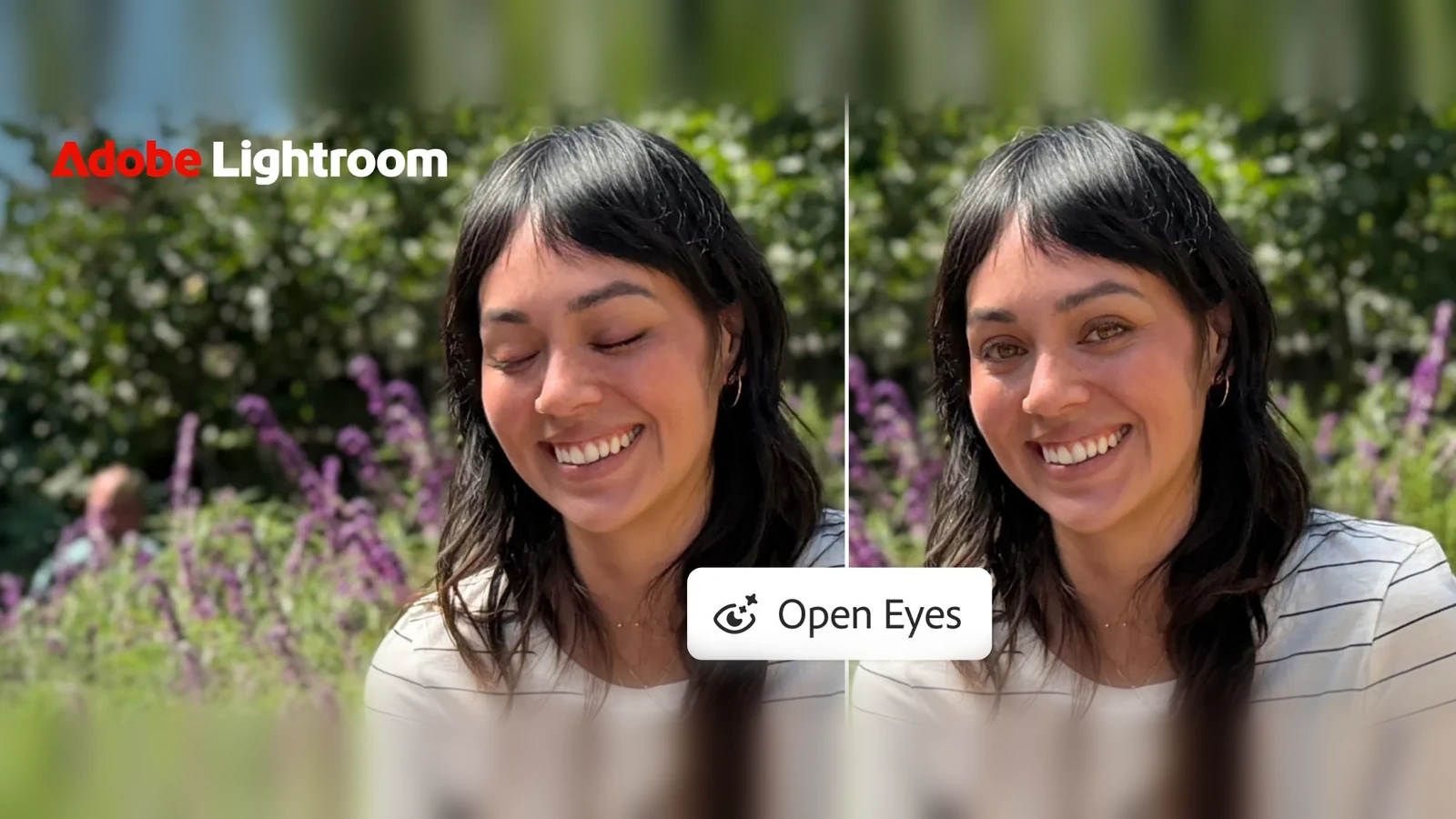
That is particularly useful for group portraits, family photos and events, where everyone else may have the perfect expression and reshooting is not an option. Adobe is positioning this as a quick mobile edit without going back to a computer.
More convincing results using photos from your library
Open Eyes does not have to rely on the frame being edited alone. If Lightroom contains other photos of the same person, the feature can use those references to better match eye color, shape and size.
Reference photos are not a requirement for the tool to work. Without them, the AI attempts a believable result from the original image. With them, it has more information about what the person actually looks like — especially useful in close portraits, where an unfamiliar gaze is easy to spot.
Availability and free access
Open Eyes was announced for Lightroom on mobile, with the app available for iOS and Android. Adobe describes the feature as free in its announcement, but does not detail there whether usage limits or generative-credit charges apply after trials. For repeated edits, it makes sense to check the terms shown by your own account before generating.
More information here.
Generative Expand did not arrive for the first time this week
Adobe also highlights Generative Expand, which extends a picture beyond its original boundaries and generates the missing scene. It can create breathing room around a portrait or help reshape a horizontal image for social platforms.
That feature had already rolled out to mobile in August 2026, so Open Eyes is the main new announcement of October 19. On desktop, Lightroom 9.5 had already brought Generative Expand alongside masking updates.
This continues Lightroom’s push into AI-driven creative tools. Photo to Video on iPhone can also generate new content from an existing picture, although testing with generative credits has shown why per-use costs deserve attention.
What we think
For a wedding, a family portrait or a group shot, this could genuinely save an otherwise excellent image. The ability to draw on real photographs of the same person sounds far more useful than a vague promise that AI can “fix the eyes”. In a close portrait, getting iris color or eye shape wrong can instantly make the result feel off.
We would still check every result at 100% before delivery: eyelids, catchlights, gaze direction and symmetry. Open eyes are not much of a fix if the person ends up looking subtly unlike themselves.
There is also an important distinction between a personal keepsake and a news photograph. In photojournalism, a person’s eyes and gaze are part of what actually happened in front of the camera. Generating them after the fact changes the image content, so we would not treat this as routine, acceptable retouching for a documentary or editorial news image.
Frequently asked questions
Do I need other photos of the person to use Open Eyes?
No. Open Eyes can generate a correction from the original photo. Other images of the same person in your Lightroom library may help the eyes look more like the real person.
Does Open Eyes pick another frame or generate new eyes?
It uses AI to generate the appearance of open eyes. Other photographs can guide the person’s appearance; they are not a mandatory, manually selected replacement frame.