



Summary
- Sand can enter buttons, control rings, ports and the internal parts of a camera.
- Lens changes should be avoided at the beach, especially in windy conditions.
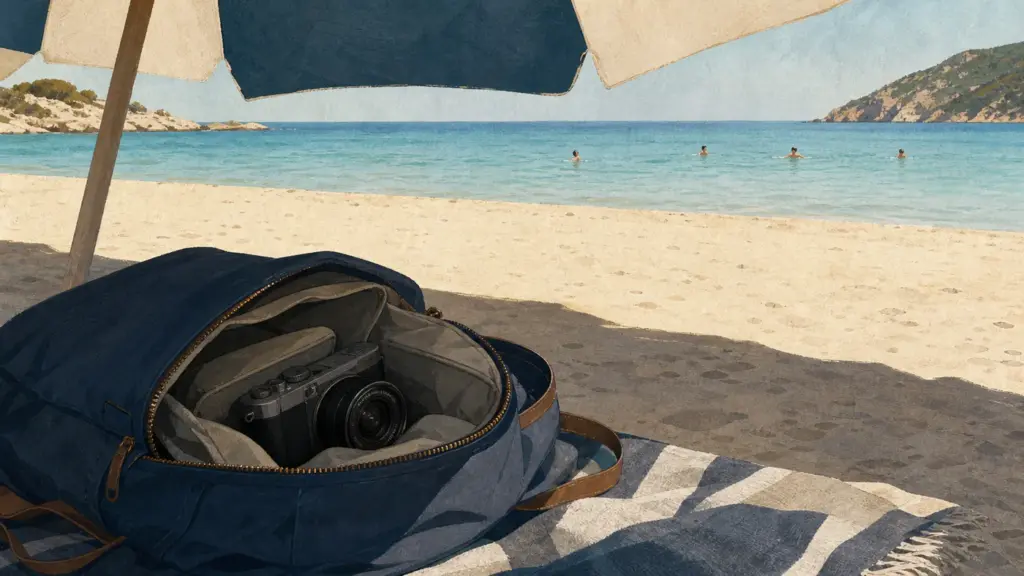
- The camera should remain inside a closed bag, away from wet towels and direct sunlight.
- Saltwater and sea spray can cause corrosion even when the camera is not fully submerged.
- The equipment should be cleaned carefully with an air blower and a microfiber cloth after returning home.
- Weather sealing does not mean that a camera is waterproof.
- Personal safety must come before photography near waves, rocks and slippery surfaces.
- Take only the equipment you need
- Avoid changing lenses
- Use a bag that closes properly
- Never place the camera on the sand
- Protect the front element of the lens
- Keep a safe distance from the waves
- Protect the camera from heat
- Watch for humidity and condensation
- Use the camera strap correctly
- Clean the equipment after leaving the beach
- What to do if the camera gets wet
- Do not ignore personal safety
- What we think
- Frequently Asked Questions
The beach offers excellent photographic opportunities, but sand, salt, humidity and heat can cause serious damage to camera equipment.
Before placing a camera in the same bag as towels and sunscreen, it is important to consider what equipment is necessary, how it will be transported and where it will be kept when it is not being used. Even a simple family trip can become dangerous for a camera if the equipment is left in direct sunlight, placed on the sand or exposed to seawater droplets.
This matters because most beach-related damage is not caused by dropping a camera into the sea. Problems usually begin with small grains of sand, salt residue on surfaces, moisture trapped inside a bag or excessive heat. Simple precautions can significantly reduce these risks.
Take only the equipment you need
The beach is not the right place to carry an entire camera system. More bodies, lenses and accessories mean additional weight, more equipment changes and a greater chance that something will be exposed to sand or direct sunlight.
For holiday photographs, family moments and general beach scenes, a zoom lens can cover most needs. A 24-70mm, 24-105mm or an equivalent lens for APS-C and Micro Four Thirds cameras reduces the need for lens changes. A compact camera or a smartphone with a capable camera involves even less risk because there is no open lens mount.
Bring one charged battery, one clean memory card and only the essential accessories. Preparing the equipment at home reduces the need to open compartments, ports or camera doors while standing on the sand.
Avoid changing lenses
Changing a lens at the beach is one of the riskiest actions for a mirrorless or DSLR camera. When the lens is removed, the inside of the camera body is temporarily exposed, allowing fine sand or dust to reach the sensor and lens mount.
Even when the air appears calm, sand can be transferred by towels, clothing, hands and bags. In windy conditions, lens changes should be avoided completely.
When a lens change is unavoidable, move to an enclosed or sheltered place, such as a car or a room. Prepare the second lens, turn the camera off, keep the mount facing downward and complete the process without unnecessary delay.
Use a bag that closes properly
An open beach bag does not provide meaningful protection for camera equipment. Sand can easily enter it, while wet swimwear or towels can increase moisture around the camera.
A padded camera bag with a zipper or a splash-resistant backpack is a better option. It does not necessarily need to be fully waterproof, but it must close properly and keep the camera separate from wet items.
A small dry bag offers additional protection, especially on beaches with strong waves or during boat trips. The camera can also be placed inside a large zip-seal bag before being stored in the main camera bag. This does not replace a proper waterproof case, but it adds another barrier against sand and water droplets.
Never place the camera on the sand
Even dry, clean-looking sand can enter buttons, zoom rings, ports, screen hinges and lens mechanisms. Sand grains can also scratch displays and optical surfaces.
A towel is not always a safe surface because it can transfer both sand and moisture. The camera should return to its closed bag whenever it is not being used.
Before handling the camera, make sure that your hands are clean and dry. After applying sunscreen, wipe your fingers carefully because oily residue can cover the screen, buttons and front lens element.
Protect the front element of the lens
At the beach, the front element is exposed to sand, sea spray, water droplets, fingerprints and sunscreen. A clear protective filter can provide an additional barrier, particularly when wind is carrying sand or water through the air.
The filter should be of good quality so that it does not noticeably reduce image quality or create excessive reflections. When the sun is inside the frame, a low-quality filter can increase flare.
A lens hood is also useful. It reduces unwanted reflections and provides limited physical protection from knocks, fingers and droplets. It does not protect the lens from water and does not make the equipment waterproof.

Keep a safe distance from the waves
Saltwater is more dangerous than fresh water because salt accelerates corrosion in metal and electronic components. A camera does not need to be submerged to suffer damage. A single wave, strong sea spray or prolonged exposure to salty air can be enough.
Avoid standing where waves break, especially when holding the camera close to the ground. A wave that appears small can suddenly travel much farther up the beach. Around rocks, water may also be redirected toward the camera from an unexpected angle.
For photographs taken in the water, use equipment designed specifically for that purpose, such as a waterproof compact camera or an appropriate underwater housing. Weather sealing does not mean that a camera is waterproof or safe around saltwater.

Protect the camera from heat
Direct summer sunlight can quickly raise the temperature of a camera. Dark camera bodies and lenses absorb heat, while high-resolution video, continuous shooting and extended screen use create additional internal heat.
When the camera is not in use, place it inside the bag and keep it under an umbrella or in another shaded area. Do not simply cover it with a towel while leaving it in direct sunlight, as heat can become trapped underneath.
A camera should never be left inside a closed car. The interior temperature can rise far above the outside temperature and affect the battery, display and electronic components.
When an overheating warning appears, turn the camera off and allow it to cool naturally in the shade. Do not attempt to cool it suddenly with water, ice packs or extremely cold air.
Watch for humidity and condensation
Humidity does not come only from the sea. Condensation can form when a camera is moved from an air-conditioned room or vehicle into a hot and humid outdoor environment.
A sudden temperature change may cause the lens to fog or moisture to form on internal surfaces. To reduce this risk, leave the camera inside its closed bag for several minutes so that its temperature can adjust gradually.
Small silica gel packets inside the camera bag can help manage moisture. They must remain dry and should be replaced or renewed when they become saturated.
Use the camera strap correctly
At the beach, a wrist or neck strap can prevent the camera from falling onto sand, rocks or water. It is especially useful when walking near the shoreline or photographing children and moving subjects.
The strap should be secured before the camera is removed from the bag. When using a small tripod or selfie grip, check that the mount and locking mechanisms are properly tightened.
Avoid allowing the camera to hang close to the water while walking through shallow areas. A slip or a larger wave can bring it into contact with the sea within seconds.
Clean the equipment after leaving the beach
Cleaning should take place after returning to a clean and dry area. Do not try to remove sand by rubbing the camera with a towel, paper or clothing because the grains may scratch its surfaces.
Begin with a manual air blower, positioning the camera so that sand moves away from buttons and openings. Pay particular attention to the lens mount, control rings, battery door and ports.
Then use a clean microfiber cloth for the camera body and a separate cloth for the lens element. When salt residue remains, follow the manufacturer’s cleaning instructions. Do not use household cleaning products, alcohol or excessive liquid.
Before removing the lens or opening the battery compartment, make sure that the exterior is clean. Otherwise, sand may fall inside the camera when it is opened.

What to do if the camera gets wet
When the camera receives a few drops of fresh water, dry it immediately with a clean cloth and inspect the joints, buttons and compartment doors.
When it is exposed to saltwater or falls into the sea, turn it off immediately and do not test whether it still works. Remove the battery only when this can be done without transferring water or sand into the camera.
Do not turn the camera on again and do not connect it to a charger. Saltwater combined with electrical current can accelerate the damage. The safest response is an immediate inspection by a qualified technician.
Do not ignore personal safety
Protecting the equipment should not distract from the surrounding environment. Wet rocks, steep coastlines, strong waves and changing tides can create serious risks.
Do not walk while constantly looking at the camera screen and do not approach the edge of rocks for a better angle. Using a longer lens or changing position is safer than standing in an unstable location.
During family holidays, attention must remain on children and the sea. Photography should never become a reason to lose supervision or overlook an approaching wave.
What we think
A camera can safely accompany a summer beach trip when it is treated as sensitive electronic equipment rather than another object inside a beach bag. Carrying fewer items, storing the camera properly, keeping it away from water and cleaning it carefully after use are the measures that make the greatest difference.
Frequently Asked Questions
Can I change lenses at the beach?
Lens changes should be avoided, particularly in windy conditions. When a change is necessary, it should take place in a sheltered area with the camera turned off and the lens mount facing downward.
Is weather sealing enough?
No. Weather sealing provides limited protection from dust and moisture, but it does not mean that a camera is waterproof or safe around saltwater.
Do I need a protective lens filter?
It is not essential, but it can help protect the front element from droplets, sea spray and sand. It should be of good quality and kept clean.
How should sand be removed from a camera?
Sand should first be removed with a manual air blower and then with a clean microfiber cloth. It should never be rubbed directly because it can scratch surfaces.
What should I do if saltwater reaches the camera?
The camera should be turned off immediately and should not be powered on again. Saltwater causes corrosion and requires prompt inspection by a qualified technician.






Comments
Μεγάλο θέμα και διάφορες περιπέτειες…
Θα περίμενα μόνο να έγραφε το άρθρο και για την προστασία από κλοπή. Εκεί τι κάνεις; (ουσιαστικά τίποτα: απλώς προσέχεις τον εξοπλισμό σου)