

Summary
- Instagram announced a new feature for carousels
- Each slide can now have its own caption
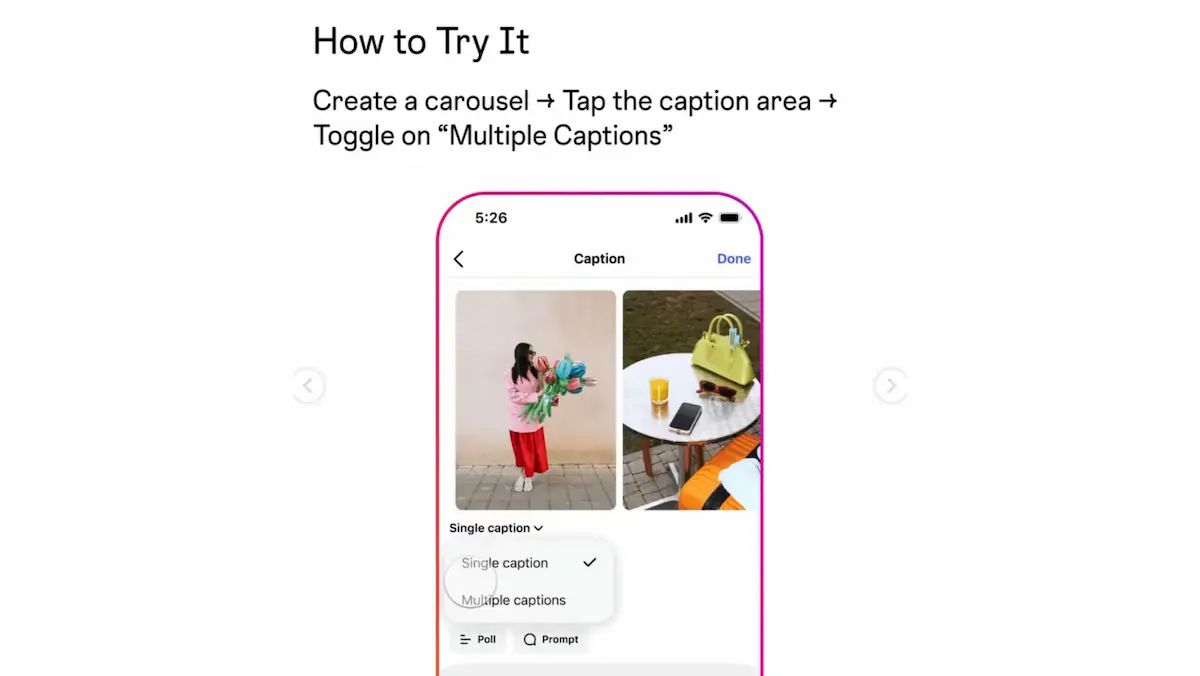
- Activation is done through a single toggle
- The rollout begins gradually this week
- The change mainly concerns creators and professional accounts
Instagram is bringing a new feature to carousels, now allowing each slide to have its own separate caption.
The change was announced by the platform’s Creators account and concerns those who publish carousel posts, whether they are content creators, professional accounts, or brands. Until now, the carousel essentially worked with one shared caption for the entire post, but that now appears to be changing.
The importance of the new capability is practical, as it gives more control over how content is presented. Instead of a post relying only on one central caption, each card can now support its own message, explanation, or callout, something that could be especially useful for educational posts, guide-based carousels, and narrative-style publications.
What changes in carousels
With the new feature, each slide in a carousel will be able to include a different caption. This means the creator will no longer be limited to one shared description for all cards, but will be able to build the content step by step as the user swipes.
The logic is closer to structured storytelling inside the same post, since each card can provide new information, a new clarification, or a different tone depending on the image or video content.
One setting is enough
According to the announcement, activation is done with a single toggle. This suggests Instagram wants the new capability to be simple to use and not drastically change the publishing process.
This approach matters because new features often require extra steps or more complex setup. Here, the platform appears to be choosing a more direct implementation so the tool can be adopted easily by more users.
Who it matters to most
The new capability is expected to be most interesting for creators who use carousels for informative or educational content. For example, someone can explain a different point on each card without overloading the main caption with too much information.
At the same time, it could also prove useful for businesses presenting products, services, or steps in a process, since each slide will be able to include more targeted text.
When it becomes available
The announcement says the rollout starts this week. That means the feature will not necessarily appear at the same time for all accounts, but will gradually reach users through a staged rollout.
As often happens with new Instagram capabilities, some users will see it earlier and others later, depending on region, account, and app version.
What we think
This is a small change that may turn out to be more important than it first appears. Carousels are one of Instagram’s strongest formats, and the ability to use a different caption on each slide gives more control, better storytelling, and clearer content organization. If the feature is implemented properly and without major limitations, it has the potential to become a core tool for many creators.
Frequently Asked Questions
What is the new Instagram carousel feature?
It is the ability for each slide in a carousel to have its own separate caption.
How is it enabled?
According to the announcement, the feature is enabled through a toggle.
Is it already available to everyone?
Not necessarily. The rollout starts this week and is being released gradually.
Who will find it most useful?
Mainly creators, professional accounts, and those publishing educational or narrative carousel posts.