


Summary
- The Pixel effect lets users describe which person or object should be pixelated in a Story.
- It can also help reduce the recognisability of faces before publishing.
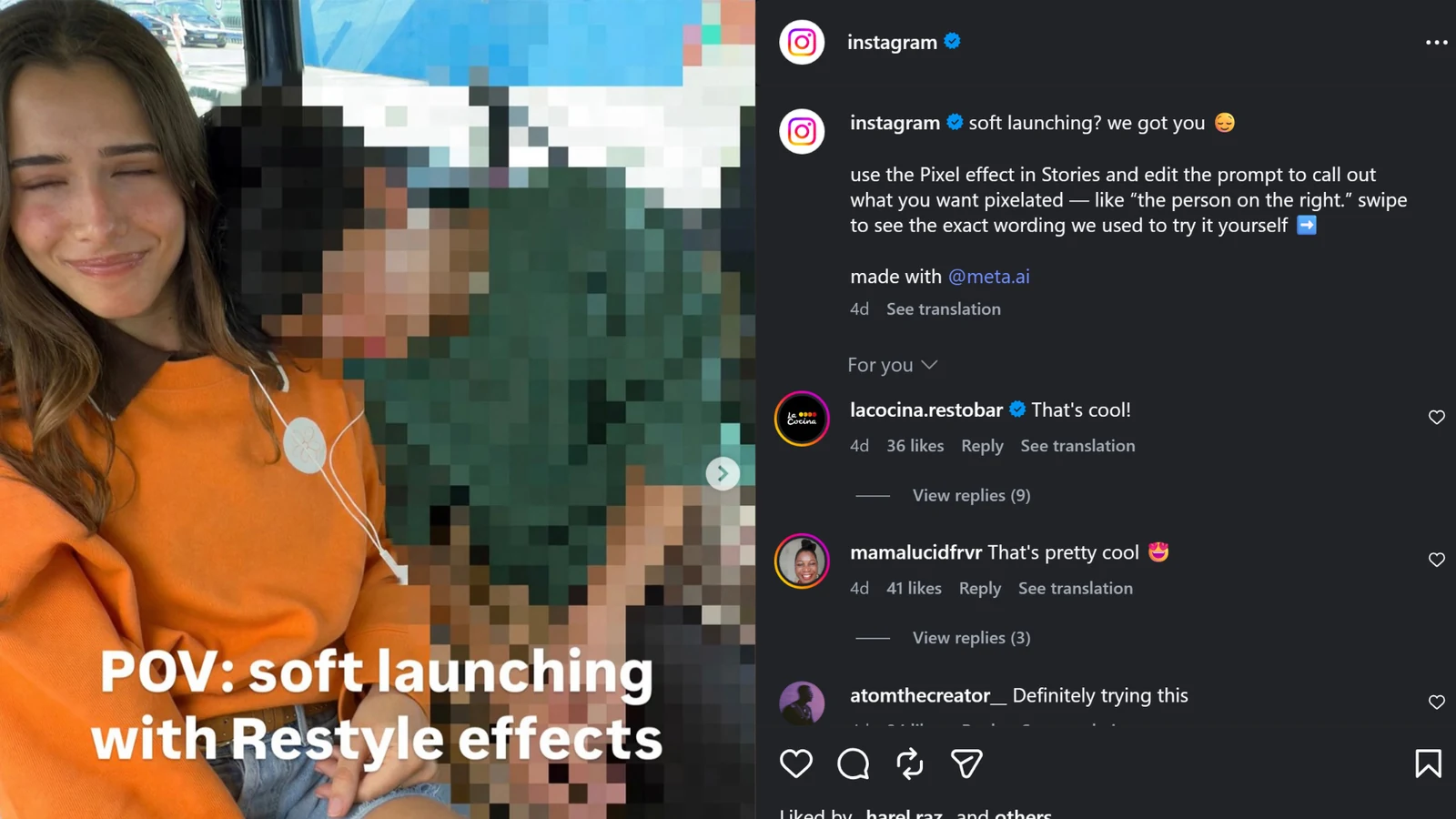
Instagram is showcasing a new AI-powered Pixel effect for Stories that can heavily pixelate a selected person or object from a written prompt.
In its official post, @instagram framed the feature around a relationship “soft launch”: users choose the Pixel effect and edit the prompt to specify what they want pixelated, such as “the person on the right.” The same post notes that the result was made with @meta.ai.
The use case goes beyond relationships. For parents who want to share a family moment without clearly showing a child’s face, or for photographers and creators who want to reduce the recognisability of a bystander, the tool can provide a quick way to obscure someone without leaving Instagram.

How the Pixel effect works
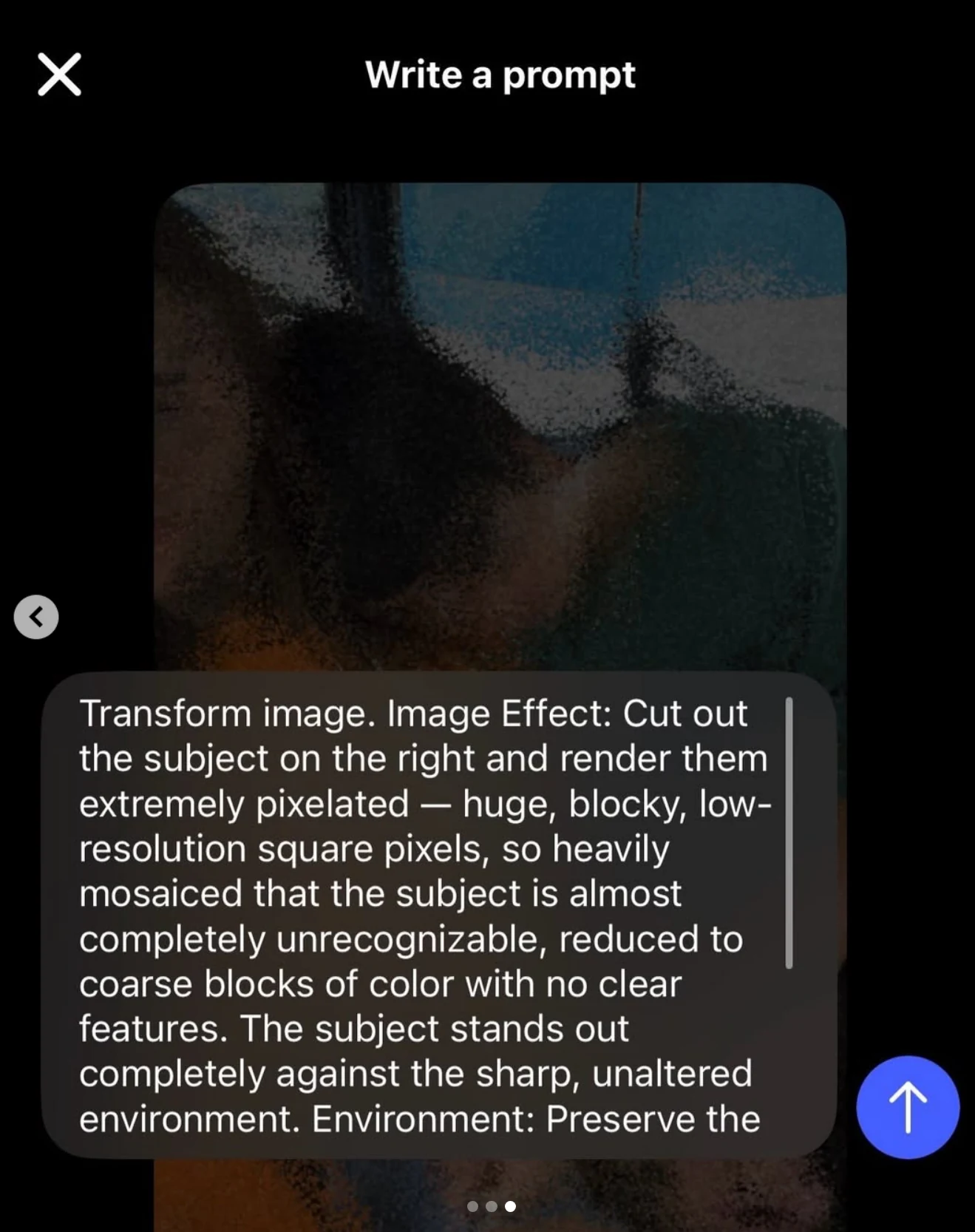
Instead of manually covering a face with a sticker or brush, you describe in the prompt which subject should be pixelated. Instagram’s example asks the effect to isolate the person on the right and render them with very large, blocky pixels until clear facial features are no longer visible.
Meta announced in July that Muse Image powers more than 30 AI-powered effects for Instagram Stories. The model is designed to understand natural-language descriptions and edit existing images, which matches the prompt-based approach used by the Pixel effect.
From relationship soft launches to children’s photos
Instagram introduced the effect with a playful relationship “soft launch” example, but its practical value is broader. A user could target a child in a family photo, another child appearing in a school or social setting, a stranger in the background, or even an object containing information they do not want to show clearly.
For people who already cover children’s faces with emoji, stickers or manual blur before posting, the Pixel effect moves that step into the Story editor. The main benefit is speed: describe what you want hidden and the AI attempts to apply the edit without requiring another app.
Pixelation does not guarantee anonymity
The result should always be checked before publishing, especially when children or other sensitive situations are involved. A pixelated face may reduce recognisability, but clothing, location, body shape, reflections or other contextual details can still reveal who is in the image.
Because the subject selection is AI-driven, users should also not assume that every relevant area will always be covered correctly. If the goal is genuine identity protection rather than a visual effect, inspect the entire image carefully rather than only the face.
What we think
The most useful part of the Pixel effect is not the relationship “soft launch” angle, but the fact that it brings a common privacy-oriented edit directly into the Stories workflow. For creators and parents it can remove an extra editing step, as long as it is treated as a convenience tool rather than a guarantee of anonymity.
Frequently asked questions
What is Instagram’s Pixel effect?
It is an AI effect for Stories that lets you describe, with a prompt, which person or object you want to appear heavily pixelated.
Can it be used to hide a child’s face?
Yes. You can ask the effect to target a specific person, but you should verify before posting that the face and any other identifying details have been obscured as intended.
Is it just a blur effect?
No. Instagram’s example uses strong block-style pixelation, with large square pixels that remove clear detail from the selected subject.
Does it use Meta AI?
Yes. Instagram’s official post says the example was made with @meta.ai, while Meta has said that Muse Image powers AI effects in Instagram Stories.
Is it available to every account?
Instagram has publicly showcased the Pixel effect, but no separate official country-by-country or account availability list for this specific effect was found.