

Summary
- The setting is located under “Sharing and reuse”
- Two separate options need to be disabled
- The first covers photos, videos and other public content
- The second covers original audio used by Meta AI
- The settings should be checked again when an account becomes public
Instagram users can disable the setting that allows their public content to be reused in Meta AI creations.
The feature concerns public accounts and may allow photos, Reels, Stories, profile pictures and original audio to be used for generating images through Meta’s Muse Image tool.
The setting is particularly important for photographers and creators because it may be enabled by default and requires manual deactivation within the app.
How to disable the setting
First, the user opens the Instagram app and goes to their personal profile.
They then tap the three horizontal lines in the upper-right corner to open the settings menu.
Next, they scroll down and select “Sharing and reuse.”
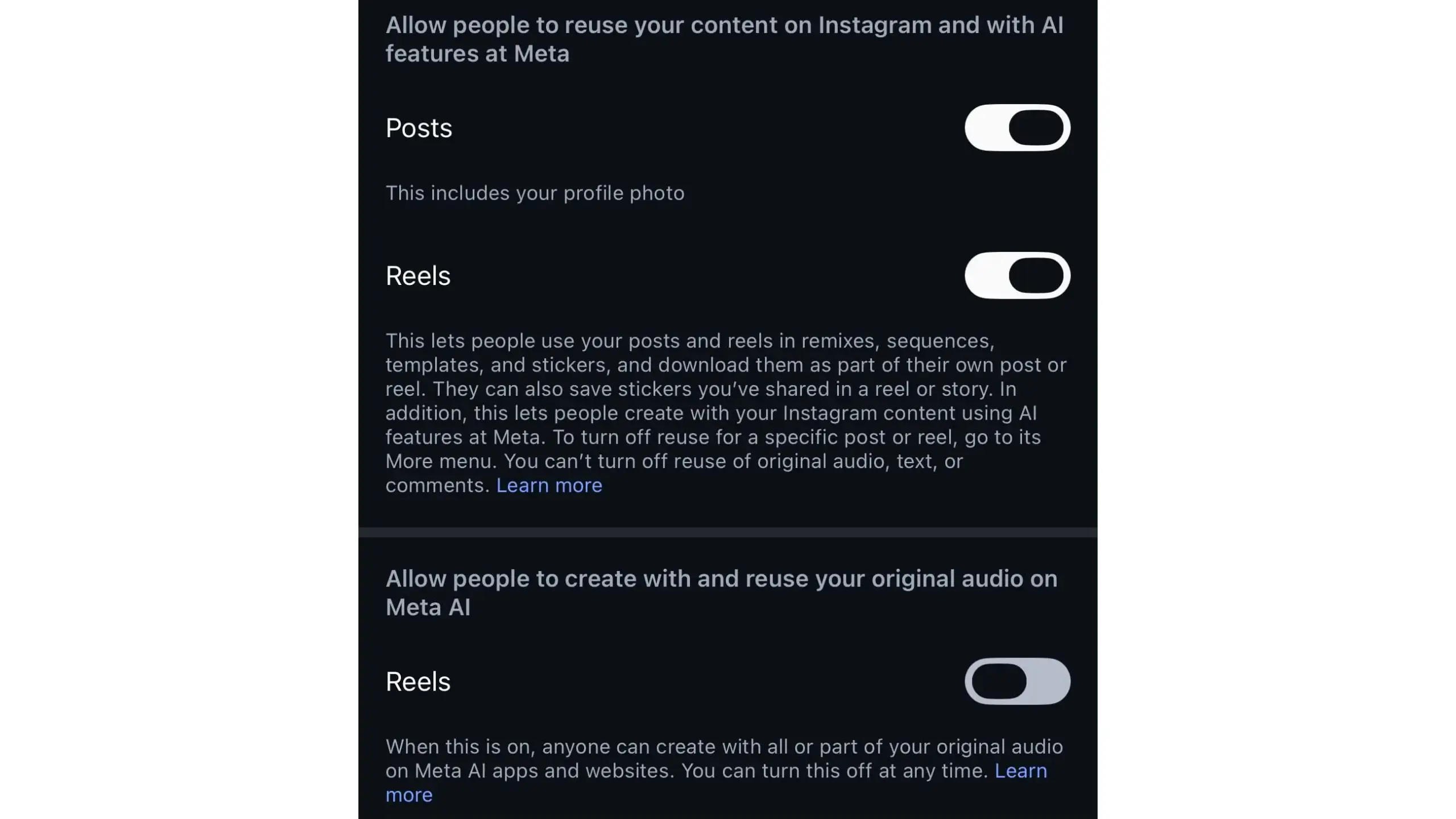
Inside this section, they need to locate and disable the option that allows other people to reuse their content on Instagram and with Meta’s AI features.
They should also turn off the second option, which allows other people to create with and reuse their original audio on Meta AI.
What applies to private accounts
Content from private accounts is not available for this type of reuse.
However, when an account is changed from private to public, the feature may be enabled automatically. Users should therefore check the relevant settings again after changing their account’s privacy status.
What cannot be disabled
The available switches cover visual and audio content, including photos, videos and original audio.
According to the available information, there is no equivalent setting for opting out of the use of text and comments.
What we think
Disabling the setting is a simple but important step for photographers and creators who do not want their public content to be reused by artificial intelligence tools. Regularly reviewing privacy settings remains essential, as platforms can introduce or change features without users immediately noticing.
Frequently asked questions
Where is the setting located?
It can be found on the Instagram profile page, inside the menu opened by tapping the three horizontal lines and selecting “Sharing and reuse.”
Which options need to be disabled?
Users should turn off both the option covering content reuse with Meta AI features and the option covering original audio reuse on Meta AI.
Does this apply to private accounts?
Content from private accounts is not available for this type of reuse. The settings should be checked again when an account is made public.
Can the use of comments be disabled?
Based on the available information, there is no equivalent switch for text and comments.