

Summary
- Color Mode is now available in the regular Adobe Premiere 27.0 release.
- Clip Grid and new Operations reorganize grading.
- The old Lumetri Color panel is retired, but existing effects remain supported.
- Editors gain updated SDR and HDR color-management workflows.
Adobe Premiere 27.0 brings Color Mode into the regular release, changing how editors correct and grade footage inside the application.
Adobe announced general availability on November 10, 2026. Color Mode had been available in beta as part of the September Premiere 26.5 changes, so the news is its move into the stable 27.0 release rather than a first unveiling.
How the new Color Mode works
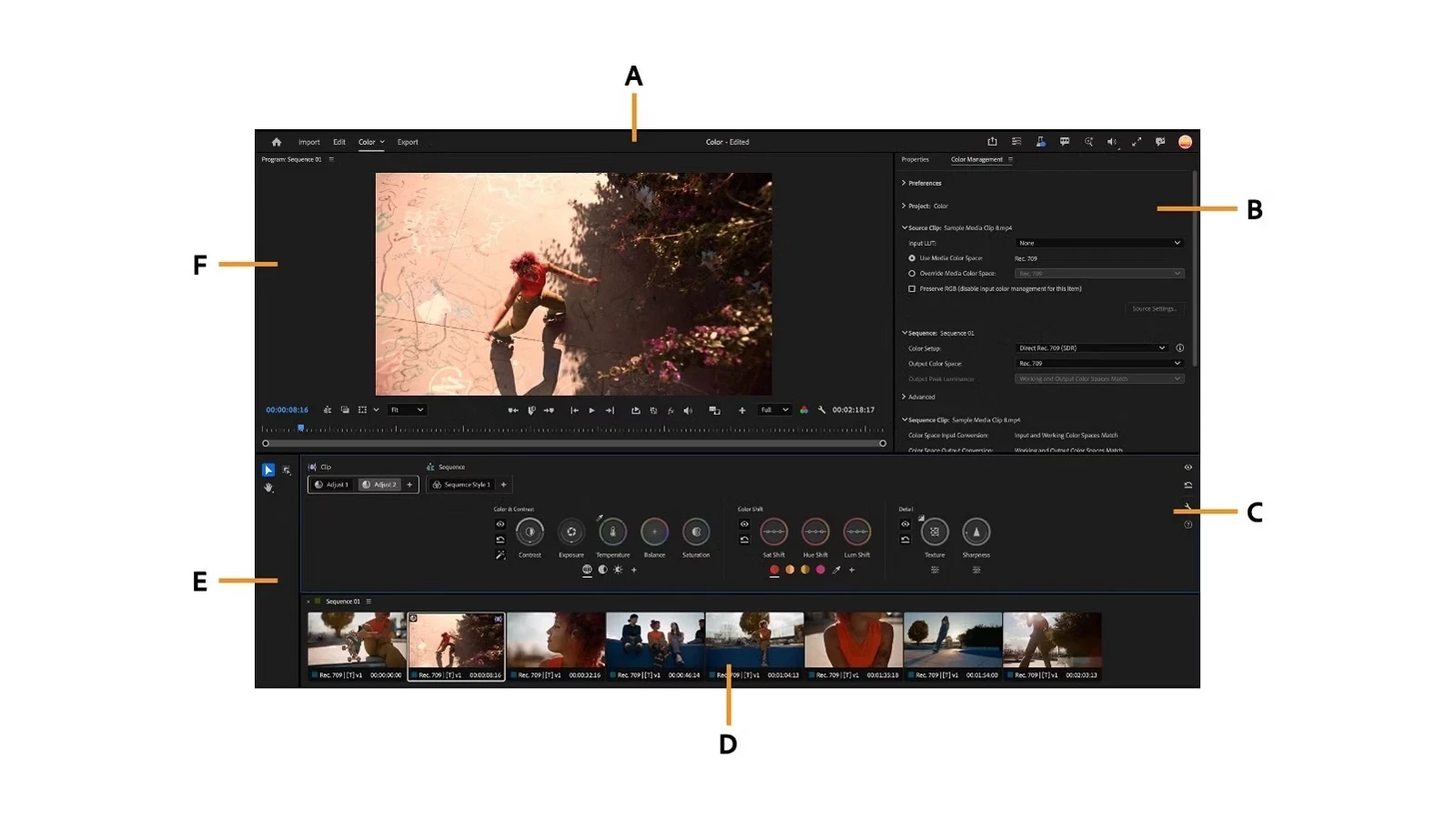
The workspace opens from the Color tab next to Edit. Color Monitor keeps the image front and center, Clip Grid displays the shots in a sequence for quick navigation and selection, and the Color Controls panel brings adjustments together without constant switching between panels.
Color edits are organized as Operations. Adjust covers exposure, contrast, color balance, and texture; Style adds creative looks and configurable modules; and LUT operations are supported. Editors can work on individual clips or establish a shared Sequence Style across the timeline.
Auto Color provides an automatic starting point for exposure and white balance. Heads-up displays combine visual guidance and scopes as adjustments are made, while many controls use two-axis gestures to change related parameters together.
What changes for Lumetri Color users
The old Lumetri Color panel is retired in Premiere 27.0, but the Lumetri Color effect is not going away. Existing projects retain their previous adjustments and Lumetri effects remain editable through the Properties or Effect Controls panels, depending on the workflow.
For new grading, Adobe recommends Color Mode as the main workflow. Combining new Color Mode operations with Lumetri effects can restrict certain grading capabilities. Clip Match and the previous Comparison Mode have also been removed.
Log, RAW, SDR and HDR in one workflow
The Color Management panel handles source and output transformations, including log and raw material as well as SDR and HDR. Editors can work with Direct Rec. 709 or wider-gamut pipelines; HDR delivery supports Rec. 2100 HLG or PQ with an appropriate reference display.
Adobe advises choosing the correct sequence color setup before grading, as changing the color-space configuration afterwards may alter already-graded images. The company also notes potential performance issues with demanding 8K sequences.
More information here.
What we think
For editors who also handle everyday color correction, Clip Grid may be the most useful part. On a video with dozens of shots, quickly finding the ones that need attention and copying adjustments across them matters more than simply having another attractive panel.
It is also good to see Adobe treating grading as a sequence-level task, rather than just a stack of isolated effects. Shared looks can save time, provided editors still work through the shots that need individual attention.
Anyone finishing a substantial Lumetri-based production, however, has little reason to change workflows mid-project. Compatibility matters, but removed legacy features and a different way of working make testing with a duplicate project a sensible first move.
Frequently asked questions
Do I still need the beta to use Color Mode?
No. Color Mode is included in the regular Adobe Premiere 27.0 release from November 2026.
Will old projects lose their Lumetri effects?
No. Existing Lumetri effects and their adjustments remain intact; it is the old Lumetri Color panel that has been retired.