Summary
- Premiere 26.5 gains the Generative Media Tool for creating video and sound effects directly in the timeline.
- Adobe Firefly and partner models including Google Veo, Kling, Runway and Luma are supported.
- Generate Music, Generate Soundscape, new audio tools and Color Mode remain in beta.
- After Effects gains an AI Assistant capable of carrying out tasks across an entire project.
- Generative video consumes credits, so the real cost depends on the plan and model being used.
- Generative Media Tool: AI video directly inside Premiere
- Sound effects, soundscapes and music without leaving the timeline
- Premiere gets much more aggressive AI audio tools
- AI Assistant in After Effects works across the entire project
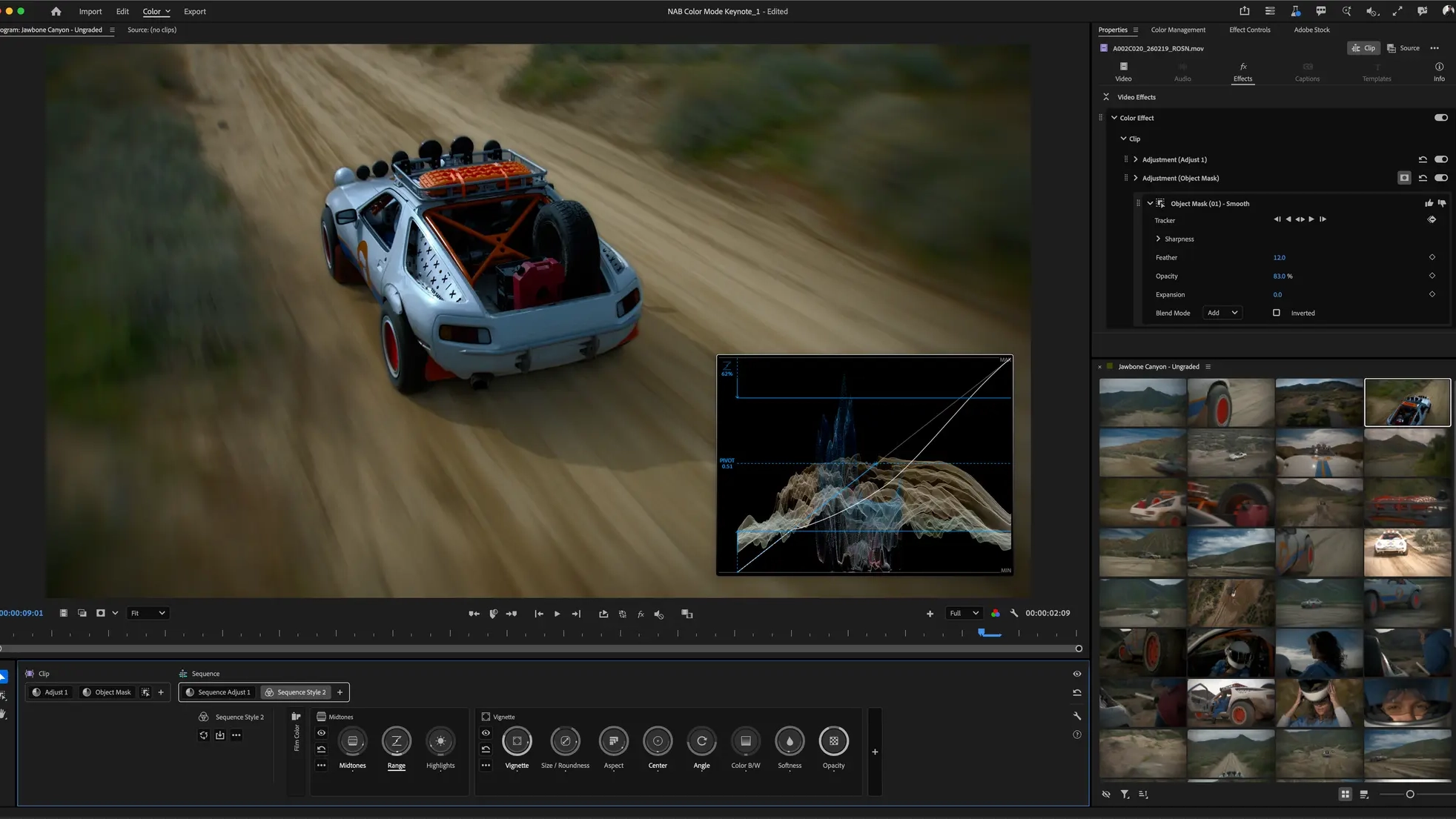
- New Color Mode and the future of Lumetri
- Premiere 26.5 includes other changes as well
- From Generative Extend to generating an entire shot
- Availability, pricing and the real cost of AI credits
- Commercial use and partner models
- What we think
- Frequently asked questions
Adobe is bringing video and sound-effect generation directly into the Premiere 26.5 timeline while expanding its AI tools across audio, color grading and After Effects.
Adobe announced a new wave of Premiere and After Effects features on September 8, 2026, ahead of IBC 2026, with the Generative Media Tool as one of the key additions. In the new Premiere 26.5 release, editors can generate video clips and sound effects from prompts without leaving the timeline and add them directly to a sequence as editable clips.
The change matters because Adobe is moving generative AI from an external production stage directly into the editing process itself. Instead of creating media in a separate tool, downloading it, importing it and adapting it to the edit, Premiere can even use frames from the existing project as references and generate new media exactly where it is needed.
Generative Media Tool: AI video directly inside Premiere
The new Generative Media Tool lets users select a range in the timeline, describe what they need with a prompt and then choose the AI model to use. Available choices include Adobe Firefly as well as partner models such as Google Veo, Kling, Runway and Luma.
Reference frames from the sequence itself can be used for video generation. A first frame can define the beginning of a new shot, while a combination of first and last frames can be used to generate a transition. Depending on the model, users can also adjust resolution, aspect ratio, frame rate, seed and duration, while some models can generate audio together with the video.
The result is added directly to the sequence and can be moved, trimmed and further edited like any other clip. This makes the tool particularly relevant when an edit is missing a small piece of b-roll, a transitional shot or a temporary visual needed to complete a cut.
Sound effects, soundscapes and music without leaving the timeline
Adobe is extending the same approach to audio. Generate Sound Effects creates effects from text descriptions, while users can even use their voice as a guide for the rhythm, timing and intensity of the generated result. The system is powered by Adobe’s own audio model.
Generate Soundscape, currently in beta, can analyze up to 15 seconds of video and create an initial audio environment with ambience and sound effects timed to the on-screen action. Its purpose is not to replace final sound design, but to give editors a fast starting point that can be refined further.
Generate Music is also in beta and creates original instrumental music with multiple variations, tempo controls and looping. Adobe says the Firefly Music Model is designed for background music in video, does not generate lyrics, and that generated material can be used commercially under the company’s applicable terms.
Premiere gets much more aggressive AI audio tools
Another major part of the announcement involves new audio-processing tools in public beta.
Enhance Audio expands on Enhance Speech and offers more detailed control over dialogue, music, ambience and sound effects contained in the same clip. Separate Crosstalk can identify two people speaking at the same time and create separate tracks for each speaker, along with a separate background track.
This can be particularly useful for interviews, documentaries, podcasts and multicamera productions because overlapping voices can then be mixed independently. The feature is not free in terms of AI credits: Adobe says Separate Crosstalk costs one generative credit for every second of audio processed.
Dynamic Auto Ducking automatically balances dialogue, music and other elements without manually creating keyframes, while a new speed algorithm aims to produce more natural results when changing audio duration while preserving pitch and timbre more effectively.
AI Assistant in After Effects works across the entire project
The biggest change in After Effects is the expansion of AI Assistant, now available in public beta.
Unlike a simple help chatbot, the Assistant can carry out actions inside the project. Users can ask it in natural language to organize layers and compositions, write or debug expressions, inspect footage or compositions, and perform processes that would otherwise require multiple manual steps.
Importantly, it works across an entire project rather than only the composition currently open. Adobe says it can help organize projects containing thousands of layers and can also generate images or video through Firefly and partner models.
For now, it is clearly a beta feature. After Effects (Beta) is installed separately from the Beta apps section of the Creative Cloud desktop app.
New Color Mode and the future of Lumetri
Adobe is also continuing its major overhaul of the Premiere color workflow through Color Mode, which remains in beta.
New additions include Style Modules such as Vignette and Midtones, along with a new Auto Color feature that can automatically correct color temperature and exposure on a clip, group or even an entire sequence. Color Mode is designed to provide a more focused grading environment with greater emphasis on the image and less movement between panels.
There is also an important change existing users need to know about: Adobe has confirmed that the Lumetri Color panel will be retired in the upcoming Premiere 27.0. The Lumetri Color effect itself is not being removed and existing Lumetri effects will continue to work, but they will be edited through the Properties panel.
Adobe also warns that the current Color Mode is still in beta and is not recommended for critical client work, because changes to project formats or beta effects may cause compatibility issues with standard Premiere releases.
Premiere 26.5 includes other changes as well
The September 2026 release is not limited to generative AI. Premiere 26.5 adds Paper Edit, which can create rough cuts by selecting sentences or portions of sentences from a transcript and converting those selections directly into a new sequence.
It also adds support for Sony FX5 footage, including XAVC and XOCN media with 32-bit float Hi-Res audio, improved ProRes RAW compatibility, and additional changes to search, export and everyday timeline tools.
Adobe has also made Frame.io Mounted Storage available to all accounts, allowing full-resolution media to be streamed from the cloud into Premiere without requiring a complete manual download to local storage first. The feature had been introduced earlier in 2026 with a phased rollout, and Adobe now says access has expanded to all accounts.
As part of the same announcement, Adobe said Premiere is being recognized with a 2026 Engineering, Science & Technology Emmy Award, connecting today’s move toward AI-assisted workflows with the software’s 35-year history in professional post-production.
From Generative Extend to generating an entire shot
This direction did not appear overnight. PTTL had already covered the arrival of Generative Extend in Premiere Pro and the gradual move of generative AI into video editing in 2024, when the technology was primarily focused on extending existing clips.
That was followed by deeper Firefly, AI search and Frame.io integration, also covered in PTTL’s report on Premiere 25.6. With the Generative Media Tool, the direction is now much clearer: AI is no longer limited to filling a few missing frames but can create new visual and audio material exactly where the edit is being built.
Availability, pricing and the real cost of AI credits
The Generative Media Tool for video and sound-effect generation is included in Premiere 26.5, the September 2026 release. Generate Music, Generate Soundscape, the new AI audio tools, Color Mode and the After Effects AI Assistant are in beta or public beta and are accessed through the corresponding beta applications where required.
In Greece, Adobe currently lists both Premiere and After Effects at €27.08 per month including VAT on an annual plan billed monthly. Users can visit the official Adobe Premiere product page and the official Adobe After Effects product page. Current Greek pricing is shown on Adobe’s official plans page.
The most important detail, however, is that an application subscription does not mean unlimited AI video generation. Generative tools consume credits, and usage varies by model and settings. Adobe currently lists Firefly Generate Video at 1080p and 24 fps at 100 credits per second. A five-second video at that setting therefore corresponds to 500 credits.
According to Adobe’s updated table dated September 3, 2026, new Single App Premiere or After Effects subscriptions started on or after June 17, 2025 include 25 generative credits per month, while older active Single App subscriptions retain 500. Creative Cloud Pro includes 4,000 credits for premium generations and unlimited standard generations. Frequent AI video creation or partner-model use can therefore depend heavily on the plan and available credit allowance.
Adobe also states that partner models inside Premiere use Adobe generative credits and do not require separate subscriptions to the respective providers. Some models are not yet available across every business plan.
Commercial use and partner models
Adobe describes its own Firefly and audio models as designed for commercially safe use, with training based on licensed and public-domain material. For Generate Music, the company also states that generated tracks can be commercially used under royalty-free terms.
That does not mean every available third-party generator operates under the same framework. Adobe itself notes that users choose which partner model to use and remain responsible for determining whether its terms are appropriate for their project. According to the company, prompts, reference frames and media submitted for generation are not used to train Adobe or partner models.
What we think
The meaningful change is not simply that Premiere has gained another AI generator. It is that new-media generation is moving directly into the timeline, where an editor can see the exact gap that needs to be filled and has the visual context of the surrounding project available.
This could make rough cuts, temporary b-roll, sound design and smaller production fixes considerably faster. At the same time, beta features, generative credits and different partner-model terms mean these workflows still require caution in real production environments. Adobe’s bigger challenge will be making the integration predictable, affordable and reliable enough for AI to behave like a normal editing tool rather than a separate experiment.
Frequently asked questions
What is the Generative Media Tool in Premiere?
It is a new tool for generating video clips and sound effects from prompts directly inside the Premiere timeline, with support for reference frames and a choice between Adobe Firefly and supported partner AI models.
Are all the new tools available in the standard Premiere 26.5 release?
No. Video and sound-effect generation through the Generative Media Tool is included in Premiere 26.5, but Generate Music, Generate Soundscape, Color Mode and several new audio tools remain in beta. The After Effects AI Assistant is also in public beta.
Is a separate Google Veo, Kling, Runway or Luma subscription required?
Not for use through Premiere. Adobe says supported partner models use the generative credits associated with the Adobe account and do not require a separate account or subscription with the provider.
Is AI video generation unlimited with a Premiere subscription?
No. Video generation and other premium generative features consume generative credits, with costs varying by model, duration and settings.
Is Lumetri Color being removed?
No. In the upcoming Premiere 27.0 release, the Lumetri Color panel is being retired, but the Lumetri Color effect remains available and existing effects will continue to be editable through the Properties panel.