


Summary
- Adobe has added an experimental AI Playground to Project Indigo version 1.1.
- It can remove objects, blur backgrounds, change lighting and apply artistic styles.
- The system can critique a photograph and suggest ways to reshoot or edit it.
- The first version uses Google’s cloud-based Nano Banana model.
- Generated images are approximately 2,000 pixels on each side.
- Adobe uses a separate machine-learning model to boost SDR results back to HDR.
- The free experiment is available to a small percentage of randomly selected users.
- What is Project Indigo?
- Why Adobe considers prompt-based editing problematic
- The four main sections
- Removing people, vehicles and unwanted objects
- Simulating shallow depth of field
- Artistic and photographic styles
- AI-powered photo critique
- Free-form instructions with Custom Edit
- Turning paintings and sculptures into photographs
- Google Nano Banana powers the first version
- An internet connection is required
- How Adobe restores the images to HDR
- The identity-shift problem
- Generative models remain slow
- No sliders and limited precision
- Privacy and experimental data
- Which photographs can be edited
- Authenticity and ethical concerns
- Availability
- What Adobe is developing next
- What we think
- Frequently Asked Questions
Adobe’s Project Indigo is gaining an experimental AI Playground that can edit, evaluate and creatively transform a photograph immediately after it is captured.
Adobe Research has announced the addition of a generative artificial intelligence environment to the Project Indigo camera app. Available as part of version 1.1, the AI Playground includes tools for removing unwanted objects, simulating shallow depth of field, changing lighting, applying artistic styles, critiquing photographs and performing custom edits through text instructions.
The significance of the experiment lies in Adobe’s attempt to place generative editing beside the shutter button. Instead of moving a photograph to another application or web service, users can make changes while they are still standing in front of the scene. The company is also exploring how complex prompts can be converted into straightforward buttons that do not require prompt-writing expertise.
What is Project Indigo?
Project Indigo is an experimental iPhone camera app developed by Adobe’s Nextcam team. It was introduced as an attempt to combine the manual control and more natural rendering of a traditional camera with the capabilities of computational photography.
The app offers manual controls, JPEG and RAW capture, a natural camera-like appearance and specialised computational features. These include the ability to reduce reflections when shooting through glass.
The new AI Playground is an experiment inside this already experimental application. It is not a separate photo editor, but a collection of tools located within Indigo’s image-review interface.
Why Adobe considers prompt-based editing problematic
Modern generative AI models can now modify existing photographs as well as create images from scratch. Adobe, however, argues that text remains an awkward way to control a photographic editing tool.
Even a detailed instruction may be interpreted differently depending on the image, the model’s assumptions and the cultural context. Users often need to repeat or rewrite the same prompt several times before receiving an acceptable result.
There is also a practical workflow problem. A photographer typically needs to capture an image, open another app or web service, transfer the file and then type an editing instruction.
AI Playground attempts to reduce these steps. Adobe has created simple buttons that trigger more complex prompts developed and refined by the Indigo team.
The four main sections
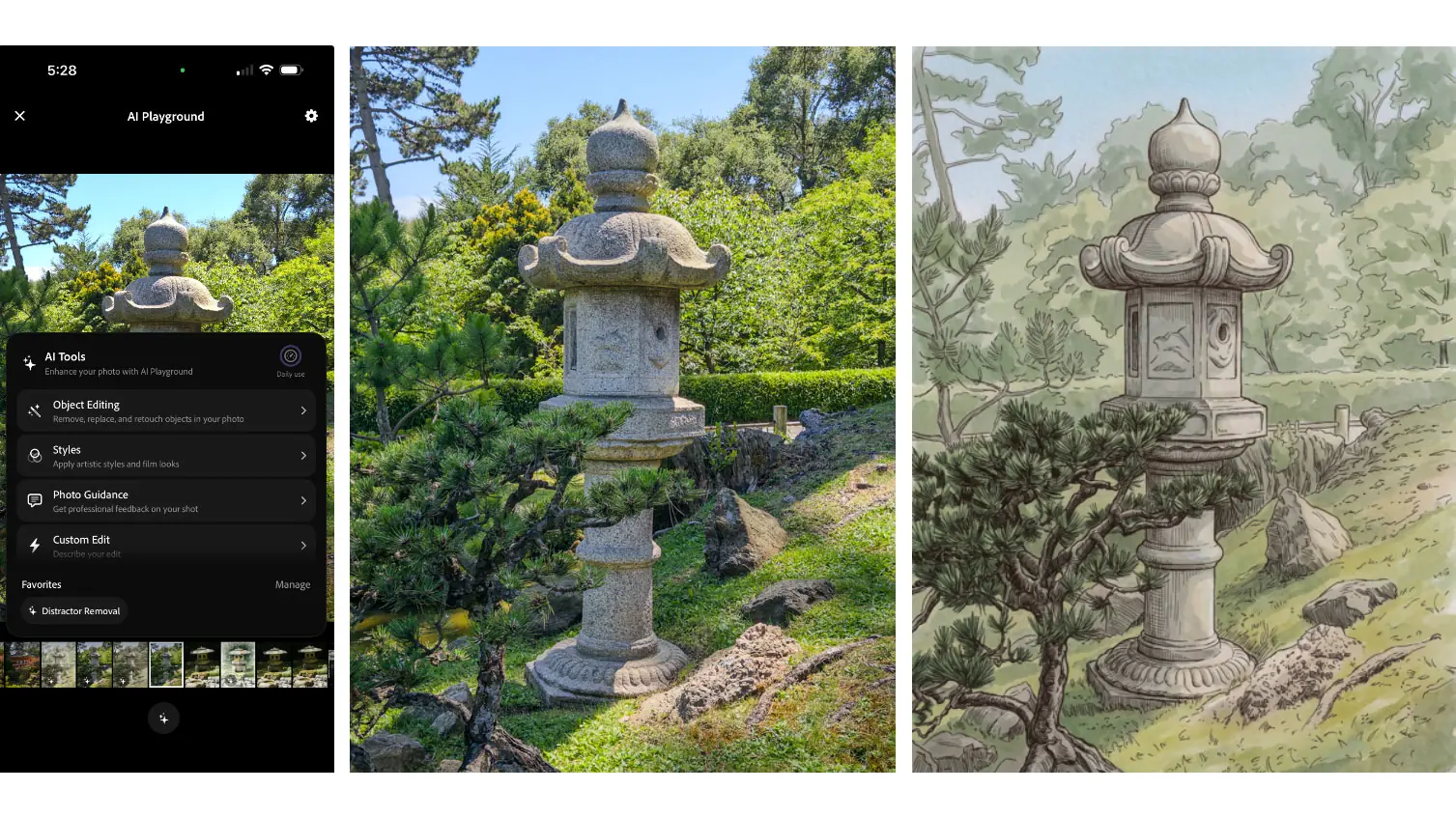
AI Playground is divided into four categories: Object Editing, Styles, Photo Guidance and Custom Edit.
Object Editing covers distractor removal and depth-of-field changes.
Styles can re-render a photograph using photographic or artistic techniques.
Photo Guidance analyses the image and returns a critique, editing recommendations and suggestions for taking another photograph.
Custom Edit allows the user to enter any text instruction, extending the system beyond the available buttons.
When the first result is unsatisfactory, the user can press the same button again. As the process is generative, the next version will normally be slightly or significantly different.
Removing people, vehicles and unwanted objects
The Distractor Removal feature is designed to eliminate elements that draw attention away from the main subject.
Users can enable categories such as background people, vehicles or clutter. They can also create their own categories by typing or dictating what should be removed.
Adobe demonstrates examples in which the system removes passers-by, clears a scene of cars and signs, or performs more extreme changes such as removing fog.
The latter example demonstrates both the power and the risk of generative editing. When fog is removed, the model does not necessarily reveal what was genuinely hidden behind it. It generates what it considers plausible and fills the covered area with synthetic content.
Simulating shallow depth of field
Object Editing also includes an option for defocusing the background to simulate shallow depth of field.
The feature attempts to separate the main subject from its surroundings and blur the background. Traditionally, this result is produced with a fast lens, a larger sensor and appropriate distances between the photographer, subject and background.
In Indigo, the effect is generated after capture. It is not merely a conventional blur filter, because the system needs to understand the structure and depth of the scene.
Artistic and photographic styles
The Styles section can re-render a photograph using different visual techniques.
Adobe’s examples include pen and ink, ink lines with a colour wash and golden-hour lighting.
Although the button names are simple, the underlying prompts are more complex. The Indigo team says they have been refined through experimentation to emphasise the main subject and reduce visual clutter.
The transformation does not work like a basic colour filter. The model reconstructs the image according to the selected style, which may alter details, textures and contours.
Adobe acknowledges that facial features can also change in some results. This identity-shift problem is one of the most important weaknesses of current generative image-editing models.
AI-powered photo critique
One of the Playground’s most interesting features does not modify the image at all. It analyses the photograph and provides a critique.
At the press of a button, a large language model can identify positive and negative aspects of the shot. Another tool suggests ways to reshoot the photograph or improve it later through editing.
Placing this capability inside a camera app has practical value. The photographer can receive advice about position, framing or lens choice while still standing in front of the subject.
Adobe admits that producing genuinely useful advice is more difficult than it may appear. The model must understand that it is analysing a smartphone photograph and avoid suggesting adjustments the device cannot make.
For example, recommending a smaller physical aperture is not useful when the phone does not have an adjustable aperture. The system must also understand which lenses are present, their minimum focus distances and the capabilities of each iPhone model.
The team is working to customise the advice for specific phones and lenses. It is also exploring the use of an additional ultra-wide image or video to suggest improved composition and cropping.
Free-form instructions with Custom Edit
Custom Edit allows users to type or dictate an unrestricted instruction.
This can be used for changes that are not covered by the available buttons, such as removing a specific object, placing a subject in a different environment or changing the direction of the light.
Adobe shows an example in which a stone lantern is placed on a mountain ledge with low sunlight coming from the right. The model changes not only the environment, but also attempts to adapt the object’s lighting to the new scene.
In another example, a photograph is transformed into a drawing resembling a Leonardo da Vinci study. The model even adds handwritten annotations, although the writing itself is meaningless.
The result underlines a familiar limitation of generative models: they can imitate the appearance of writing without necessarily producing correct or coherent text.
Turning paintings and sculptures into photographs
Adobe also experimented with the reverse of transforming a photograph into a painting.
With an instruction such as “convert to a colour photograph without changing the composition,” Playground attempts to render a painting or drawing as though it were a real photographic scene.
Other demonstrations convert sculptures into photographs of living people while trying to preserve the original pose.
The feature is mainly experimental and entertaining, but it can also act as a visual exploration tool. A viewer can examine how the subject, object or landscape behind an artwork might have appeared.
The output is not a historical reconstruction. It is a synthetic interpretation based on what the model has learned from its training data.
Google Nano Banana powers the first version
The first model used by AI Playground is Google’s Nano Banana. Adobe says this may change in the future, and different users or functions could eventually receive different models.
The team is also considering Adobe Firefly models. According to the company, some Firefly models perform particularly well when removing distractions without changing the rest of the photograph.
Using different models for individual functions could allow Adobe to select the most suitable system for each task. One model may be better at object removal, while another may be more effective at applying styles or understanding complex instructions.
An internet connection is required
Nano Banana is a cloud-based model, so AI Playground requires a Wi-Fi or cellular data connection.
The generated images are approximately 2,000 pixels on each side. This is lower than Indigo’s full capture resolution, but sufficient for digital sharing and social media.
Adobe selected this size to reduce transmission and generation time. When processing fails because of a server issue, the app informs the user and suggests trying again.
The model’s safety filters also remain active. An image or prompt that violates the rules may be rejected, while repeated violations can lead to removal from the experiment.
How Adobe restores the images to HDR
Project Indigo captures high-dynamic-range photographs, but current leading image-generation models generally return standard-dynamic-range images.
This creates a noticeable difference on a modern smartphone display. The original HDR photograph may contain brighter highlights and stronger perceived contrast, while the AI-edited SDR result can appear comparatively flat.
Adobe has developed a separate machine-learning model to address this limitation. It receives the SDR image produced by Nano Banana and attempts to boost it back to HDR, using the original Indigo photograph as guidance.
Adobe says the captured image is used as a reference for that specific conversion and is not used to train the model.
The process is not always accurate. When the generative model makes major changes to colours, lighting or content, matching the result to the original HDR photograph becomes more difficult.
The identity-shift problem
Unwanted changes to faces and personal characteristics are among the biggest challenges in generative editing.
A model may be instructed to alter only the background or visual style, yet also modify the shape of a face, an expression, the eyes or other details.
Adobe says one established approach involves reference photographs. The system can compare the subject with other images of the same person to preserve their identity more accurately.
Manually selecting reference images, however, adds friction. The company is exploring automated selection using technologies similar to those employed when searching for people in a smartphone photo library.
Generative models remain slow
Speed is another major limitation.
The most capable models are large and run on powerful remote servers. Users therefore require a stable connection and must wait for the photograph to be uploaded, processed and returned.
One potential industry-wide solution is model distillation. In this process, a large model teaches a smaller model that could eventually operate directly on the phone.
Smaller models remain less capable. They may not recognise specific artists, techniques or complex visual references, resulting in less accurate or less creative transformations.
No sliders and limited precision
Traditional editing tools offer precise sliders. Users can increase exposure by a defined amount, control contrast or select a specific blur intensity.
Generative models do not work in the same way. Their primary control method is to alter the prompt and generate another result.
This makes the outcome less predictable. A second attempt may improve the image, but it can also produce a different version that changes elements the user intended to preserve.
Adobe considers the creation of practical controls for generative editing to be a challenge facing the entire imaging industry. AI Playground is also a testing ground for how such controls and workflows might be designed.
Privacy and experimental data
The initial trial is free and does not require users to sign in. It will, however, be available only to a small percentage of Indigo users and for a limited period.
Selected users will see an invitation after updating to version 1.1. Participation requires consent to the recording of button presses inside Playground.
Adobe says it will not inspect participants’ prompts or photographs, upload them to its own servers or use them to train AI models. Since no sign-in is required, the usage analytics collected for the experiment are described as anonymous.
Users can decline participation and continue using Project Indigo without the AI Playground.
There is an important technical distinction: because Nano Banana operates in the cloud, an image still needs to be transmitted to the infrastructure running the model for processing. Adobe’s statement concerns its own collection, inspection and use of the content for the experiment.
Which photographs can be edited
AI Playground works only with photographs captured through Project Indigo.
After taking a picture, the user opens it in Indigo’s built-in filmstrip or grid and presses the sparkle button at the bottom of the screen.
When the button is greyed out, the image was not captured with Indigo and cannot be used in Playground.
This restriction gives Adobe a controlled workflow in which the system knows more about the image’s source, format and technical characteristics.
Authenticity and ethical concerns
The ability to change a photograph immediately after capture inevitably raises questions about authenticity.
The same tool can remove a rubbish bin or passer-by, but it can also alter the true content of a scene in a misleading way.
Adobe says it is working to attach metadata to images edited through AI Playground using technology from the Content Authenticity Initiative. The aim is to provide information indicating that an image has been modified with AI.
Some of the models used, including Nano Banana, also apply invisible watermarks to generated images.
The company nevertheless acknowledges that technology alone cannot determine whether a use is fair or misleading. That depends on the nature of the change, the audience and the context in which the image is presented.
Availability
AI Playground is being distributed through Project Indigo version 1.1.
Adobe is randomly selecting a small percentage of users, who will receive an invitation after updating and reopening the app.
Free access will last for a few weeks. The team wants to study which functions are used, how useful the prepared buttons are and how generative editing fits into everyday photography.
Depending on the results, the experiment may be extended, expanded to more users or followed by additional trials.
Adobe says that if the feature proves popular, it ultimately expects to offer a paid version.
What Adobe is developing next
The Nextcam team intends to add more buttons for common editing tasks, focusing on prompts that produce relatively reliable results.
Development of the photographic-guidance tools will also continue, with the goal of providing more precise advice for specific devices and lenses.
The team is additionally working on computational photography functions that do not rely on generative AI. These include planned improvements in low-light image quality.
Playground is therefore more than a demonstration of eye-catching filters. It is a public experiment through which Adobe is trying to understand how capture, evaluation and generative editing can coexist inside the same camera experience.
What we think
AI Playground is one of the more substantial attempts to integrate generative AI into a camera app because it goes beyond adding visual styles. It combines editing, photographic education and creative transformation at the point of capture.
Its limitations remain significant. Lower output resolution, the need for connectivity, processing delays, possible changes to faces and the lack of precise control mean it cannot yet replace a conventional photo editor.
The most interesting aspect is Adobe’s use of Indigo as a genuine testing ground. If the experiment succeeds, several of these ideas could influence the company’s future photography tools and change the way the capture stage itself is understood.
Frequently Asked Questions
What is Project Indigo’s AI Playground?
It is an experimental collection of generative AI tools inside Adobe’s Project Indigo camera app. It supports object removal, depth-of-field and lighting changes, artistic styles, photo critique and free-form text editing.
Which AI model does it use?
The first version uses Google’s Nano Banana. Adobe may later test different models or use separate models for individual functions, including Adobe Firefly.
Is it available to everyone?
No. The initial free trial is available only to a small, randomly selected percentage of Project Indigo users and for a limited period.
Does it require an internet connection?
Yes. The model operates in the cloud, so a Wi-Fi or cellular data connection is required.
Does Adobe use the photographs to train AI?
Adobe says it does not inspect participants’ prompts or images and does not use them to train AI models. It collects anonymous information about which Playground buttons are used.






Comments
The lack of precise sliders is definitely the biggest hurdle for pro users. Do you think Adobe will eventually introduce hybrid controls that allow for both prompt-based generation and manual fine-tuning? That balance seems crucial for serious editing.