Summary
- Runway has launched a free plugin for Adobe Premiere Pro and After Effects on macOS and Windows
- The panel supports Gen-4.5, Seedance 2.5, Kling 3.0 Pro and Veo 3.1 for video
- For images, it offers Gen-4 Image, Nano Banana and GPT Image 2
- Aleph 2.0 edits existing footage up to 30 seconds long at 1080p
- Video-to-video, HDR with Runway Ruby, background removal and upscaling are also supported
- Installation is free, but generations require a paid Runway plan and credits
- How Runway works inside Adobe
- Which models are available
- Generative video from the timeline
- Aleph 2: editing footage you already have
- What Aleph 2 can change
- Video-to-video, HDR, background removal and upscale
- Why this matters to editors, filmmakers and motion designers
- Availability and pricing
- Limitations to be aware of
- What we think
- Frequently asked questions
Runway is bringing its image and video generation and editing models directly into Adobe Premiere Pro and After Effects with a new plugin designed to dramatically reduce constant exports and re-imports.
Runway’s latest official update, dated September 8, 2026, introduces Runway Plugins for Adobe: a free macOS and Windows plugin that opens as a panel inside Premiere Pro and After Effects and enables image and video generation, AI editing of existing footage, upscaling, background removal and HDR workflows without leaving the Adobe project.
Its importance is not simply that “Runway is now inside Adobe,” but that it moves generative and video-to-video tools into the place where editors, filmmakers and motion designers already make creative decisions. This is distinct from Adobe’s own new native AI workflows, which PTTL recently covered in its article on the [Premiere 26.5 Generative Media Tool and the new AI tools in After Effects]Premiere 26.5 Generative Media Tool and the new AI tools in After Effects.
How Runway works inside Adobe
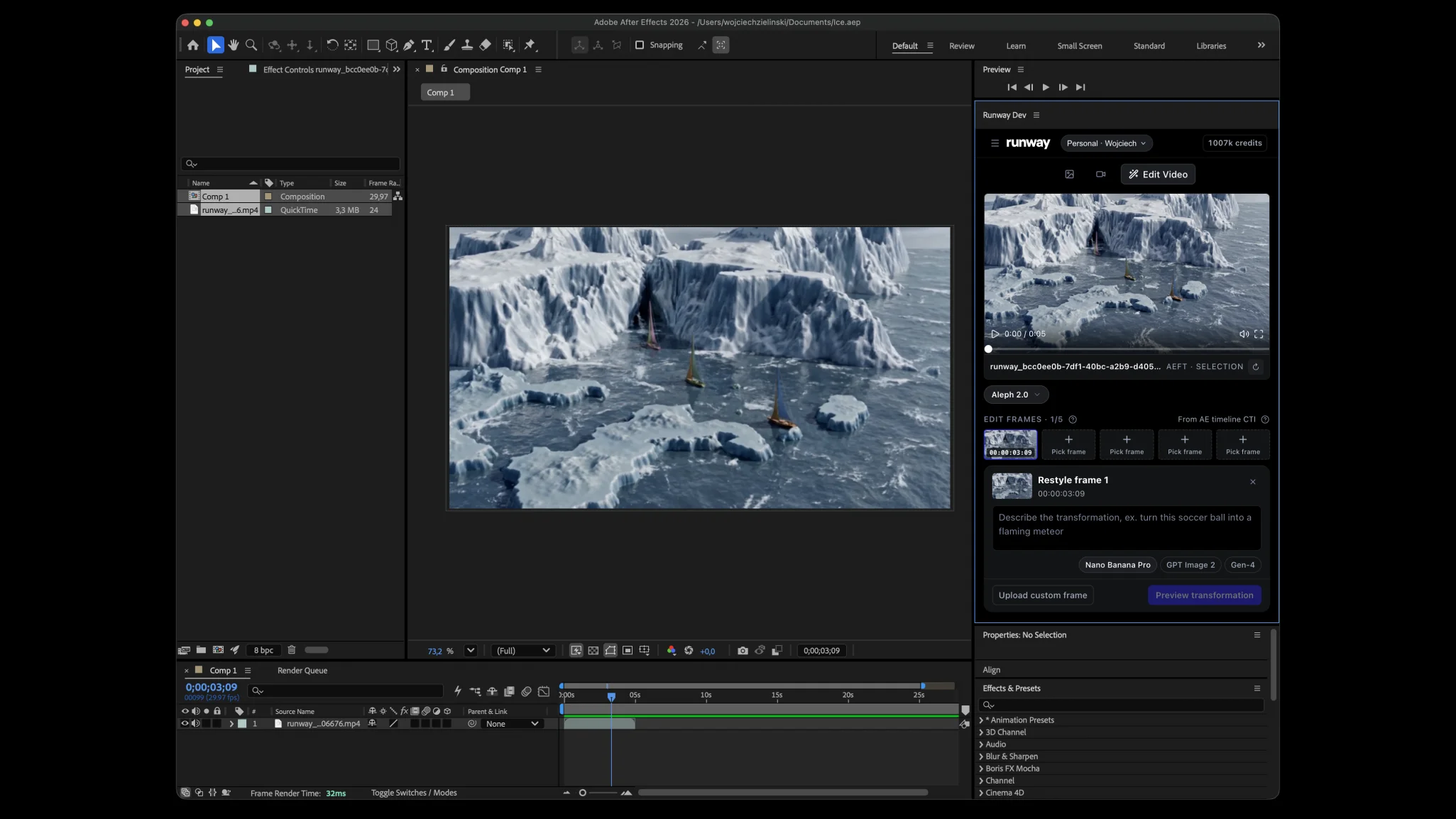
The plugin is installed using a single installer that covers both Premiere Pro and After Effects. After installation, the panel is available under Window → Extensions → Runway, where users sign in with their existing account. Processing does not take place locally but on Runway’s servers, so an internet connection is required.
The main difference from a browser-based workflow is that the result returns directly to the project. In Premiere Pro, it can be placed on the timeline at the playhead, while in After Effects it can be imported into the active composition or, if no comp is open, into the Project panel. Users can also monitor generation progress inside the Runway panel and bring previous workspace assets back into the project.
This removes a sequence of intermediate steps that used to be common: exporting a frame or clip, uploading it to Runway, generating, downloading the result and importing it back into the Adobe application.
Which models are available
Runway’s official plugin page lists Gen-4.5, Seedance 2.5, Kling 3.0 Pro and Veo 3.1 for video generation. For still images, it lists Gen-4 Image, Nano Banana and GPT Image 2. Duration, aspect ratio and resolution options vary depending on the selected model.
Runway also explains in its Help Center that the plugin follows the model lineup available under the user’s Runway plan. Paid individual plans include access to the full lineup, while Enterprise environments may be subject to model restrictions set by an administrator.
The practical benefit is that an editor is not tied to a single generative video model. Different models can be selected depending on the shot, style, duration or type of control required, without changing applications.
Generative video from the timeline
From the Generate tab, users can create video from a prompt, as well as material based on references or start frames depending on the capabilities of the selected model. Runway lists new scenes, B-roll, inserts and camera moves as representative uses.
Still images can also be generated, including backgrounds, plates, overlays, title cards and other scene elements. Generation runs in the cloud and, once complete, the asset can be imported into the project without manual file handling.
For an editor, this means a temporary missing shot can be generated while the cut continues. For a motion designer, a plate or visual element can be created without leaving After Effects. For filmmakers, the larger benefit is being able to test alternative versions of a shot while retaining the context of the full sequence.
Aleph 2: editing footage you already have
Aleph 2.0 may be the most important part of the new Adobe workflow because it is not about creating an unrelated new clip, but modifying existing footage. Runway describes it as an upgraded in-context video editing model designed to change specific elements while preserving as much of the original shot as possible.
Through the plugin’s Edit Studio workflow, the user selects an existing clip or layer. The panel can capture frame-accurate anchor frames directly from the timeline without requiring a manual export, and allows the anchors to be restyled or up to five keyframes to be defined. Aleph 2 then re-renders the full clip at the same duration as the source, with a before-and-after comparison available before the result is placed back into the edit.
Aleph 2.0 supports video up to 30 seconds long at 1080p and can apply relevant changes even across material containing multiple cuts or scene changes.
What Aleph 2 can change
The model’s core concept is that an edit can be defined at image level and then propagated over time through the video. Runway gives examples including changing a product or clothing color, replacing a background, changing lighting or season, removing objects and distractions, and restyling an entire shot.
The key technical point is its focus on localized edits. Rather than arbitrarily regenerating the entire scene, Aleph 2 is designed to modify the requested element while preserving as much as possible of the motion, composition, background and other source details.
That has much more immediate relevance to real post-production than a basic text-to-video demo. An unwanted object in frame, a product colorway that changed after production or a background that needs to be adapted for another campaign version are all problems that would normally require roto, compositing, grading or even a reshoot.
Video-to-video, HDR, background removal and upscale
The Adobe panel is not limited to generations. It supports video-to-video workflows for changing the appearance of an existing shot, as well as HDR conversion through Runway Ruby. Runway says Ruby can transform SDR video into HDR with expanded brightness and color range.
Background removal is also available with text-based subject selection, an option to invert the selection and alpha-ready output without a green screen, together with upscaling tools for clips and frames.
For motion designers in particular, these tools can reduce the number of cases where a separate service is needed just to complete an isolated task before bringing the asset back into the composition.
Why this matters to editors, filmmakers and motion designers
For editors, the main advantage is faster iteration. Testing a generative insert or a different version of a shot can happen without losing context inside the sequence.
For filmmakers, Aleph 2 introduces an interesting category of post-shoot corrections: changes to props, environment, lighting or visual style can be explored before deciding whether conventional VFX or a reshoot is required.
For motion designers, generating plates, elements, images and alternative video assets directly inside After Effects reduces context switching, while background removal and upscaling can serve as quick supporting operations inside the same panel.
That does not mean conventional VFX, roto, compositing or color grading are being replaced. It does mean that some tasks now have access to a faster AI first pass that can either be used directly or become the basis for more detailed work.
Availability and pricing
Runway Plugins is available for Premiere Pro and After Effects on macOS and Windows. A single installer sets up the panel in both applications. The official product page is available on the Runway Plugins page.
The plugin itself is free, so the download price is €0 for users in Europe and Greece as well. Generating new content, however, requires a Standard plan or higher and uses credits from the existing Runway account. Free-plan users can sign in to the panel but cannot start generations from it.
Runway currently displays its subscription prices in US dollars rather than publishing an official regional euro price. Standard costs $15 per month or $12 per month when billed annually, Pro costs $35 or $28 respectively, and Max costs $95 or $76. At the September 12, 2026 exchange rate of roughly €0.862 per US dollar, the final euro charge will depend on payment processing, taxes and currency conversion.
Limitations to be aware of
The plugin does not yet support everything available elsewhere in Runway’s ecosystem. The company says Outpainting/Expand is not available in the panel, while After Effects does not yet support ProRes or image-sequence delivery directly through the plugin.
Generations also cannot currently be cancelled once submitted and will continue to consume the associated credits.
That matters in professional workflows because the convenience of having generation tools directly on the timeline may encourage more iterations, while the cost remains tied to the model, duration and resolution of each generation.
What we think
The meaningful change is not that another AI panel has appeared inside Adobe, but that Runway is moving generation tools and, more importantly, video editing into the actual post-production context. Aleph 2 is the most interesting part because it targets existing footage rather than only creating new clips.
For editors and motion designers, the time saved by removing the export-upload-download-import cycle is significant on its own. For demanding productions, however, the real test will be the consistency of localized edits and how reliably the results can be integrated into professional finishing. In any case, the integration clearly points toward a future where generative tools stop being separate web apps and become part of the timeline itself.
Frequently asked questions
Is the Runway plugin for Premiere Pro and After Effects free?
Downloading and installing the plugin is free. Generating inside the panel requires a paid Runway plan and uses the account’s existing credits.
Which video models work inside the Adobe panel?
The official page lists Gen-4.5, Seedance 2.5, Kling 3.0 Pro and Veo 3.1 for video, while image models include Gen-4 Image, Nano Banana and GPT Image 2. Actual availability follows the user’s plan lineup and any Enterprise restrictions.
What does Aleph 2 do to existing footage?
Aleph 2.0 can modify specific elements of an existing clip, including backgrounds, objects, colors, lighting or the overall style, and propagate that change through the video. It supports footage up to 30 seconds long at 1080p.
Do you need to export a clip before using Aleph 2?
No. The plugin can read the selected clip or layer and capture anchor frames directly from the Adobe timeline or composition.
Does the plugin work in both Premiere Pro and After Effects?
Yes. The same installer covers both applications on macOS and Windows, and the panel is opened from Window → Extensions → Runway.