

Summary
- Premiere beta AI Assistant began using plan Firefly credits on November 6.
- Previous daily and weekly usage caps have been removed.
- The credits consumed are displayed after each response.
- This change makes costs harder to predict for complex professional edits.
The AI Assistant in Adobe Premiere (beta) is moving from a complimentary daily allowance to Firefly credit usage, changing how editors account for AI-powered tasks.
The change took effect on November 6, 2026. Adobe has removed the previous daily and weekly usage limits, with the Assistant now drawing Firefly credits from the user’s Adobe plan.
What changes for AI Assistant users
During the earlier beta, users had a separate allowance of complimentary credits for testing, subject to a daily reset and without affecting the credits included in their paid subscriptions. The Assistant now uses credits from the Adobe plan. The previous daily cap is gone, but the available plan balance is still finite.
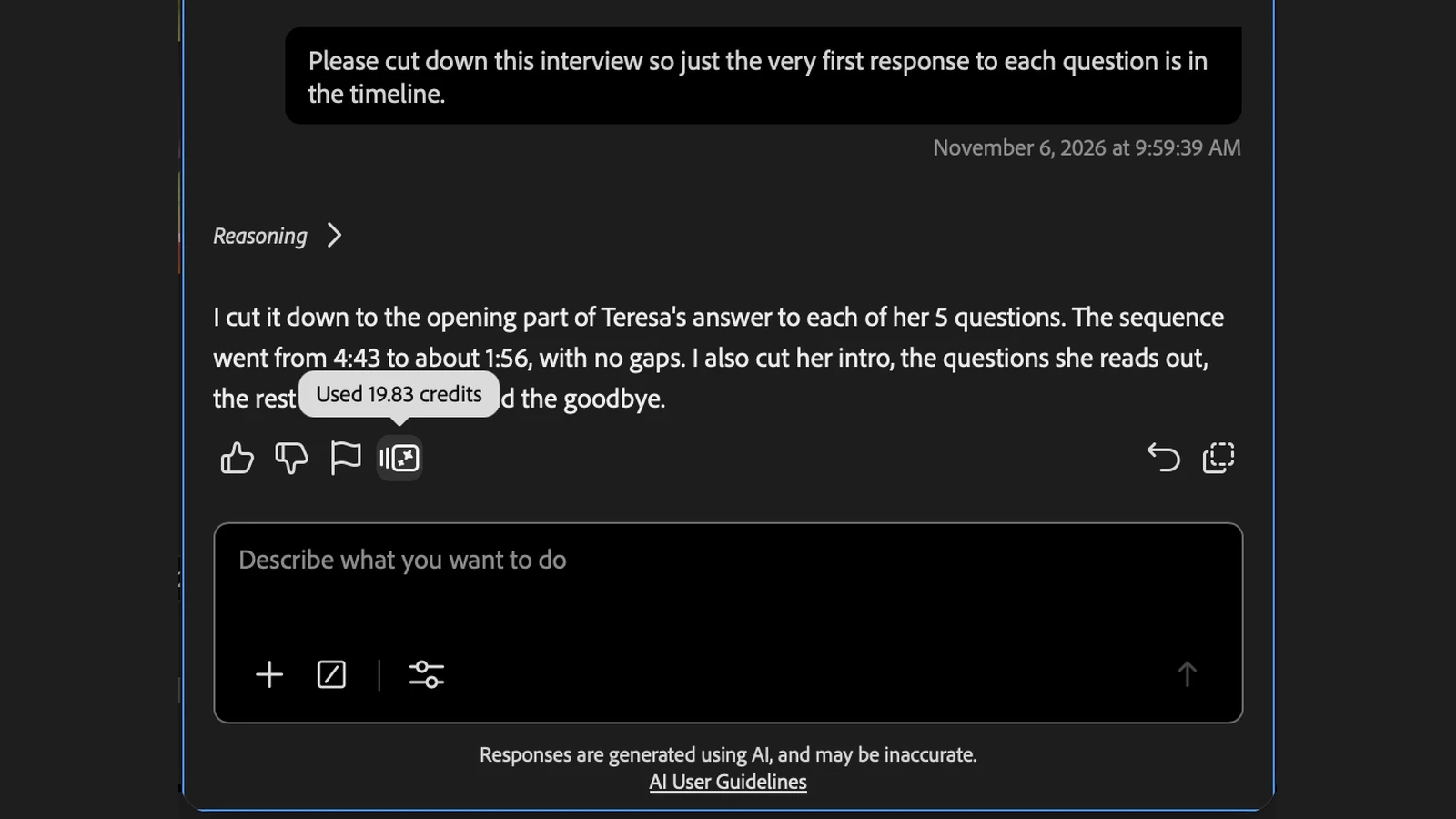
A credits icon appears beneath each response. Hovering over it reveals how many credits that particular prompt and response used. When the balance runs low, Premiere displays a notification and offers the option to purchase additional credits in the application.
In Adobe’s official example, the Assistant is asked to shorten an interview by keeping the first answer to each of five questions. It reduces the sequence from 4:43 to around 1:56, and the indicator reads “Used 19.83 credits”. This is the usage for that particular task, not a fixed price for every response.
What will AI-assisted editing actually cost?
The announcement does not provide a fixed credit charge per prompt or a general rate card for Premiere AI Assistant tasks. The figure shown in the screenshot therefore cannot simply be multiplied by the number of prompts to estimate a reliable project budget. The consumption indicator described by Adobe is displayed after the task has been completed.
For a studio or post-production team, that distinction matters. Experiments, revisions and repeated instructions can all draw from an allowance also used by other Firefly features. Before adopting the Assistant for client workflows, it makes sense to check the available balance and measure actual usage in a small test project.
What the Assistant can do inside Premiere
Premiere AI Assistant goes beyond a chatbot that merely offers advice. It accepts natural-language instructions and can organize bins, rename clips, prepare transcripts, add markers and assemble an initial edit on the timeline. The resulting changes remain editable and can be undone.
This particular feature remains in public beta. It should not be confused with the Generative Media Tool and other AI features introduced with Premiere 26.5, which also support video and audio generation using generative credits. This new announcement specifically concerns credits charged for the tasks performed by AI Assistant itself.
More information here.
What we think
The appeal of an editing assistant is being able to hand it a tedious, time-consuming task — such as selecting the opening answers from an interview — and spend more of your own time on pacing and storytelling. Adobe’s example makes that potential easy to understand.
The problem is predictability. Knowing you have a free daily allowance to experiment with is very different from watching each attempt consume credits from your plan. If you have to repeat a request because the first edit was not quite right, the time saved needs to be weighed against the credits you have spent.
For professional projects, we would much rather see an estimate before running a task. Until the cost of different types of work is clearer, we would start with small test edits and keep track of which Assistant tasks actually save enough time to justify their credit use.
Frequently asked questions
Is Premiere AI Assistant still free during the beta?
Not under the previous complimentary daily-credit model. Since November 6, 2026, responses have drawn on the Firefly credits included in the Adobe account’s plan.
Where can I see how many credits a prompt used?
Hover over the credits icon below the Assistant’s response to see usage for that particular prompt. Adobe also provides a warning when the available balance runs low.