

Summary
- Photoshop beta introduces New Camera Angles Layer with six viewpoint presets.
- Each generated result appears on a separate layer for comparison.
- Adobe recommends clear subjects with depth and simple backgrounds.
- A synthetic new viewpoint is not an authentic photographic capture.
Can you change a photograph’s camera angle after taking the shot? Adobe is testing a Photoshop AI tool that generates alternative viewpoints from a single existing image.
New Camera Angles Layer arrived in Photoshop (beta) on November 10, 2026. It lets creators choose from six predefined viewpoints and generate a result on a separate layer, leaving the original image available for comparison.
Six viewpoints from one photograph
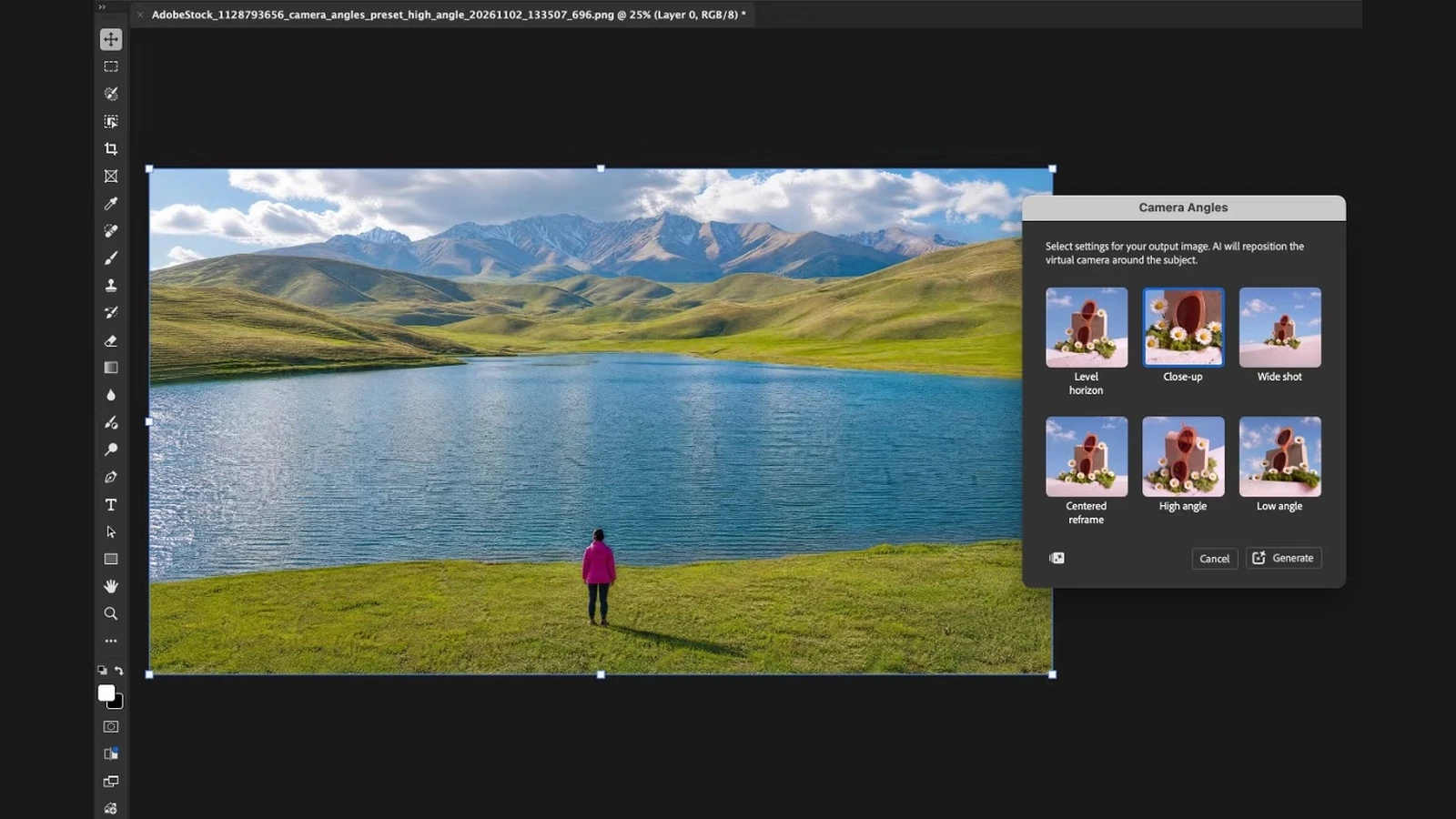
The Camera Angles panel offers Level Horizon, Close-up, Wide Shot, Centered Reframe, High Angle and Low Angle. Adobe describes the process as repositioning a virtual camera around the subject.
Open an image, select Layer → New Camera Angles Layer, choose a preset and select Generate. Each new viewpoint is placed on a separate Camera Angles Layer, allowing you to toggle its visibility and compare versions.
Where it works best — and where it struggles
Adobe recommends photographs with a clearly identifiable person or object, some sense of depth and a relatively uncluttered background. Flat graphics, landscapes with little depth and scenes containing overlapping objects are less suitable for the best results.
That limitation matters. If a new viewpoint reveals surfaces the original lens never captured, the software must synthesize them. It is not genuine information recorded by a second camera, even if the result looks convincing.
What photographers can actually use it for
In advertising concepts, creative mockups, composition studies and illustration work, exploring a higher, lower or closer angle without reshooting could speed up creative decisions. But it cannot be assumed to replace a genuine reshoot when the exact shape or position of objects matters.
The feature builds on Photoshop’s earlier AI and nondestructive editing tools, but this time it alters the camera’s apparent position rather than only lighting, colour or selected elements within the frame.
Full instructions and the available presets are listed in Adobe’s official Camera Angles guide.
Availability
Camera Angles is available in Photoshop (beta) for desktop, where Adobe offers it for testing and feedback. The documentation does not announce a specific date for release in the stable Photoshop version.
What we think
The most useful reason to try Camera Angles is not to pretend we took the original photograph from somewhere else. It is to quickly explore how a shot might look if we moved the camera, before heading back to a set or settling on a creative direction.
For images that are meant to be constructed — advertising, artwork or campaign concepts — that could save meaningful time. In documentary photography, though, changing the viewpoint is not an innocent reframe. It adds visual information the photographer never recorded. Presenting such an image as an authentic photograph would mislead viewers about what was actually in front of the lens.
Where provenance has journalistic or evidentiary importance, we would want versions like these clearly identified as AI-generated or AI-altered. Making the transformation easier only makes that distinction more important.
Frequently asked questions
Does Camera Angles take a real new photograph?
No. It generates a synthetic rendition of the original image from another viewpoint. No physical camera movement records new visual information.
Can I compare the result with the original?
Yes. Each result is stored on its own Camera Angles Layer, and you can toggle layer visibility.
Is it available in the regular Photoshop release?
Adobe currently documents the feature for Photoshop (beta) on desktop, rather than announcing general availability in the stable release.