Summary
- Airplane Mode reduces power use from Wi-Fi and Bluetooth when they are not needed.
- Shorter Auto Power Off, Screen Off and Viewfinder Off times reduce the time the camera stays active unnecessarily.
- BOOST and High Performance modes can use more power than Normal or Economy settings.
- High display quality and high EVF or monitor refresh rates can also increase power consumption.
- Shortening or disabling Image Review reduces unnecessary display time after each shot.
- There is no universal battery-saving percentage because actual battery life depends on the camera and how it is used.
- 1. Enable Airplane Mode when Wi-Fi and Bluetooth are not needed
- 2. Reduce the Auto Power Off time
- 3. Make the screen and EVF switch off sooner
- 4. Do not leave BOOST enabled without a reason
- 5. Check display quality and EVF frame rate
- 6. Reduce or disable automatic Image Review
- 7. Use the camera’s dedicated Power Save features
- There is no single magic setting
- What we think
- Frequently asked questions
Before adding another battery to the camera bag, it is worth checking seven camera settings that can help reduce unnecessary power consumption.
Modern mirrorless cameras feature Wi-Fi, Bluetooth, high-refresh-rate electronic viewfinders, bright displays and high-performance modes, which means several menu options can directly or indirectly affect battery life. Manuals from manufacturers including Fujifilm, Canon and Sony include dedicated power-saving settings and warnings about options that increase power consumption.
This matters because not all of these features are required for every shoot. A photographer who does not use smartphone connectivity, does not always need the highest EVF frame rate and leaves the camera active between shots may gain battery life simply by adjusting the setup, without changing the battery or other equipment.
1. Enable Airplane Mode when Wi-Fi and Bluetooth are not needed
Airplane Mode is one of the easiest settings to forget.
On the Fujifilm X100VI, for example, enabling it disables wireless LAN and Bluetooth. Fujifilm also explicitly states that keeping Bluetooth enabled increases battery drain. Canon offers a similar feature on cameras such as the EOS R7, where Airplane Mode temporarily disables Wi-Fi and Bluetooth.
If images are not being transferred to a phone and remote shooting or other wireless functions are not needed, Airplane Mode provides a convenient master switch.
PTTL has previously examined why Airplane Mode can help camera battery life, so here it forms only one part of a broader power-saving strategy.
2. Reduce the Auto Power Off time
A camera that remains switched on while the photographer stops for several minutes continues to consume power.
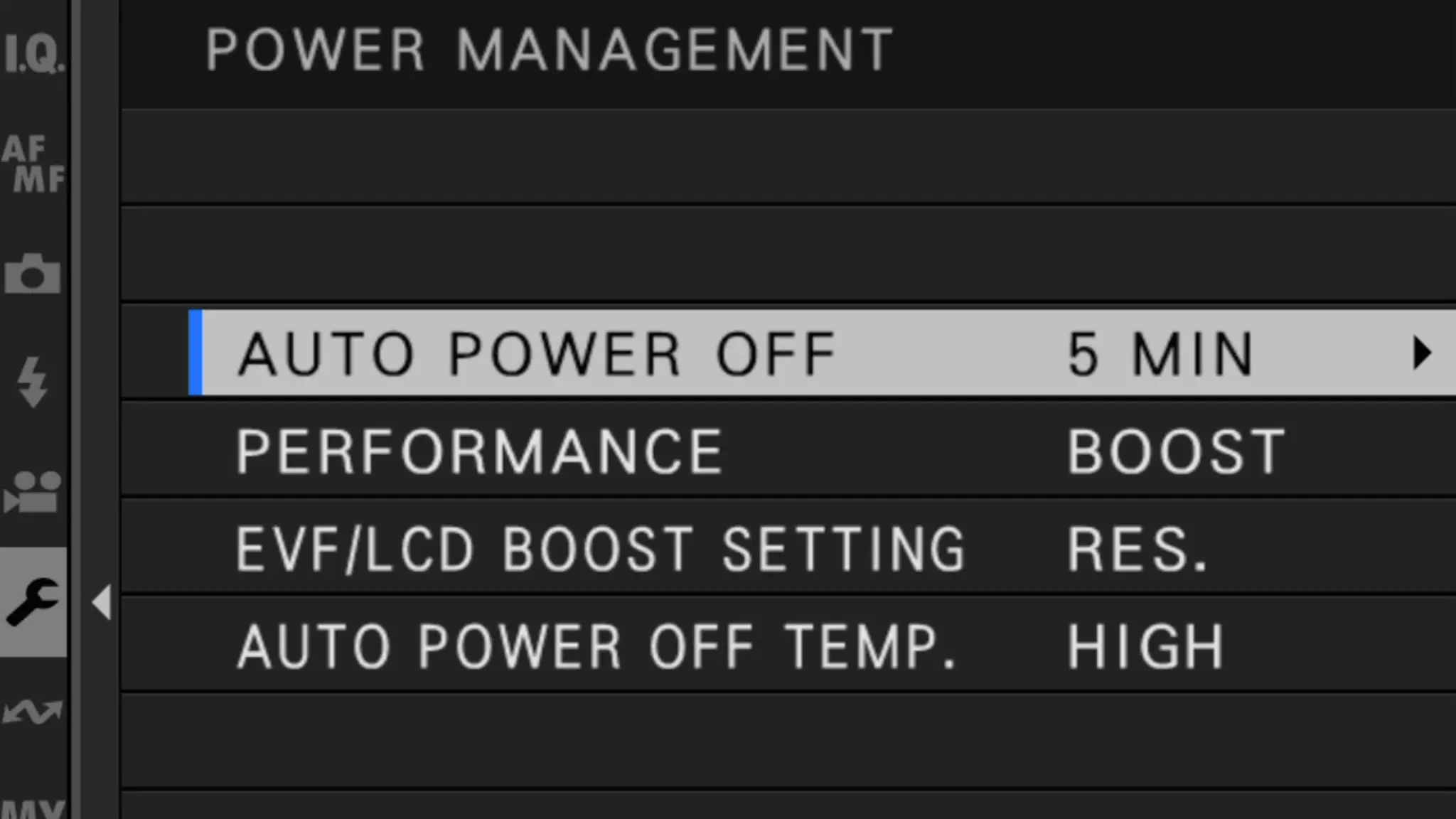
Fujifilm clearly states in its Power Management settings that shorter Auto Power Off times increase battery life. On the X100VI, options range from 15 seconds to 5 minutes, as well as OFF.
The most aggressive option is not necessarily ideal. In street or wildlife photography, for example, an extremely short timeout may become frustrating when the camera needs to remain ready.
For general use, however, a reasonably short Auto Power Off time is preferable to leaving the camera active indefinitely.
3. Make the screen and EVF switch off sooner
Automatically shutting down the entire camera is not the only relevant setting.
On the EOS R5 Mark II, for example, Canon provides separate settings for Screen dimmer, Screen off, Auto power off and Viewfinder off. This allows the display to dim or turn off before the entire camera powers down.
This is especially relevant to mirrorless cameras, where the LCD and EVF are fundamental parts of normal camera operation.
The right balance depends on the type of work. Studio and video use may require a display to remain active, while travel or landscape photography may benefit from shorter timeouts.
4. Do not leave BOOST enabled without a reason
This is one area where the difference can become particularly noticeable.
Fujifilm cameras offer settings such as BOOST, NORMAL and, on several models, ECONOMY. BOOST prioritizes elements such as autofocus or EVF performance, but Fujifilm explicitly states that the battery drains faster than under NORMAL. ECONOMY limits certain performance characteristics to provide better battery endurance.
The official X100VI figures provide an interesting example. Under Fujifilm’s specified CIPA test conditions, the company rates the camera at approximately 310 shots using the LCD in BOOST, around 320 in NORMAL and approximately 380 in ECONOMY. Using the EVF, the corresponding figures are approximately 270, 310 and 360 shots. These figures do not guarantee real-world battery life, but they illustrate how much the Performance setting can affect this particular camera.
BOOST therefore makes sense when its additional performance is required. It may not be necessary for a quiet landscape shoot or a day of travel photography.
5. Check display quality and EVF frame rate
Higher refresh rates and maximum display quality come with an energy cost.
Sony, for example, states for the α6700 that setting Display Quality to High consumes more battery than Standard. Similar notes appear for models including the α1 II and α7 IV.
Canon offers Display Performance options on some EOS cameras. The EOS R100 provides a direct Power saving option instead of Smooth, while on models such as the EOS R8, high-frame-rate display use under certain conditions is associated with faster battery consumption and fewer available shots.
For action and wildlife photography, a smoother EVF can be important. For static subjects, however, maximum display performance may not always be necessary.
6. Reduce or disable automatic Image Review
Every time an image is automatically shown after capture, the display or EVF remains active for additional time.
On the Canon EOS R7, Image Review can be set to a specific duration or switched Off. Fujifilm provides similar choices such as Continuous, 1.5 seconds, 0.5 seconds and Off on cameras including the X100VI.
Disabling review does not mean an image cannot be checked. It simply means the photographer reviews it when necessary instead of having the display activate after every frame.
The benefit depends on shooting style. For someone taking only a few photographs, it will be small. During a day involving hundreds or thousands of frames, however, the total automatic display time becomes much greater.
7. Use the camera’s dedicated Power Save features
Several modern cameras include additional options that are not always obvious.
Sony models such as the α6700 include Power Save by Monitor. The camera can, for example, enter power-saving mode when its articulating monitor is closed facing inward and wake again when the screen is opened.
Other Sony cameras include a Power Save Start Time setting, and the company notes that settings such as Off or 30 Min result in higher power consumption than shorter intervals.
Fujifilm also offers Auto Power Save on some cameras, reducing display frame rate when the camera is idle and restoring normal operation as soon as the controls are used again.
It is therefore worth visiting the Power Management or Power Setting menu of the specific camera, because the available options vary considerably between models.
There is no single magic setting
None of these changes guarantees a specific increase in battery life across every camera.
Actual endurance depends on temperature, battery age and condition, autofocus and stabilization use, the number of photographs taken, video recording, EVF and display use, and many other factors. Even official manufacturer figures are based on specified test conditions and can differ significantly from real-world use.
There is also little point in sacrificing features that are essential to the shot simply to gain a little extra battery life. If a high EVF frame rate is required for fast action or a permanent wireless connection is necessary for professional file delivery, those functions should remain enabled.
For the long-term condition of the battery itself rather than just endurance on a single charge, PTTL has also examined the habits that affect the lifespan of camera batteries.
What we think
Today’s cameras offer excellent performance, but they often leave features active regardless of whether they are needed for a particular shoot. Battery saving should not become an obsession, but a sensible Power Management setup can genuinely reduce unnecessary consumption. Airplane Mode, shorter timeouts and Economy or Standard modes are particularly logical choices when maximum performance is not required.
Frequently asked questions
Which setting should I change first for better battery life?
It depends on how the camera is used. If Wi-Fi and Bluetooth are not needed, Airplane Mode is an easy starting point. If the camera often remains active between shots, a shorter Auto Power Off setting may matter more.
Does Economy mode reduce image quality?
It does not necessarily reduce the quality of the recorded image file. Depending on the camera, it may limit operational performance such as autofocus speed or EVF and display behavior. The manual for the specific model should therefore be checked.
Does Airplane Mode stop normal photography?
Normally, no. It mainly disables wireless communication, so still images and video can continue to be recorded. Functions that rely on Wi-Fi or Bluetooth will not work until Airplane Mode is disabled.
Should the EVF always be set to its lowest-performance mode?
Not necessarily. In sports, wildlife and other fast-moving situations, a higher frame rate can be genuinely useful. Power saving makes more sense when that additional performance is not required.