

Summary
- Apple sent a new batch of Threat Notifications to users in 110 countries
- The alerts indicate mercenary spyware targeting, not necessarily a successful infection
- The new warning can appear directly on the iPhone Lock Screen
- Apple recommends software updates, Lockdown Mode and expert assistance
- Notifications may arrive months after the original targeting attempt
Apple has sent a new round of warnings to users who may have been individually targeted by highly sophisticated mercenary spyware, with the latest notifications reaching users across 110 countries.
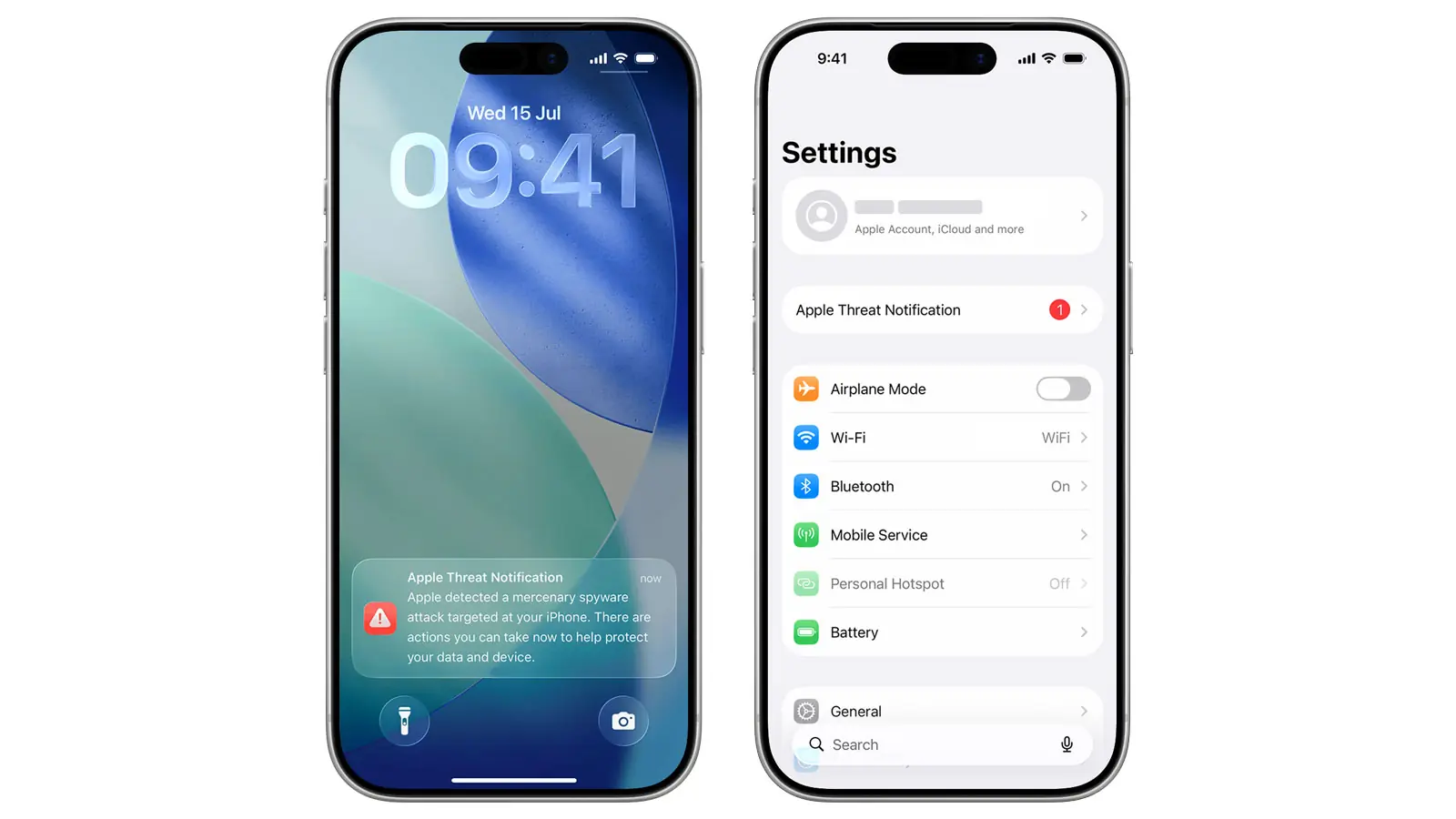
On August 13, 2026, Apple sent a new batch of Apple Threat Notifications to users who, according to the company’s detection systems, had been targeted by commercial spyware. Apple confirmed to TechCrunch that this round affected users in 110 countries, without disclosing the number of recipients or publishing a detailed list of countries. The updated notification experience now places a prominent warning directly on the iPhone Lock Screen, while alerts are also sent by email and displayed on the user’s Apple Account.
The significance of this notification is far greater than that of a routine cybersecurity warning. Apple describes Threat Notifications as high-confidence alerts that a specific individual has been targeted, probably because of who they are or what they do. These attacks affect a very small number of users and have historically been associated with targets including journalists, activists, politicians and diplomats.
What the notification actually means
An Apple Threat Notification does not automatically mean that an iPhone has already been successfully compromised. It does, however, mean that Apple has detected evidence giving it high confidence that the individual was targeted by mercenary spyware and that the incident should be taken seriously.
Apple says these attacks are exceptionally expensive and technically advanced, constantly evolving and typically deployed against very specific individuals. The company does not attribute individual notifications to a particular attacker, government or geographical region because disclosing technical details could help attackers modify their behavior. Since 2021, Apple has sent these notifications several times a year and has now notified users in more than 150 countries overall.
Another important detail is that the alerts are not necessarily real-time warnings. Citizen Lab research has shown that notifications can be sent in batches and may reach users months after the original targeting attempt.
How to identify a genuine Apple warning
The new notification can appear on the iPhone Lock Screen and in Settings. Apple also sends an email to addresses associated with the Apple Account and displays a warning banner at the top of the user’s account page after sign-in.
There is an important detail because of the obvious phishing risk: Apple says genuine Threat Notifications never ask users to open a file, install an application or configuration profile, follow a link, or provide an Apple Account password or verification code. The safest verification method is to access the Apple Account directly, where a genuine notification is displayed at the top.
What recipients should do immediately
Apple recommends enabling Lockdown Mode and seeking expert technical assistance. Keeping every device updated to the latest available software is also considered one of the most important security measures. As of August 16, 2026, Apple lists iOS and iPadOS 26.6 and macOS 26.6.1 as the current versions.
For journalists, bloggers, organizations and other members of civil society, Apple also points users to the non-profit Access Now Digital Security Helpline, a free 24/7 service providing assistance with digital-security incidents.
Access Now adds another important recommendation: a recipient should not rush to erase the affected device. Erasing it does not guarantee protection against another infection and may destroy evidence useful for subsequent forensic analysis. The organization recommends preserving a backup so potential evidence of targeting can be retained.
Lockdown Mode: What changes in practice
Lockdown Mode is Apple’s extreme protection feature for people facing elevated risks from sophisticated targeted cyberattacks. It is available on iOS 16 or later, iPadOS 16 or later, macOS Ventura or later and watchOS 10 or later.
When enabled, it substantially reduces the attack surface but also limits several features. Messages blocks many attachment types and features such as link previews, while certain web technologies, incoming FaceTime calls from unfamiliar contacts, Apple service invitations and configuration-profile installation are restricted. Wired connections require an unlocked device, and iPhones and iPads will not automatically join unsecured Wi-Fi networks, while 2G and 3G cellular support is disabled.
For photographers, there is another practical change: location information is removed when photos are shared, while Shared Albums disappear from the Photos app on the device using Lockdown Mode. That adds another layer of privacy but may also affect existing delivery and collaboration workflows.
Apple told TechCrunch that it has not yet seen a case in which a device was successfully compromised while Lockdown Mode was enabled. That does not make the feature an absolute security guarantee, but it helps explain why it is one of the primary recommendations for high-risk individuals.
Why photographers and creators should care
Most photographers and creators will never become targets of mercenary spyware. The risk profile changes considerably, however, for creators working in journalism, conflict zones, political assignments, investigations or with confidential sources. Apple itself identifies journalists among the groups historically targeted by these attacks.
A modern iPhone or Mac can be a central work device containing unpublished photos and footage, conversations with sources and clients, calendars, documents, location data and credentials for online services. For a photojournalist or documentary creator, therefore, such an alert should not be treated as just another generic security notification.
PTTL also reported in 2025 on the urgent iOS 18.6.2 and iPadOS 18.6.2 security update addressing an ImageIO vulnerability that Apple said may have been used in highly sophisticated attacks against specific individuals. That case had already highlighted the importance of installing system security updates promptly when targeted attacks are involved.
The Greek connection
The issue is neither theoretical nor distant from Greece. In July 2026, Citizen Lab announced that forensic analysis of the iPhone belonging to former MEP and journalist Stelios Kouloglou showed Pegasus infections in 2022 and again in March 2023. The investigation also identified Apple threat notifications associated with his account in March and August 2023 and April 2024.
Citizen Lab did not attribute the infections to a particular government agency or NSO Group customer and explicitly said it had no evidence showing that the Greek government was responsible. The case nevertheless demonstrates why Apple’s notifications can become an important starting point for subsequent forensic investigations and why they should not be ignored.
No detailed list of the 110 countries included in the August notification wave has been published, so the available information does not establish whether Greece was specifically included in this latest batch.
What we think
The most important change is not that Apple has suddenly discovered a new category of threat, but that it is making these warnings much harder to overlook. For high-risk individuals, particularly journalists and creators handling sensitive material, a prominent Lock Screen notification could be critical. At the same time, a Threat Notification should be treated as serious evidence of targeting, not as proof of a successful infection or of the identity of the attacker.
Frequently Asked Questions
Does an Apple Threat Notification mean the iPhone has been hacked?
Not necessarily. Apple says the notification is a high-confidence indication that a user has been targeted by mercenary spyware, but targeting alone does not prove a successful infection.
How can a user verify that the warning is genuine?
A genuine warning is displayed in the user’s Apple Account. Apple Threat Notifications do not request passwords or verification codes and do not ask users to install applications or configuration profiles.
Should everyone enable Lockdown Mode?
No. Apple designed it for the very small number of people at risk from extremely sophisticated targeted attacks, and the feature significantly restricts some normal device functionality.
Can a notification refer to an attack that happened months earlier?
Yes. Citizen Lab notes that these warnings may be sent in batches rather than in real time, meaning the original targeting could have occurred considerably earlier.