

Summary
- Peakto 3.0 improves organization and AI search for libraries of more than three million assets.
- AI processing runs locally on the Mac without moving original files to the cloud.
- New rough-cut tools, expanded web collaboration and MCP integration are planned for later phases.
- Standard pricing starts at $10 per month.
With photos and footage scattered across drives, Lightroom catalogs and old projects, CYME’s Peakto 3.0 upgrades search with on-device AI and support for libraries containing more than three million photos and videos.
The French company introduced the release in early November with more than 150 changes. The launch is split into three phases: the first, focused on organization and search for photographers, is available now. New rough-cut tools for filmmakers and extended team collaboration are planned for later phases.
The two presentation videos outline where CYME wants to take its software:
One library for more than three million assets
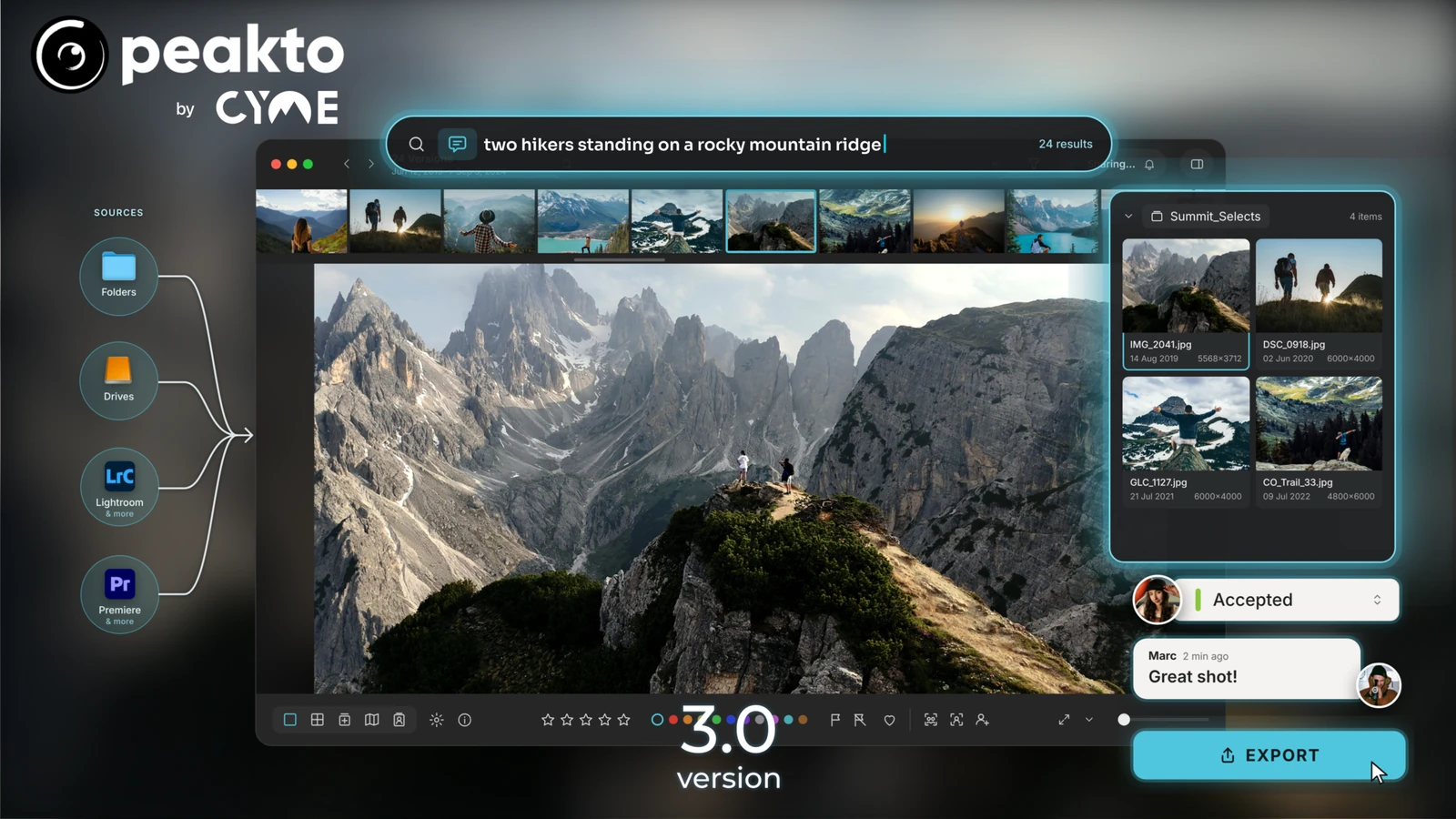
Peakto acts as a central catalog for photos and videos stored in Mac folders, external drives and NAS devices, as well as application libraries including Lightroom Classic, Capture One, Apple Photos and Adobe Premiere Pro. It can search across these sources without requiring creators to move or duplicate original files.
CYME says its rebuilt database architecture can handle collections exceeding three million assets, with fast startup and smoother browsing at scale. A new Control Center provides indexing progress, pause controls, scheduled updates and more efficient use of available Mac resources.
Search by description, faces and metadata
Instead of relying only on filenames or keywords, users can describe a picture in natural language — such as two hikers standing on a rocky ridge — to locate visually matching content. Similarity search, face recognition and metadata filters provide other ways to narrow the results.
According to CYME, AI analysis runs locally on the Mac, and the refreshed AI search is up to three times faster. The interface more clearly separates results drawn from image analysis, keywords, metadata or transcripts. Face clustering and subfolder navigation have also been improved. The announcement does not include an independent benchmark for the claimed speed gain.
For filmmakers: from finding footage to a rough cut
The second phase targets filmmakers. Its planned workflow combines a new video player, subclip management and a multi-track bin editor, allowing material from different sources to be assembled into an initial rough cut before continuing in Adobe Premiere Pro, DaVinci Resolve or Final Cut Pro.
The idea is particularly useful for documentaries and interviews: select a sentence in a transcript and turn the matching passage into a subclip. Search results can also become selected video segments. CYME is preparing these capabilities for phase two; they should not be mistaken for a fully available new editing environment today.
This builds on the Peakto 2.7 RAW video search and pre-edit workflow, which introduced support for Nikon and RED files alongside team approval tools.
Browser-based collaboration and AI agents
Peakto already offers browser access, but phase three is intended to provide a more complete environment for creative teams: advanced search, Timeline View, a multi-track player and rough-cut editing in the web client. Project management, source synchronization and notifications for comments, annotations and changes are also part of the roadmap.
The same phase is planned to bring Model Context Protocol (MCP) support so external AI agents, including Claude and Codex, can be instructed to search media, add annotations or build albums. Original photos and videos remain on local disks or NAS storage; remote browser access does not require moving the full library to a cloud media service.
A connection to Specio for wildlife photography
CYME has also announced a connection between Peakto and Specio, its on-device AI wildlife identification app. The company says Specio can identify more than 450,000 animal species and enrich photographs with common and scientific names, a potentially useful addition for large wildlife and nature archives.
Price and availability
The first phase of Peakto 3.0 is available for Apple Silicon Macs (M1 or newer) running macOS 14 Sonoma or later. CYME lists Standard subscriptions from $10 per month, including the Mac app and individual web access, and Pro from $25 per user per month, adding team and guest access. A perpetual Standard license includes one year of updates, while subscription plans offer a seven-day trial. An official Greece-specific euro price could not be confirmed from the pricing page.
More information here.
What we think
Peakto’s strongest argument is that it does not ask you to give up Lightroom, Capture One or the drives you already rely on. For photographers with years of work spread across several catalogs, finding a particular frame without remembering where it lives is more valuable than yet another AI tool promising to improve the image itself.
For those of us also working with video, searching transcripts and creating subclips could save hours on interviews and documentary projects. What matters is how phase two actually ships: if a rough cut cannot move cleanly into the editing software, time saved during logging may be lost again during handoff.
Local AI processing is also a meaningful choice for anyone handling unpublished client or production work. Before paying for a subscription, we would want to see how long initial indexing takes on our own library, and how the search performs against genuinely messy archives — rather than only the carefully prepared examples shown in demos.
Frequently asked questions
Are rough cuts and MCP collaboration available now?
Not in full. CYME has released the first, photographer-focused phase of Peakto 3.0. The new video tools are planned for phase two, with expanded collaboration and MCP capabilities targeted for phase three.
Does Peakto upload original photos to the cloud?
Not as a requirement for its media catalog. Peakto indexes files on drives and NAS devices, and its AI analysis runs locally on the Mac. Remote access is available through the web client.
Does Peakto 3.0 work on Intel Macs?
The published requirements for Peakto 3.0 specify Apple Silicon from M1 onward, with macOS 14 or later.