

Summary
- ArtCraft is developing seven free, open-source applications for photographers, filmmakers and designers.
- PhotoCraft targets image editing, LightCraft focuses on RAW workflows, and FilmCraft handles video timelines.
- Availability varies, with downloadable builds for some applications and installers still pending for others.
- The project is promising, but it is not yet a proven replacement for Creative Cloud.
- Seven applications, seven creative jobs
- PhotoCraft and LightCraft: What photographers stand to gain
- FilmCraft: The clearest path to editing without Premiere?
- Alternatives for Illustrator, After Effects, Acrobat and InDesign too
- Which applications can you install today?
- Open source, AI and the real cost for creators
- What we think
- Frequently asked questions
Could we finally escape Adobe subscriptions? ArtCraft is developing seven free, open-source applications for photography, video editing, design and other creative work.
It is an appealing proposition for anyone paying monthly for Photoshop, Lightroom or Premiere Pro. Before cancelling Creative Cloud, though, it is worth separating what can be used today from what remains in development—and what those features mean in a real workflow.
Seven applications, seven creative jobs
ArtCraft has built the lineup around familiar creative jobs. The Adobe comparisons clarify what each application aims to do; they do not establish equivalent features or full project compatibility.
| Application | Focus | Adobe counterpart |
|---|---|---|
| PhotoCraft | Images, layers, masks | Photoshop |
| LightCraft | RAW developing and catalogues | Lightroom |
| FilmCraft | Timeline-based video editing | Premiere Pro |
| VectorCraft | Vector illustration | Illustrator |
| EffectCraft | Motion graphics and VFX | After Effects |
| PdfCraft | PDF and page management | Acrobat |
| DesignCraft | Page layout and publishing | InDesign |
PhotoCraft and LightCraft: What photographers stand to gain
PhotoCraft targets layered editing with masks, adjustment layers, brushes and on-device object selection. The team lists 8-, 16- and 32-bit documents, RGB/CMYK/Lab, ICC colour management and opening and saving layered PSD/PSB files. It also reports that 134 out of 135 real-world test files completed a byte-identical round trip. That is the developer’s own test claim, not an independent PTTL benchmark.
If your clients send complicated PSD documents, that matters far more than an interface that merely resembles Photoshop. It still does not prove that every smart object, third-party plug-in or specialised effect will behave exactly as expected.
LightCraft addresses the other half of photography: catalogues, selects and non-destructive RAW processing. Its listed formats include DNG, Canon CR2, Sony ARW, Nikon NEF, Fujifilm RAF including X-Trans, Panasonic RW2 and others. Tone curves, an eight-band colour mixer, masking and colour grading sit alongside albums, ratings and flags for organising a shoot.
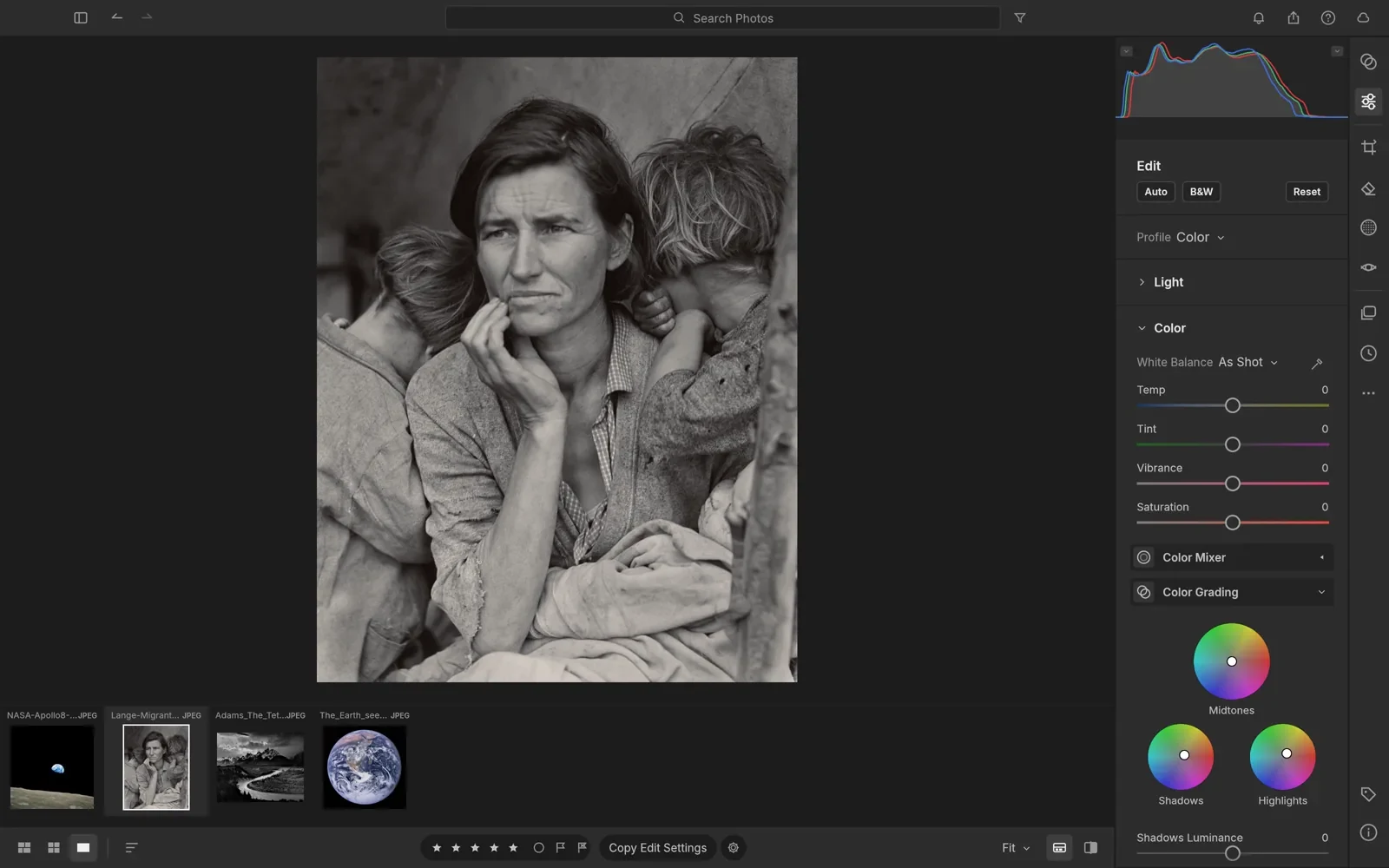
LightCraft’s proposed engine uses a wide-gamut, 32-bit floating-point pipeline accelerated by the GPU. The team quotes roughly 4 ms per slider move on a 24 MP RAW—again, its own figure. Replacing Lightroom would require practical checks on camera-specific colour rendering, thousands-of-image imports and dependable batch exports.
FilmCraft: The clearest path to editing without Premiere?
FilmCraft is more ambitious than a basic timeline editor. The official feature list includes source and program monitors, three-point editing, J/K/L trimming, keyframes, around 55 video effects and 30 transitions. It also advertises native H.264, HEVC, ProRes, VP9, AAC and Opus codecs rather than relying on FFmpeg internally.
Filmmakers also get a proposed grading toolset with colour wheels, curves, LUTs, HDR/log workflows and scopes; audio features include an automated mixer and EBU R128 loudness metering. The claimed integer timebase for 23.976 fps and 29.97 drop-frame is particularly relevant: reliable timing and sync matter more on a long edit than an impressive demo reel.
A specific 0.4.0 release is listed with installers or portable builds for Windows, macOS and Linux. That is not a guarantee that it can handle a demanding documentary on deadline without testing, but it does give editors an actual build to evaluate.
Alternatives for Illustrator, After Effects, Acrobat and InDesign too
VectorCraft targets illustrators with Pen tools, boolean operations, editable effects, image tracing and SVG/PDF import and export. Open formats can help when moving logos, icons and production graphics between tools, provided that paths and other elements survive the exchange.
EffectCraft tackles motion graphics with compositions, nested layers, keyframes, expressions, 3D cameras and lighting. The team lists 259 effects plus exports including H.264, ProRes with alpha and EXR sequences. It is a substantial ambition, but compositing software earns its place through reliable rendering and predictable behaviour on complex scenes.
On the document side, PdfCraft offers viewing, search, page reordering, splitting, combining and encryption support. DesignCraft targets publishing with parent pages, threaded text frames, typography styles, CMYK and print-ready PDFs. These are meaningful tools for books, brochures and print work, where predictable output matters enormously.
Which applications can you install today?
Here is the detail that should not be buried in the fine print. The seven-app overview uses the phrase “installers ready”, yet individual pages—including PhotoCraft and LightCraft—explicitly say standard installers are coming, with source-build instructions provided in the meantime. FilmCraft, by contrast, lists actual 0.4.0 downloads, and PdfCraft has a download option. Availability is clearly not uniform across the lineup.
The applications are presented as free and open source, targeting Windows, macOS and Linux. Several are also designed to compile to WebAssembly for browser use. That does not necessarily mean there is a finished web service ready for everyone. For availability and supported install paths, the best starting point is the official application directory.
Open source, AI and the real cost for creators
The applications are built in Rust, with an emphasis on local file processing rather than mandatory cloud workflows. The team also describes CLI, JSON and MCP control for automation and AI agents. That is different from claiming that every application already ships with a complete suite of generative-AI editing tools.
And “free” deserves a practical reading. No subscription does not eliminate learning time, file incompatibilities or the consequences of a failed export. Those are real costs when a client expects delivery tomorrow. But for creators who want to explore alternatives without being tied to one ecosystem, the freedom to experiment is valuable in its own right.
What we think
More dependable creative tools without compulsory subscriptions would be welcome. ArtCraft is worth watching because it tackles an entire workflow rather than a single niche app; for now, the sensible approach is to test with copies of projects, not abandon the tools you rely on to deliver paid work.
Frequently asked questions
What do I need to build an application from source?
The PhotoCraft and LightCraft build instructions specify Rust 1.90 or newer, while FilmCraft requires Rust 1.95 or newer. Building from source is mainly an option for people comfortable with developer tools.
Is ArtCraft one application or seven?
Crafting Apps is a lineup of seven distinct programs. The wider ArtCraft website also promotes AI image and video creation tools, which should not be confused with the maturity or availability of the seven applications.