

Summary
- Canva Brush edits existing designs through AI instructions.
- It can change individual elements or many pages together while keeping components editable.
- Canva reports up to 69% faster editing in its own internal tests.
- It initially runs in Canva AI for Pro subscribers.
Canva has introduced Brush, an AI model designed to change individual elements in an existing design—or update multiple pages at once—without rebuilding the entire composition.
Announced on October 29, 2026, the new vision-language model was developed by Canva Research. Just one week after the introduction of Canva Craft for image generation, the company is tackling another everyday creative task: making targeted changes to designs that already exist.
Canva also demonstrated Brush in a video published on its official account:
From a single line of copy to an entire presentation
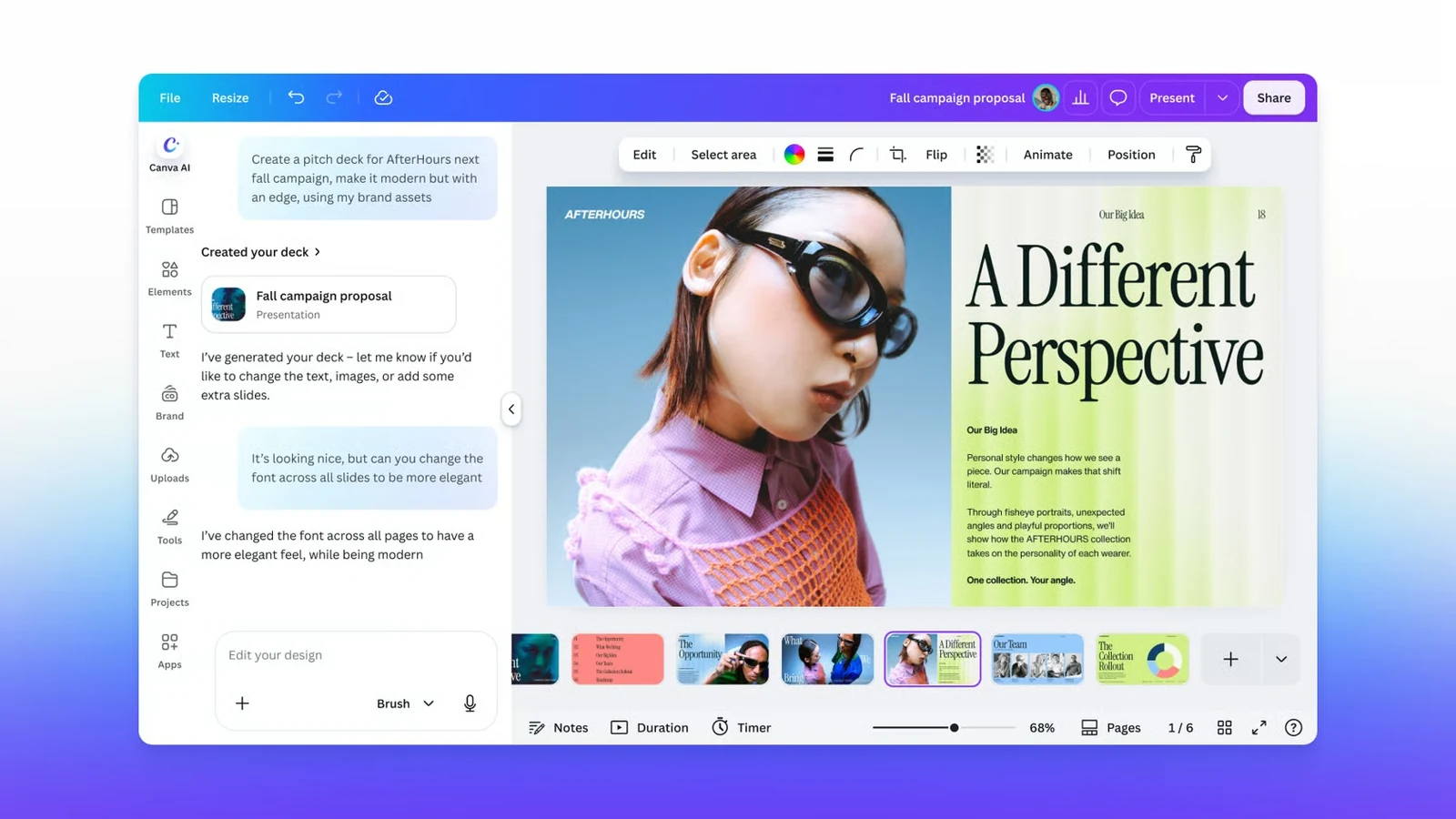
Brush interprets both the content and the structure of a design, including text, imagery, colours, layout and the relationships between elements. For example, you can ask it to change the typeface across every slide in a presentation instead of editing each slide individually.
Canva also highlights restyling an image or composition, including changes to atmosphere or weather, and adapting a design to a new format—such as turning a presentation slide into an Instagram graphic. Crucially, the result stays editable: text, imagery and layout can still be adjusted manually in Canva.
How it works and what Canva’s tests show
Rather than simply generating a replacement image, Brush works through an iterative AI-agent loop. According to Canva, it writes and runs code to modify design elements, inspects the visual result and makes further adjustments when needed.
Its development began with an open-weights model that was further trained on real design and editing tasks, using reinforcement learning. Canva says the training also drew on anonymised insights from users who opted in to improve Canva AI, while professional designers helped define the criteria used to evaluate output quality.
In the company’s internal comparisons against its previous design agent, Brush was up to 69% faster on general editing tasks and had a 46% lower cost per task. Canva also reports matching or exceeding the earlier system’s quality on most tested edits, particularly in restyling designs and adapting them to different formats. These figures are company-reported rather than independent benchmarks.
How to use it and who can access it
Brush initially powers supported editing tasks in Canva AI for Canva Pro subscribers. Open an existing design in the editor, or attach or link a design in Canva AI, then select “Brush” from the dropdown. You can continue directing changes using natural-language prompts or take over in the regular editor.
Canva plans to expand access. Brand Kit support, using attachments as references, and improvements to image-heavy layouts are on its roadmap rather than features available in this first version.
More information here.
What we think
When you are preparing assets for a client, some of the most tedious work comes from small changes that must be repeated everywhere: a different typeface, a new colour palette or several versions of the same creative for social channels. That is where Brush could be far more useful than another tool for generating eye-catching images.
The key advantage is that you are not locked into a finished, flattened output. You can pick up where the AI left off and fine-tune the details yourself. For photographers and filmmakers who also make presentations, proposals, thumbnails or campaign materials, that could save a meaningful amount of time.
There is still a clear distinction between editing a Canva design and doing demanding photographic retouching or RAW processing. Brush makes the most sense for layered creative assets combining text, imagery and layout. Even then, the final check—especially typography, alignment and brand consistency—remains our responsibility.
Frequently asked questions
Is Canva Brush the same as Canva Craft?
No. Craft focuses on generating images, while Brush edits and refines existing designs and keeps their components editable.
Can I use Brush without Canva Pro?
At launch, Brush supports selected editing tasks in Canva AI for Canva Pro subscribers. Canva says broader availability is planned.