Summary
- PlantCam costs $150 and is designed specifically for monitoring plants.
- It features a 5-megapixel sensor and 100-degree or 65-degree lens options.
- It captures between one and six photos per hour, or up to 144 images per day.
- Photos are uploaded through Wi-Fi and processed into timelapse videos in the cloud.
- The system uses brightness normalization and AI-based frame interpolation.
- It runs on continuous USB-C power and is intended for indoor use.
- The camera has no microphone, speaker, or location-tracking capability.
- The PlantCam app is available for iOS and Android.
- A Camera Built Specifically for Plant Growth
- 5-Megapixel Sensor and AI Image Enhancement
- Between One and Six Photos Per Hour
- Reduced Flicker and Smoother Transitions
- Two Different Lens Options
- Window Mounting and USB-C Power
- Size, Weight, and Durability
- Cloud Storage Without a Memory Card
- Privacy Features
- The Personal Story Behind PlantCam
- A Tool for Better Understanding Plants
- A DIY Alternative
- Pricing and Availability
- What We Think
- Frequently Asked Questions
PlantCam is a compact, specialized camera that automatically documents plant growth and turns the captured images into timelapse videos.
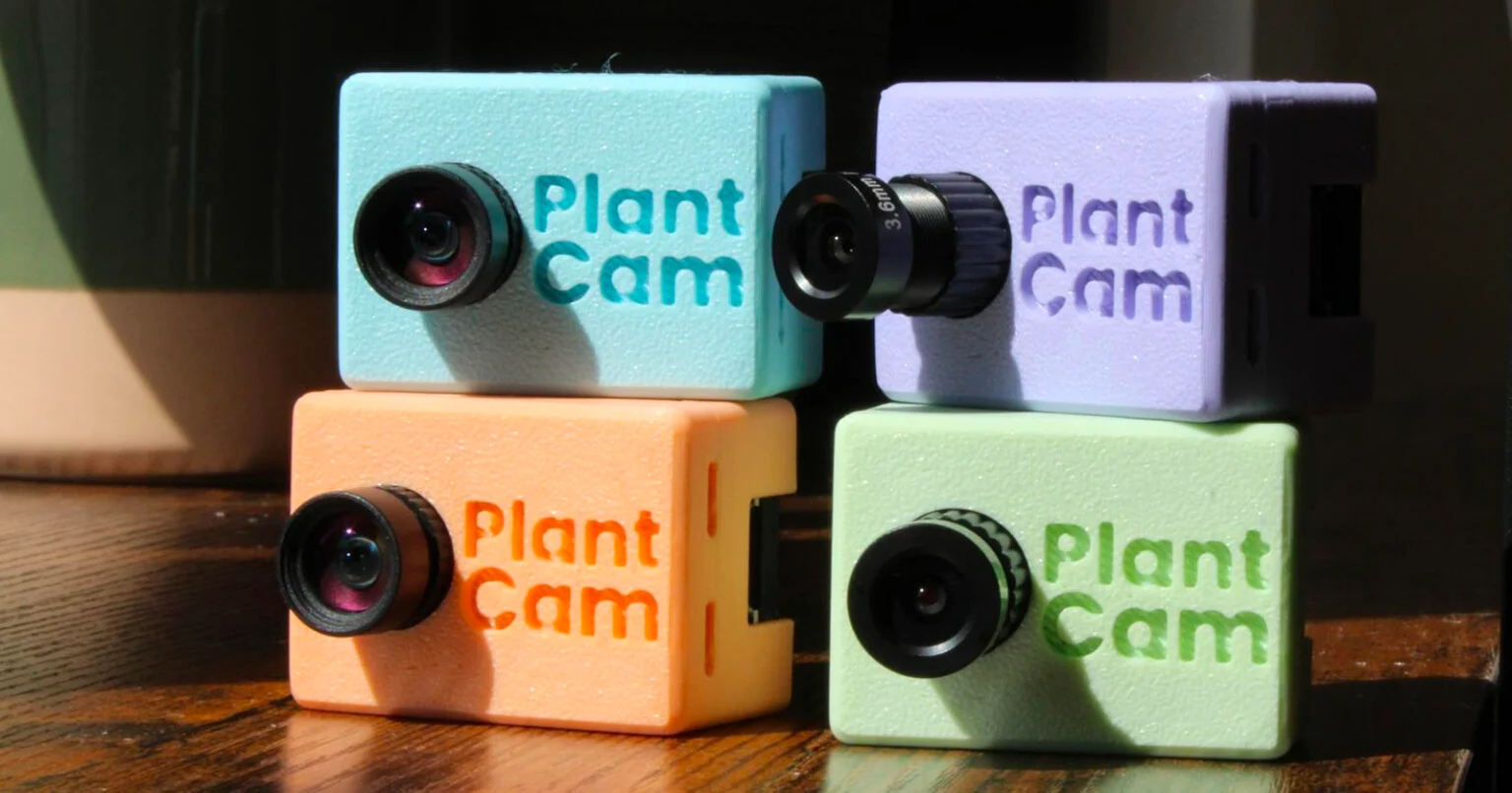
PlantCam has introduced a compact camera and companion app designed specifically for monitoring plants over extended periods. The device mounts to a window, captures images at scheduled intervals, and enables users to create timelapse videos through the PlantCam app. It is priced at $150.
The system aims to make changes visible that normally occur too slowly to be noticed in everyday life. Through continuous recording, plant owners can observe new leaves and flowers, recognize growth patterns, and see how their plants respond to changes in lighting and their surrounding environment.
A Camera Built Specifically for Plant Growth
Rather than requiring users to photograph their plants manually every day, PlantCam operates automatically in the background. It remains positioned in front of the subject and captures consistent images over a long period, creating a visual record of the plant’s development.
The camera does not record conventional video or audio. Its operation is limited to taking still images at user-defined intervals and using them to create timelapse videos. This enables it to document the emergence of new leaves, the development of flowers, and the ways plants react to different conditions.
5-Megapixel Sensor and AI Image Enhancement
PlantCam uses a 5-megapixel sensor and captures images at a resolution of 2,560 × 1,920 pixels.
According to the company, the photos are processed with AI-based enhancement technology. The processing is designed to improve overall image quality, increase sharpness, and reduce digital noise.
Between One and Six Photos Per Hour
The capture frequency can be set between one and six photos per hour. At the maximum rate, the camera can produce up to 144 images in a single day.
After capture, the photos are automatically uploaded to the cloud over Wi-Fi. Users can access them through the PlantCam smartphone app and select a date range and playback speed for the final timelapse. The video is processed and assembled in the cloud.
Reduced Flicker and Smoother Transitions
Changes in natural and artificial lighting can produce noticeable flicker in timelapse videos because consecutive photos may have different brightness levels.
PlantCam uses brightness normalization to reduce this effect. It also applies AI-based frame interpolation to create smoother transitions between the individual images in the timelapse.
Two Different Lens Options
The camera is available with two lens options to accommodate different types of plants and spaces.
The 100-degree wide-angle lens is intended for larger areas, multiple plants, or a broader view of a growing space. It can, for example, capture an entire collection of potted plants in a single frame.
The 65-degree zoom lens offers a narrower field of view and is designed for closer images of a specific plant, flower, or small details in its development.
Window Mounting and USB-C Power
PlantCam mounts directly to a window using the included suction-cup mount. Its design is intended for long-term monitoring from a fixed position.
It does not include an internal battery and runs continuously on USB-C power. This removes the need to recharge or replace batteries during a recording project that lasts for days or months.
Size, Weight, and Durability
The compact camera measures approximately 45 × 52 × 32 millimeters and weighs about 30 grams.
It is designed for indoor use and can operate in higher-humidity environments. However, it is not weatherproof or waterproof and is not intended to be exposed outdoors.
Cloud Storage Without a Memory Card
PlantCam does not rely on removable memory cards. Photos are transferred directly to cloud storage and can be accessed through the app without manually copying files from the camera.
The company offers cloud storage subscriptions for remotely accessing and managing images. The app also enables users to configure camera settings, view captured photos, and create timelapse videos.
Privacy Features
According to the company, captured photos and videos remain private and can only be accessed through the user’s account.
The camera does not include a microphone, speaker, or location-tracking functionality. It also cannot be activated remotely on demand.
Its operation follows a specific cycle: it wakes up at the scheduled time, captures one image, uploads the file, and returns to a low-power state until the next capture interval.
The Personal Story Behind PlantCam
The idea for PlantCam emerged from founder Yannik’s personal experience. After moving into a new apartment, he purchased houseplants for the first time and began researching how to care for them properly.
He tried to understand how often they needed watering, what pot sizes were appropriate, and how much sunlight they required. While away from home, he worried that the plants might be damaged by the sun and wanted a way to check remotely whether they were doing well.
Eventually, two of his four plants died. To prevent the same thing from happening again, he decided to create a camera that would allow him to monitor them continuously. PlantCam later became his full-time startup project, with the goal of creating a timelapse camera specifically adapted to plants.
A Tool for Better Understanding Plants
The company says that maintaining a continuous visual record can help users understand their plants better instead of relying only on occasional observations.
Comparing images over days or weeks may reveal changes that would otherwise go unnoticed, offering a clearer picture of how watering, light, and environmental conditions affect growth.
A DIY Alternative
Photographers who prefer to build a similar system themselves also have a do-it-yourself option.
In 2024, Ted Kinsman presented a guide for building a homemade timelapse controller for plant photography, providing an alternative for users with the necessary technical knowledge.
Pricing and Availability
PlantCam is available now for $150.
The package includes the camera, a suction-cup window mount, and a three-meter USB-C cable. A USB power adapter is not included.
The PlantCam app is available for iOS and Android devices. It allows users to configure the camera, view captured images, and create timelapse videos.
You will find it here.
What We Think
PlantCam does not attempt to replace a general-purpose camera but instead simplifies a highly specific form of long-term photography. Its two lenses, automatic cloud transfer, and timelapse-smoothing features are practical additions, although the dependence on continuous power, Wi-Fi, and subscription-based storage may limit its audience. For users who regularly document plants or want a ready-made solution without manual processing, it is an interesting and highly specialized option.
Frequently Asked Questions
How much does PlantCam cost?
The camera is priced at $150.
How many photos can it capture?
The frequency can be set between one and six photos per hour, with a maximum of 144 images per day.
Does it record video or audio?
No. PlantCam only captures scheduled still images and does not include a microphone or conventional video-recording functionality.
Does it require a battery?
It does not have an internal battery. It runs continuously through a USB-C cable.
Can it be used outdoors?
No. It is designed for indoor use and, although it can operate in higher humidity, it is not weatherproof.