

Summary
- ShotDeck unveiled its redesigned platform on November 18, 2026, including natural-language search.
- Its Clips library now covers movies and television, with camera-movement filters and MP4 or GIF export.
- Public Decks can be viewed without an account.
- Its iOS and Android apps have also been updated.
ShotDeck is changing how filmmakers look for visual references: you can now describe the shot you have in mind in a sentence and examine a cinematic reference in motion rather than relying on a still frame.
On November 18, 2026, the platform created by cinematographer Lawrence Sher unveiled a major redesign, combining natural-language search, movie and TV clips, camera-movement filters and simpler ways to share reference collections.
This official introduction to ShotDeck, published before the 2026 relaunch, illustrates the platform’s role as a cinematic reference library:
Natural-language search without guessing the right tags
Instead of trying combinations of keywords, you can enter something like “horses running through the desert” or describe the lighting, action and atmosphere of a scene. Semantic search then attempts to connect that description to relevant frames across the library.
ShotDeck has not discarded the detailed metadata that made it useful. Natural-language queries work alongside millions of human-curated tags and filmmaking filters including colour, framing, aspect ratio, optical format, interior or exterior settings and time of day. A broad visual idea can therefore be refined into shots with specific technical characteristics.
Cinematic stills move into motion
ShotDeck Clips, previously focused on commercials and music videos, now extends to feature films and television. Short clips of roughly ten seconds help filmmakers study movement timing, actor blocking and the relationship between camera and action — details a still photograph cannot fully convey.
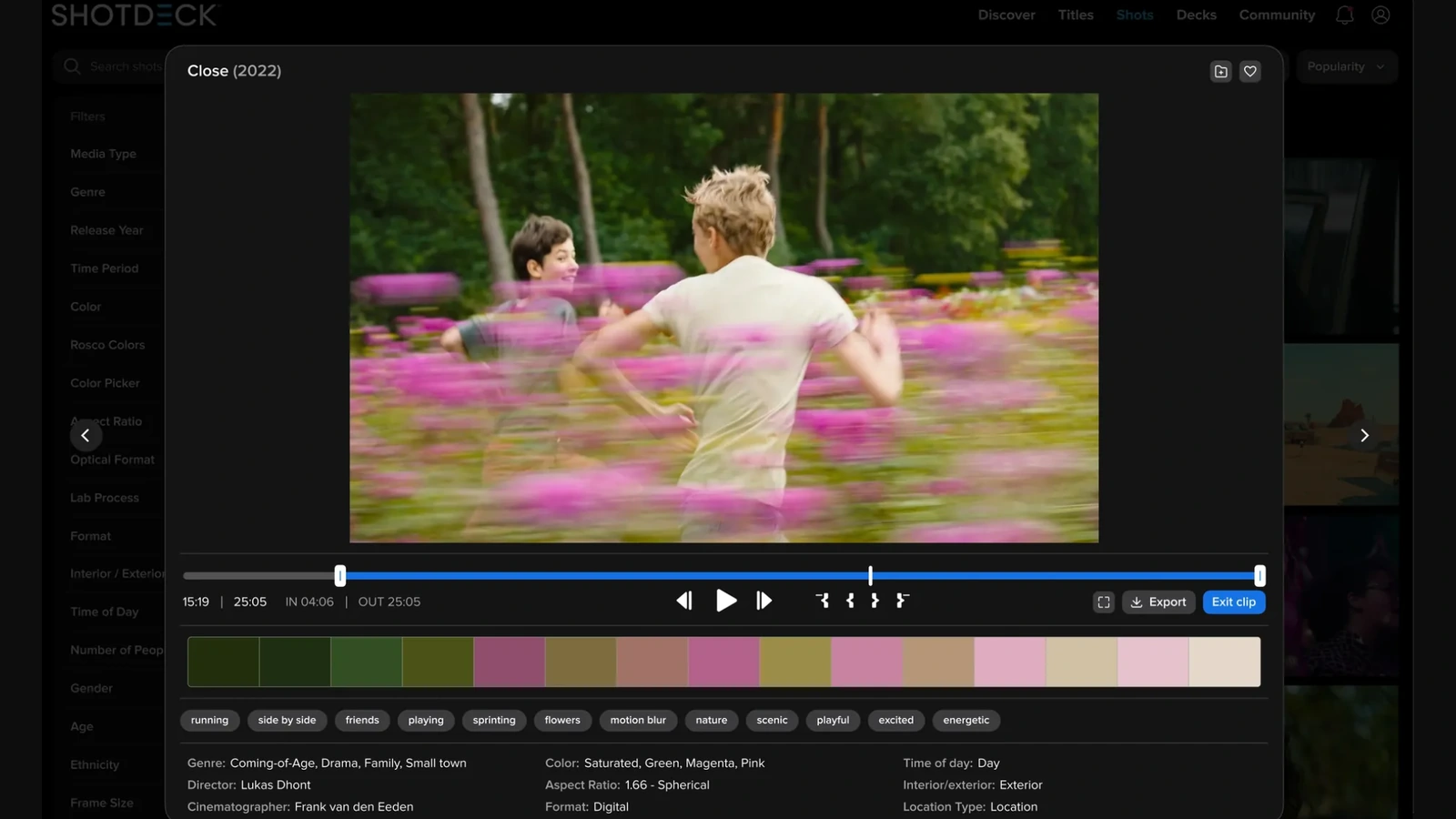
The player lets users choose in and out points and export MP4 or GIF files for presentations, mood boards and internal references. The accompanying screenshot from “Close” (2022) shows the player, timeline, tags, colour palette and information about the film’s director and cinematographer.
New camera-motion filters include pans, tilts, zooms and rolls. That changes the search from finding a similar composition to finding a reference that demonstrates the type of camera movement planned for a shot.
Discover, titles and public decks for crews
The new Discover page collects trending films, filmmakers, recent additions and curated selections. Titles has been redesigned with poster browsing, alphabetical and release-date views, along with filters for major awards including the Oscars, BAFTAs and Camerimage, film movements and more than 250 genres and themes.
Decks — reference collections for a production — now support folders, Favorites, multi-selection and more flexible PDF layouts. The most practical collaboration feature is a public Deck link that anyone can open for viewing, even without a ShotDeck account.
That complements filmmaking preproduction tools such as Cadrage Studio, which brings shot lists, camera diagrams and production information into one place. ShotDeck primarily addresses how teams find and communicate a visual direction. Its iOS and Android apps have also been refreshed.
Subscriptions and clip usage
ShotDeck remains a subscription-based service with individual, team and educational options. Being able to view a publicly shared Deck without an account does not give its recipient access to every paid feature.
Exporting a clip does not by itself grant public redistribution rights to copyrighted film footage. Anyone planning to use an excerpt in a public release, advertising campaign or finished film should separately check licensing and permissions.
What we think
The useful part of this update for preproduction is the combination of descriptive search and moving references. When talking with a director or cinematographer about a difficult shot, a still can communicate composition and lighting, but it cannot show precisely when a tracking move begins or how the camera’s distance from a performer changes. A short clip does that far more clearly.
The public Deck links are another welcome practical change. References often go to clients and crew members who do not all use the same platform. Being able to show someone exactly what you mean, rather than trading long descriptions, can save a surprising amount of back-and-forth.
There is still a distinction worth keeping in mind between visual inspiration and imitation. A reference library is most useful when it helps us understand why a shot works and translate that insight into the needs of our own story, not when it becomes a catalogue of shots to reproduce mechanically.
Frequently asked questions
Can someone view a public Deck without a ShotDeck account?
Yes. A Deck creator can share a public viewing link that does not require the recipient to have an account. This does not remove subscription requirements for the platform’s other functions.
Can I export film clips as MP4 or GIF files?
The redesigned ShotDeck supports clip trimming and MP4 or GIF export. The technical ability to download an excerpt does not automatically grant rights to reuse that footage in a public production.