Summary
The new Huginn app for iPhone and iPad can send custom Film Simulation recipes directly to the C1–C7 slots of compatible Fujifilm cameras without a cable.
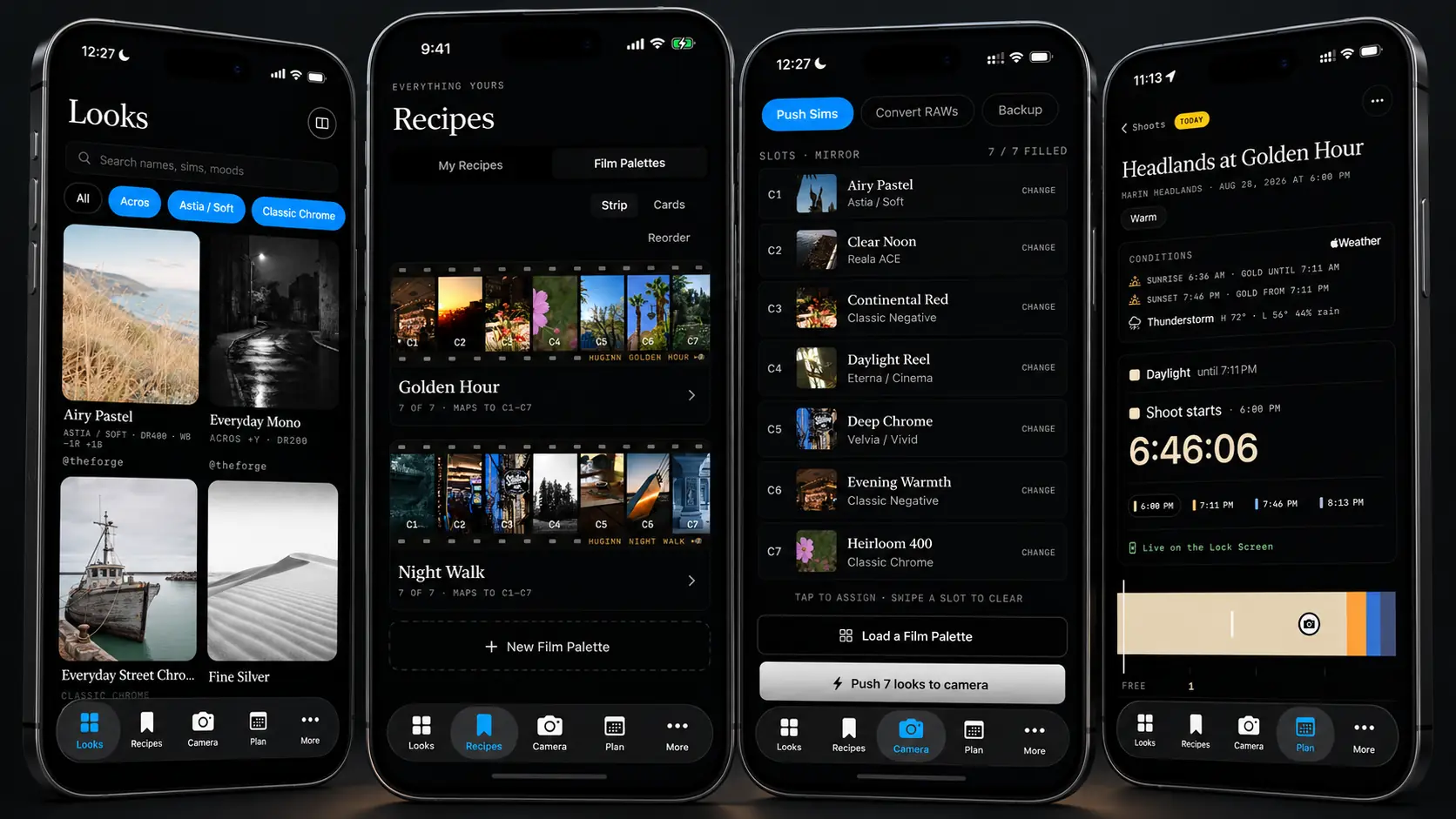
Huginn was developed by The Forge and is available on the App Store for iPhone and iPad. Its main differentiator is the wireless workflow: according to its developer, it can write a single recipe or a full seven-recipe palette to C1 through C7 without a cable, even while the camera is switched off in a bag.
The Forge describes Huginn as the first app to transfer custom Fujifilm film recipes wirelessly. This is a developer claim; the company says it had verified the feature’s uniqueness as of August 27, 2026. USB-C transfer is also supported.
Recipes in C1 through C7 without manual entry
Users can choose ready-made looks from the library, create their own or adjust parameters including Film Simulation, white balance and shift, dynamic range, highlights, shadows, color, sharpness, noise reduction, clarity and grain.
Recipes can be grouped into Film Palettes of up to seven slots and written together to the camera’s custom settings. Huginn can also read a recipe from a Fujifilm JPEG, recognize written settings from a photo or screenshot, and rebuild a recipe from a share code.
Wireless camera control and backup
Beyond Film Simulation recipes, Huginn offers Bluetooth control over settings such as ISO, aperture, exposure compensation and drive mode. It also includes a self timer and intervalometer and can back up and restore camera settings or an individual custom slot.
Virtual Bracketing with Fujifilm’s own JPEG engine
Through USB-C, Huginn can send a RAF file back to the camera and run it through selected recipes using the camera’s own processor for the JPEG render rather than a software approximation on the phone.
The company says its own test ran roughly 120 recipes through one RAF in about two and a half minutes. That figure is an internal developer test rather than an independent benchmark.
Shoot planning and a visual look library
Huginn also includes planning tools for sunrise, sunset, golden hour and blue hour, plus shot lists, gear lists and look selection for a planned shoot. Recipe cards lead with sample images so photographers can choose a visual result before opening the underlying settings.
Compatibility, price and availability
Huginn is free to download from the App Store and requires iOS 17 or later on iPhone and iPadOS 17 or later on iPad. Its official description says it is built for recent Fujifilm X Series bodies with USB-C and C1–C7 custom slots, but it does not publish a complete compatibility list.
The free tier includes library browsing, unlimited recipe creation and saves, plus USB-C transfer to C1–C7. Pro adds wireless functions, full Film Palette push, Virtual Bracketing, unlimited backups and advanced planning tools. Founder pricing is $19.99 per year or $3.99 per month, with the developer stating that regular pricing will later rise to $29.99 per year or $4.99 per month.
More information here.
What we think
Huginn’s most useful idea is turning Film Simulation recipes from a notes-and-menu task into a direct phone-to-camera workflow. If wireless writing proves reliable across supported bodies, it could be especially useful for photographers who frequently change looks or prepare different C1–C7 palettes for each shoot.
Frequently asked questions
What is Huginn?
It is an iPhone and iPad app for organizing Fujifilm Film Simulation recipes and transferring them to compatible cameras.
Can it send recipes without a cable?
Yes. Wireless transfer is part of the Pro tier and, according to The Forge, can write one recipe or an entire C1–C7 palette.
Is there a free version?
Yes. The free tier includes the library, recipe creation and saving, and USB-C transfer.
Which Fujifilm cameras are supported?
The official description refers to recent Fujifilm X Series bodies with USB-C and C1–C7 custom slots, without publishing a full public model list.