Summary
- Viber offers three quality settings for photos shared from the gallery.
- Excellent does not guarantee delivery of the original file.
- On phones, choose File instead of Gallery to transfer a photo as a file.
- On desktop, Original size sends the photo at its original size.
A photo can look perfectly fine in a Viber chat but still reach the recipient as a smaller file with less detail than the original.
The app provides quality settings for photos shared from the gallery, but there is an important difference between a high-quality chat image and transferring the file itself. That distinction matters when a photo is going to be edited, printed, or archived.
What Viber does to photos sent from your gallery
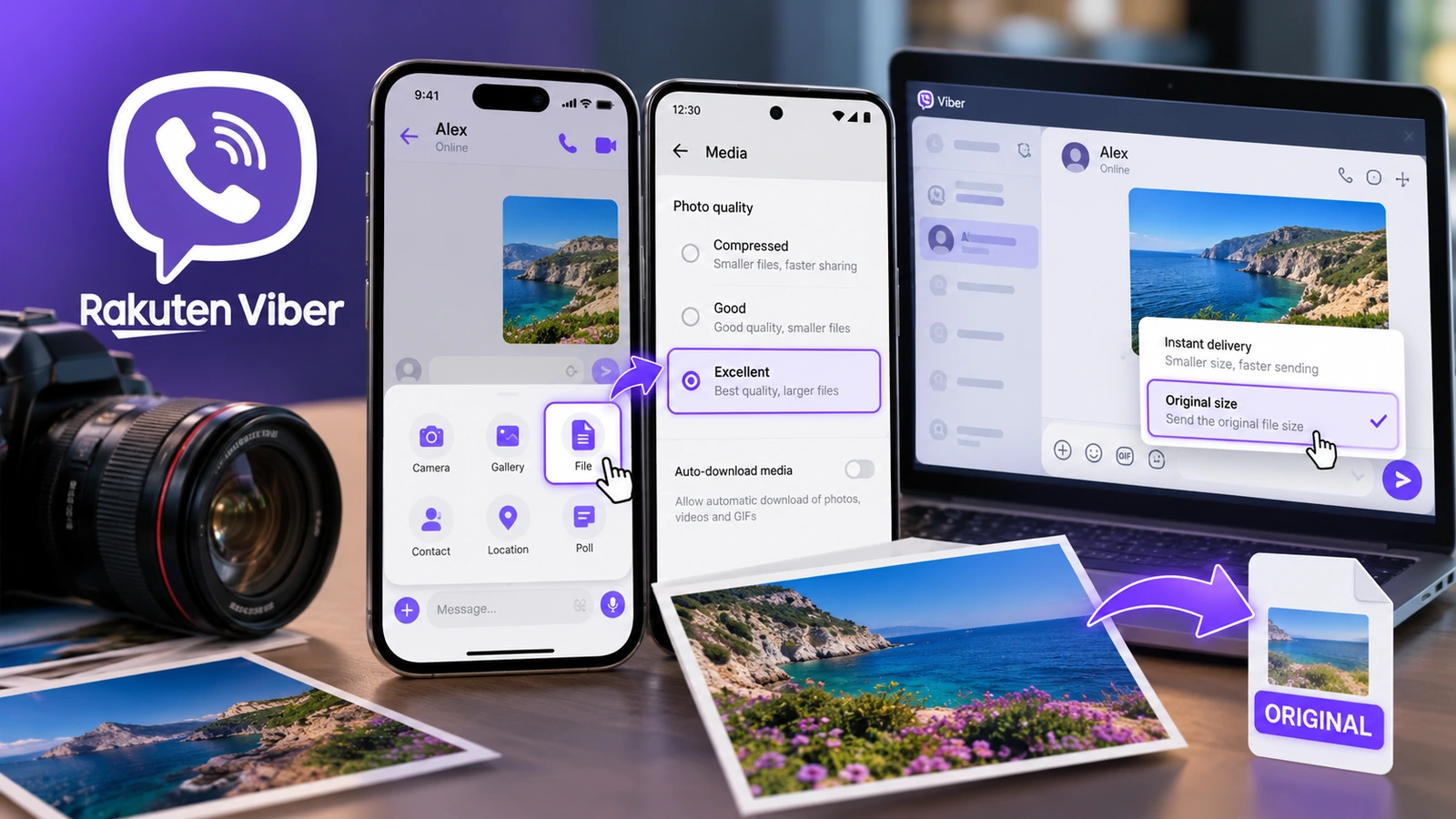
When you send a picture through Gallery, Viber follows its Photo quality setting. The official support documentation lists three levels with approximate file sizes:
- Compressed: around 180 KB, prioritizing smaller transfers.
- Good: around 250 KB, a middle-ground setting.
- Excellent: around 650 KB, intended for higher-quality images in chats.
These figures are illustrative rather than guaranteed sizes for every photo. Even Excellent is not an explicit “send the original file” setting. A multi-megabyte photo may need a different transfer method if you want to preserve it as a file.
How to select the highest photo quality on iPhone and Android
- Open Viber and tap More.
- Go to Settings.
- Choose Media, then Photo quality.
- Select Excellent.
Photos sent in the usual way from your gallery will now follow this setting. It is convenient for everyday sharing, but it is not the safe choice when you need an original file for professional work.
How to send a photo as a file from your phone
To bypass the normal Gallery route, use Viber’s file-sharing feature. Its official help describes Plus (+) → File for phones:
- Open the conversation where you want to send the picture.
- Tap the + icon beside the message field.
- Choose File rather than Gallery.
- Find the photo in your file browser and select it for sending.
On an iPhone, if the picture lives only in Photos and is missing from the file picker, first export it to the Files app using Share → Save to Files. On Android, locate it through the available file manager. Note that converting or exporting to a different format before sharing can itself change the original file.
The idea will feel familiar to anyone who has followed the guide to sending photos without compression in WhatsApp: what matters is the distinction between sharing a chat picture and transferring a file.
Sending at original size on Windows and Mac
Viber Desktop offers a clearer option. Drag a photo from a folder into a chat and select Original size instead of Instant delivery. According to Viber, the former sends the photo in its original size, while the latter follows your photo quality settings.
Alternatively, Viber Desktop’s File share feature lets you transfer the selected item as a file. If you are delivering images to a colleague or client, choose the explicit Original size option whenever it is offered in the photo sharing dialog.
How to check whether the right image arrived
Do not rely on a chat preview. Download the received item and compare its pixel dimensions, file type, and byte size with the source. For conclusive proof that the files are identical, compare their SHA-256 hashes.
Original dimensions do not automatically guarantee identical bytes or preservation of all EXIF metadata. When sending RAW, HEIF, or professional image files, check the format actually received as well.
What we think
Excellent is perfectly useful for sharing a quick photo with friends. But we would not use it to deliver photographs from a paid job, only to discover later that the client received reduced versions.
The practical habit is straightforward: use Gallery for everyday conversation, and File or Original size for images that matter. Before calling a delivery “the originals,” check at least one file at the other end. Two minutes of verification can save a frustrating round of problems in print and editing.
Frequently asked questions
Does Excellent send photos without compression?
Not necessarily. It is the highest gallery photo-quality setting, but it does not guarantee that the recipient gets the source file.
Why can’t I find my photo after tapping File on iPhone?
The File picker may show content from the Files app rather than your entire Photos library. Export the photo to Files first, then select it in Viber.
Does Original size guarantee an identical file?
Viber describes this option as sending at the original size. To confirm byte-for-byte identity, compare the file you sent with the one downloaded by the recipient.